







Question: hi i have the script made ( shown below) i only need the (addition) part implemented into the scrip. the ADDITION specification in black letters
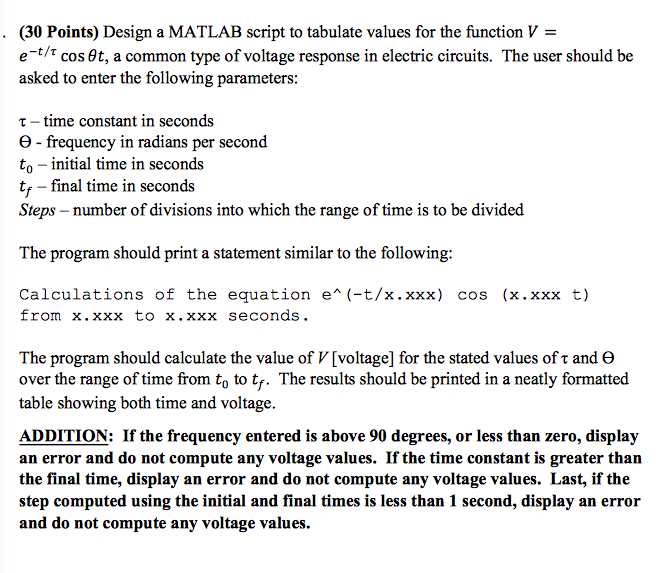
hi i have the script made ( shown below) i only need the (addition) part implemented into the scrip. the ADDITION specification in black letters shown in the picture. thank you
prompt = 'Enter time constant in seconds : '; tau = input(prompt);
prompt = ' Enter frequency in radians per second : '; theta = input(prompt);
prompt = ' Enter initial time in seconds : '; t0 = input(prompt);
prompt = 'Enter final time in seconds : '; tf = input(prompt);
prompt = 'number of divisions into which the range of time is to be divided : '; steps = input(prompt);
range = linspace(t0,tf,steps); V = zeros(1,steps);
for i = 1:steps V(i) = exp(-range(i)/tau) * cos(theta * range(i)); end
fprintf(1,'%f\t%f ', [range(:),V(:)]');
(30 Points) Design a MATLAB script to tabulate values for the function e t/T 6t, a common type of voltage response in electric circuits. The user should be cos asked to enter the following parameters: t-time constant in seconds e frequency in radians per second to initial time in seconds tf -final time in seconds Steps-number of divisions into which the range of time is to be divided The program should print a statement similar to the following: Calculations of the equation e (-t/x.xxx) cos (x.xxxt) from x.xxx to x xxx seconds The program should calculate the value of VIvoltage for the stated values of T and e over the range of time from to to tr. The results should be printed in a neatly formatted table showing both time and voltage. ADDITION: If the frequency entered is above 90 degrees, or less than zero, display an error and do not compute any voltage values. If the time constant is greater than the final time, display an error and do not compute any voltage values. Last, if the step computed using the initial and final times is less than 1 second, display an error and do not compute any voltage values
Step by Step Solution
There are 3 Steps involved in it

Get step-by-step solutions from verified subject matter experts
 Study Help