Question: Hi, I need help with quicksbook assignment and I will add all the instructions pictures below for the reference. Let me know if anything is
Hi,
I need help with quicksbook assignment and I will add all the instructions pictures below for the reference. Let me know if anything is unclear I will post again.
Thank you so much.
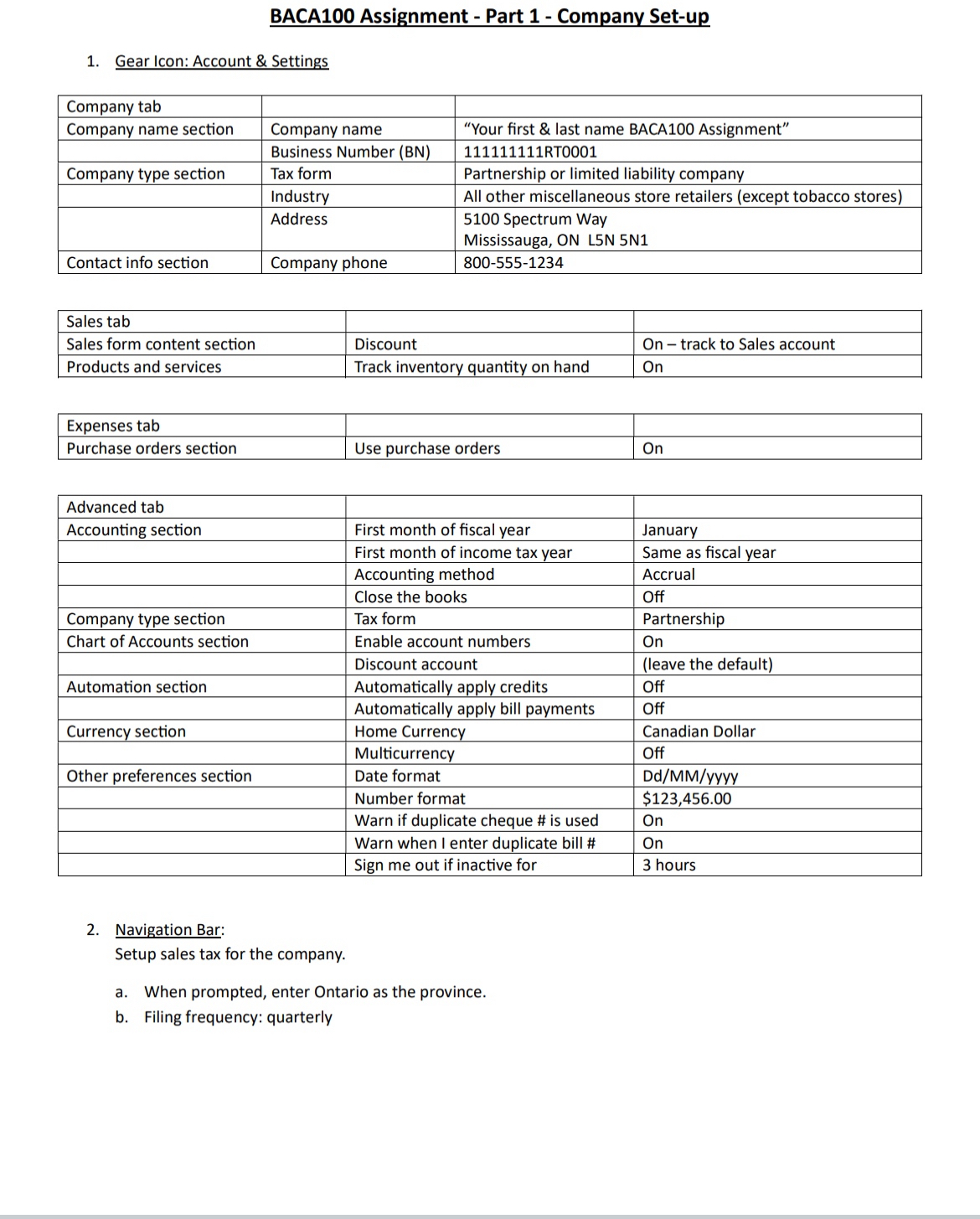
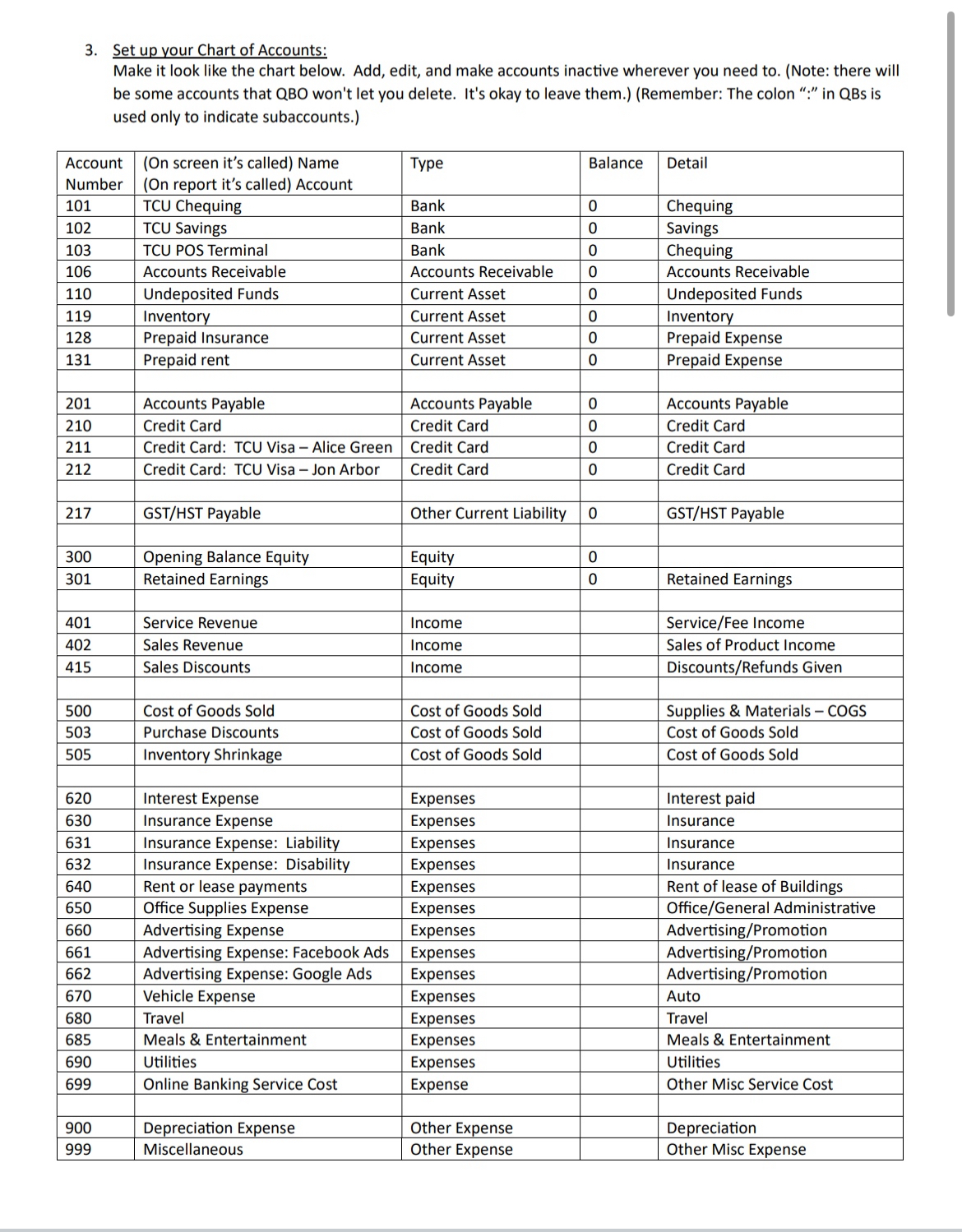
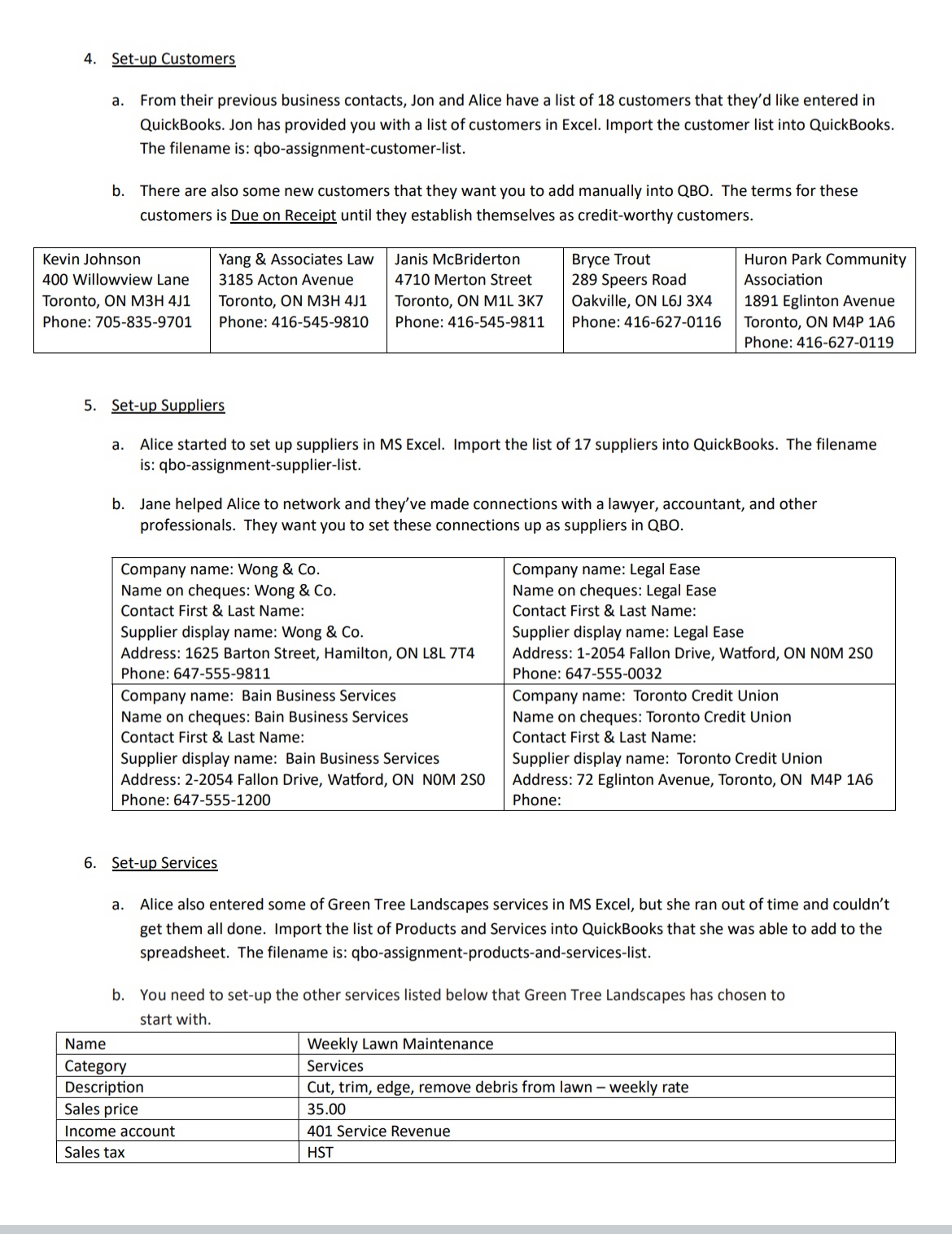
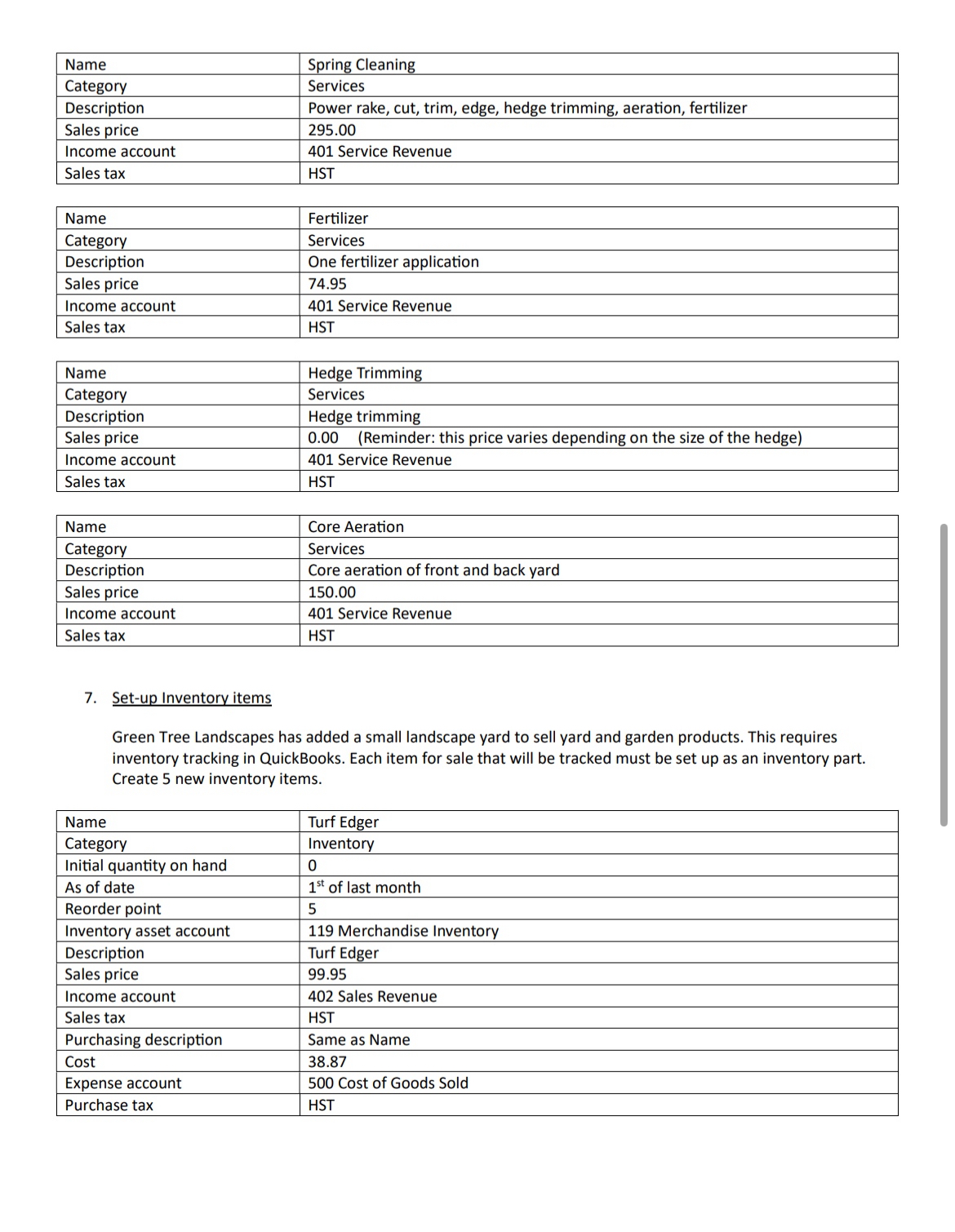
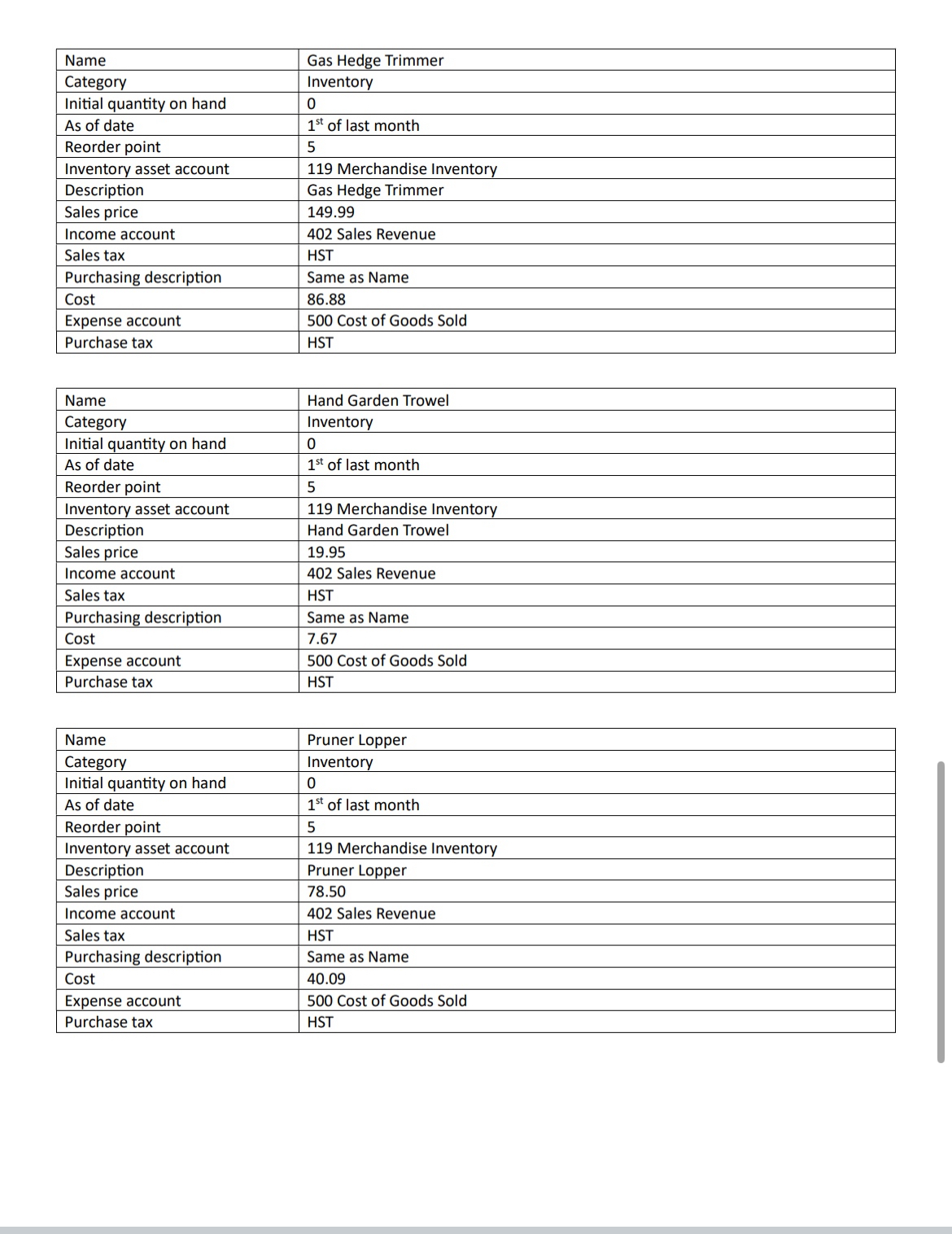
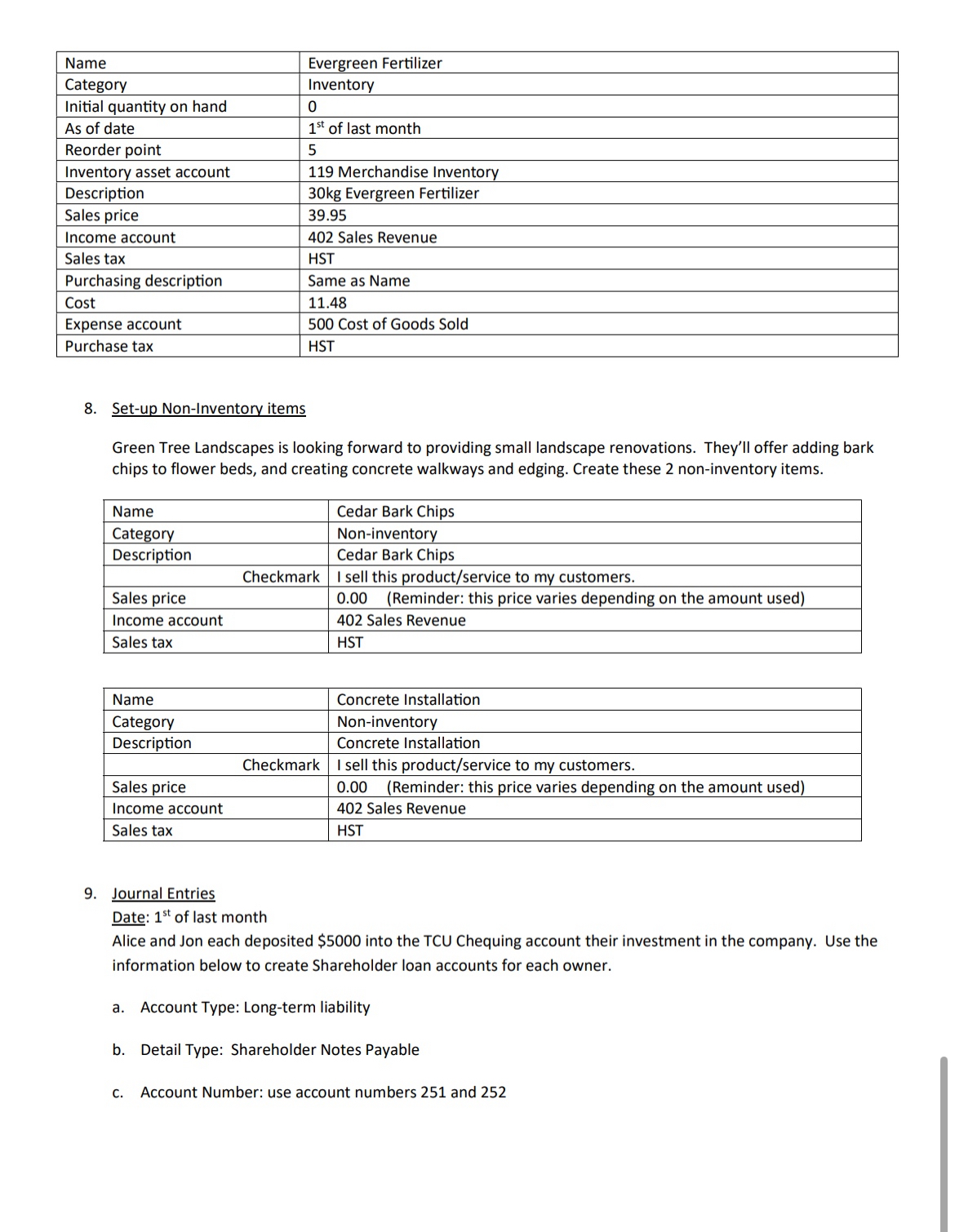
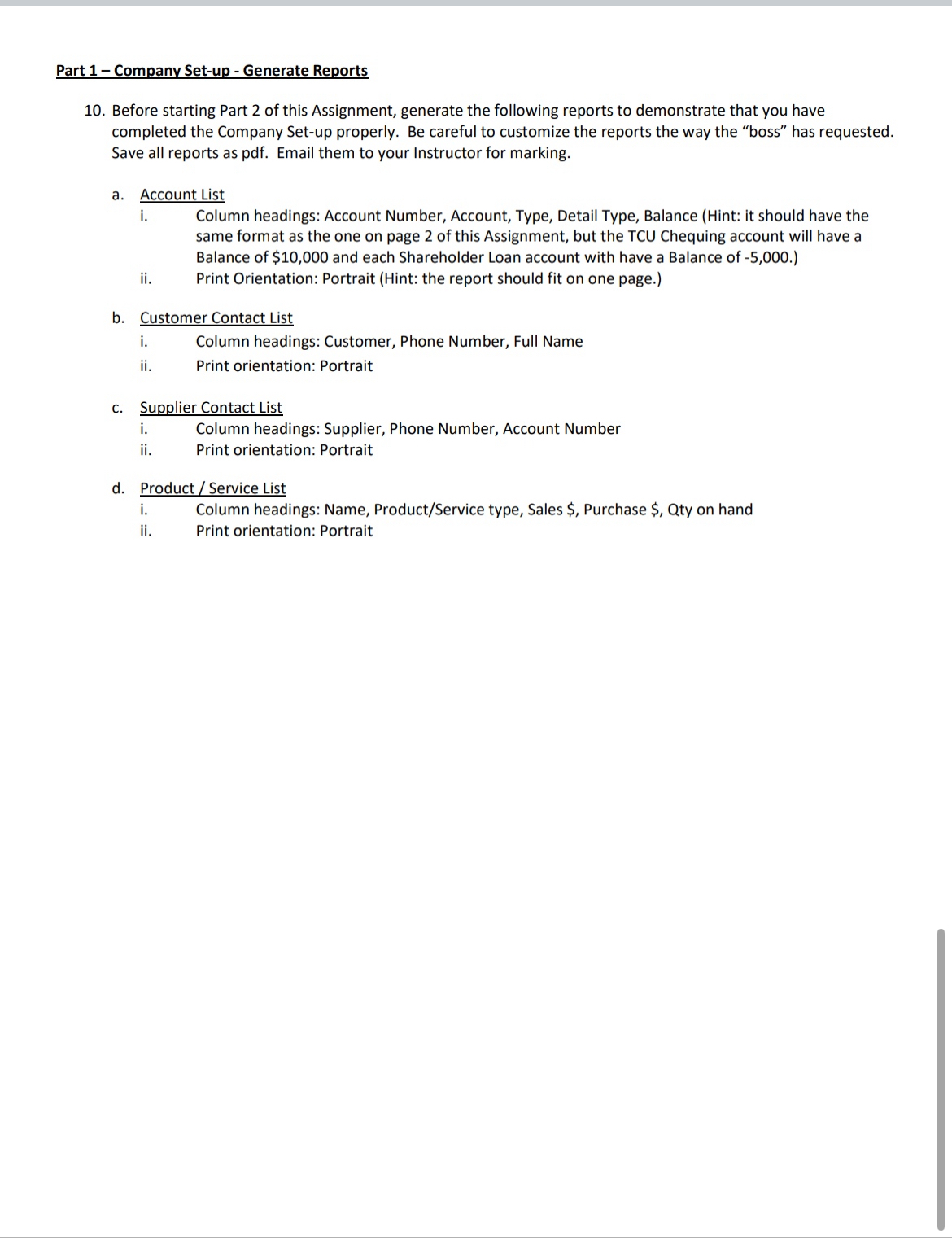
BACA100 Assignment - Part 1 - Company Set-up 1. Gear Icon: Account & Settings Company tab Company name section \"Your first & last name BACA100 Assignment\" 111111111RT0001 Company name Business Number (BN) Company type section Tax form Partnership or limited liability company Industry All other miscellaneous store retailers (except tobacco stores) Address 5100 Spectrum Way Mississauga, ON LSN 5N1 Contact info section Company phone 800-555-1234 Sales tab | Sales form content section Discount On = track to Sales account Products and services Track inventory quantity on hand On Expenses tab Purchase orders section Use purchase orders On Advanced tab Accounting section First month of fiscal year January First month of income tax year Same as fiscal year Accounting method Accrual Close the books Off Company type section Tax form Partnership Chart of Accounts section Enable account numbers On Discount account (leave the default) Automation section Automatically apply credits Off Automatically apply bill payments Off Currency section Home Currenc Canadian Dollar Multicurrency Off Other preferences section Date format Dd/MM/yyyy Number format $123,456.00 Wanrn if duplicate cheque # is used On Warn when | enter duplicate bill # On Sign me out if inactive for 3 hours 2. Navigation Bar: Setup sales tax for the company. a. When prompted, enter Ontario as the province. b. Filing frequency: quarterly 3. Setup your Chart of Accounts: Make it look like the chart below. Add, edit, and make accounts inactive wherever you need to. (Note: there will be some accounts that QBO won't let you delete. It's okay to leave them.) (Remember: The colon \":\" in QBs is used only to indicate subaccounts.) Account | (On screen it's called) Name Type Balance | Detail Number | (On report it's called) Account 101 TCU Chequing Bank 0 Chequing 102 TCU Savings Bank 0 Savings 103 TCU POS Terminal Bank 0 Chequing 106 Accounts Receivable Accounts Receivable 0 Accounts Receivable 110 Undeposited Funds Current Asset 0 Undeposited Funds 119 Inventory Current Asset 0 Inventory 128 Prepaid Insurance Current Asset 0 Prepaid Expense 131 Prepaid rent Current Asset 0 Prepaid Expense 201 Accounts Payable Accounts Payable 0 Accounts Payable 210 Credit Card Credit Card 0 Credit Card 211 Credit Card: TCU Visa Alice Green | Credit Card 0 Credit Card 212 Credit Card: TCU VisaJon Arbor | Credit Card 0 Credit Card 217 GST/HST Payable Other Current Liability | 0 GST/HST Payable 300 Opening Balance Equity Equity 0 301 Retained Earnings Equity 0 Retained Earnings 401 Service Revenue Income Service/Fee Income 402 Sales Revenue Income Sales of Product Income 415 Sales Discounts Income Discounts/Refunds Given 500 Cost of Goods Sold Cost of Goods Sold Supplies & Materials - COGS 503 Purchase Discounts Cost of Goods Sold Cost of Goods Sold 505 Inventory Shrinkage Cost of Goods Sold Cost of Goods Sold 620 Interest Expense Expenses Interest paid 630 Insurance Expense Expenses Insurance 631 Insurance Expense: Liability Expenses Insurance 632 Insurance Expense: Disability Expenses Insurance 640 Rent or lease payments Expenses Rent of lease of Buildings 650 Office Supplies Expense Expenses Office/General Administrative 660 Advertising Expense Expenses Advertising/Promotion 661 Advertising Expense: Facebook Ads | Expenses Advertising/Promotion 662 Advertising Expense: Google Ads Expenses Advertising/Promotion 670 Vehicle Expense Expenses Auto 680 Travel Expenses Travel 685 Meals & Entertainment Expenses Meals & Entertainment 690 Utilities Expenses Utilities 699 Online Banking Service Cost Expense Other Misc Service Cost 900 Depreciation Expense Other Expense Depreciation 999 Miscellaneous Other Expense Other Misc Expense 4. Set-up Customers a. From their previous business contacts, Jon and Alice have a list of 18 customers that they'd like entered in QuickBooks. Jon has provided you with a list of customers in Excel. Import the customer list into QuickBooks. The filename is: qbo-assignment-customer-list. b. There are also some new customers that they want you to add manually into QBO. The terms for these customers is Due on Receipt until they establish themselves as credit-worthy customers Kevin Johnson Yang & Associates Law Janis McBriderton Bryce Trout Huron Park Community 400 Willowview Lane 3185 Acton Avenue 4710 Merton Street 289 Speers Road Association Toronto, ON M3H 4J1 Toronto, ON M3H 4J1 Toronto, ON MIL 3K7 Oakville, ON L6J 3X4 1891 Eglinton Avenue Phone: 705-835-9701 Phone: 416-545-9810 Phone: 416-545-9811 Phone: 416-627-0116 Toronto, ON M4P 146 Phone: 416-627-0119 5. Set-up Suppliers a. Alice started to set up suppliers in MS Excel. Import the list of 17 suppliers into QuickBooks. The filename is: qbo-assignment-supplier-list. b. Jane helped Alice to network and they've made connections with a lawyer, accountant, and other professionals. They want you to set these connections up as suppliers in QBO. Company name: Wong & Co. Company name: Legal Ease Name on cheques: Wong & Co. Name on cheques: Legal Ease Contact First & Last Name: Contact First & Last Name: Supplier display name: Wong & Co. Supplier display name: Legal Ease Address: 1625 Barton Street, Hamilton, ON L8L 7T4 Address: 1-2054 Fallon Drive, Watford, ON NOM 250 Phone: 647-555-9811 Phone: 647-555-0032 Company name: Bain Business Services Company name: Toronto Credit Union Name on cheques: Bain Business Services Name on cheques: Toronto Credit Union Contact First & Last Name: Contact First & Last Name: Supplier display name: Bain Business Services Supplier display name: Toronto Credit Union Address: 2-2054 Fallon Drive, Watford, ON NOM 250 Address: 72 Eglinton Avenue, Toronto, ON M4P 146 Phone: 647-555-1200 Phone: 6. Set-up Services Alice also entered some of Green Tree Landscapes services in MS Excel, but she ran out of time and couldn't get them all done. Import the list of Products and Services into QuickBooks that she was able to add to the spreadsheet. The filename is: qbo-assignment-products-and-services-list. b. You need to set-up the other services listed below that Green Tree Landscapes has chosen to start with. Name Weekly Lawn Maintenance Category Services Description Cut, trim, edge, remove debris from lawn - weekly rate Sales price 35.00 Income account 401 Service Revenue Sales tax HSTCategory Services Description Power rake, cut, trim, edge, hedge trimming, aeration, fertilizer Sales price 295.00 Income account 401 Service Revenue Sales tax HST Name Fertilizer Category Services Description One fertilizer application Sales price 74.95 Income account Sales tax Category 401 Service Revenue Services Description Hedge trimming Sales price 0.00 (Reminder: this price varies depending on the size of the hedge) Income account 401 Service Revenue Sales tax HST Name Core Aeration Category Services Description Core aeration of front and back yard Sales price 150.00 Income account Sales tax 401 Service Revenue 7. Set-up Inventory items Green Tree Landscapes has added a small landscape yard to sell yard and garden products. This requires inventory tracking in QuickBooks. Each item for sale that will be tracked must be set up as an inventory part. Create 5 new inventory items. Name | Turf Edger Category Inventory Initial quantity on hand 0 As of date 1* of last month Reorder point 5 Inventory asset account 119 Merchandise Inventory Description Turf Edger Sales price 99.95 Income account 402 Sales Revenue Sales tax HST Purchasing description Same as Name Cost 38.87 Expense account 500 Cost of Goods Sold Purchase tax HST Name Gas Hedge Trimmer Category Inventory Initial quantity on hand 0 As of date 1* of last month Reorder point 5 Inventory asset account 119 Merchandise Inventory Description Gas Hedge Trimmer Sales price 149.99 Income account 402 Sales Revenue Sales tax HST Purchasing description Same as Name Cost 86.88 Expense account 500 Cost of Goods Sold Purchase tax HST Name Hand Garden Trowel Category Inventory Initial quantity on hand 0 As of date 1* of last month Reorder point a Inventory asset account 119 Merchandise Inventory Description Hand Garden Trowel Sales price 19.95 Income account 402 Sales Revenue Sales tax HST Purchasing description Same as Name Cost 7.67 Expense account 500 Cost of Goods Sold Purchase tax HST Name Pruner Lopper Category Inventory Initial quantity on hand 0 As of date 1* of last month Reorder point 5 Inventory asset account 119 Merchandise Inventory Description Pruner Lopper Sales price 78.50 Income account 402 Sales Revenue Sales tax HST Purchasing description Same as Name Cost 40.09 Expense account 500 Cost of Goods Sold Purchase tax HST Name Evergreen Fertilizer Category Inventory Initial quantity on hand 0 As of date 1* of last month Reorder point 5 Inventory asset account 119 Merchandise Inventory Description 30kg Evergreen Fertilizer Sales price 39.95 Income account 402 Sales Revenue Sales tax HST Purchasing description Same as Name Cost 11.48 Expense account 500 Cost of Goods Sold Purchase tax HST 8. Set-up Non-Inventory items Green Tree Landscapes is looking forward to providing small landscape renovations. They'll offer adding bark chips to flower beds, and creating concrete walkways and edging. Create these 2 non-inventory items. Name Cedar Bark Chips Category Non-inventory Description Cedar Bark Chips Checkmark | | sell this product/service to my customers. Sales price 0.00 (Reminder: this price varies depending on the amount used) Income account 402 Sales Revenue Sales tax HST Name Concrete Installation Category Non-inventory Concrete Installation Checkmark | | sell this product/service to my customers. Sales price 0.00 (Reminder: this price varies depending on the amount used) Income account 402 Sales Revenue Sales tax HST Description 9. Journal Entries Date: 1" of last month Alice and Jon each deposited $5000 into the TCU Chequing account their investment in the company. Use the information below to create Shareholder loan accounts for each owner. a. Account Type: Long-term liability b. Detail Type: Shareholder Notes Payable c. Account Number: use account numbers 251 and 252 Part 1 Company Set-up - Generate Reports 10. Before starting Part 2 of this Assignment, generate the following reports to demonstrate that you have completed the Company Set-up properly. Be careful to customize the reports the way the \"boss\" has requested. Save all reports as pdf. Email them to your Instructor for marking. a. c. d. Account List I. Column headings: Account Number, Account, Type, Detail Type, Balance (Hint: it should have the same format as the one on page 2 of this Assignment, but the TCU Chequing account will have a Balance of $10,000 and each Shareholder Loan account with have a Balance of -5,000.) ii. Print Orientation: Portrait (Hint: the report should fit on one page.) Customer Contact List i. Column headings: Customer, Phone Number, Full Name ii. Print orientation: Portrait Supplier Contact List i. Column headings: Supplier, Phone Number, Account Number ii. Print orientation: Portrait Product / Service List is Column headings: Name, Product/Service type, Sales S$, Purchase $, Qty on hand ii. Print orientation: Portrait
Step by Step Solution
There are 3 Steps involved in it
1 Expert Approved Answer
Step: 1 Unlock
Question Has Been Solved by an Expert!
Get step-by-step solutions from verified subject matter experts
Step: 2 Unlock
Step: 3 Unlock
Students Have Also Explored These Related Accounting Questions!









 Study Help