







Question: Hi, I need some help with this assignment. ///////////////////////////////////////////////////////// this is what I have so far body{background-image: url('background.jpg'); background-color: #FFFFFF; color: #666666; font-family: 'Verdana'; }
Hi, I need some help with this assignment.
/////////////////////////////////////////////////////////
this is what I have so far
body{background-image: url('background.jpg'); background-color: #FFFFFF; color: #666666; font-family: 'Verdana'; }
header {background-color: #F5F5F5; min-width:1000px; max-width:2000px; background-size:100% 100%; background-image: url("sunset.jpg"); background-repeat: no-repeat;}
#wrapper{ background-color: #ffffff; min-width: 700px; max-width: 1024px; box-shadow:10px 10px 5px blue; width:auto;}
h1{ line-height : 200%; background-image: url('sunset.jpg'); background-repeat: no-repeat; padding-left: 20px; height: 72px; margin-bottom: 0;}
h1 { padding-top:50px; padding-left: 30px; padding-bottom: 50px; }
#nav{ padding: 5px; background-color: #90C7E3; }
h3{ color: #000033;}
main{padding-left: 20px; padding-right: 20px; display: block; }
#homehero{height: 300px; background-image: url('coast.jpg'); background-size: 100% 100%; background-repeat: no-repeat;}
#yurthero{ height: 300px; background-image: url('yurt.jpg'); background-size: 100% 100%; background-repeat: no-repeat; }
#trailhero{ height: 300px; background-image: url('trail.jpg'); background-size: 100% 100%; background-repeat: no-repeat;}
nav { text-decoration: none; }
#links, #first, #sec, #third, #fourth
{display : inline; background-color: #90C7E3; }
#Footer{ font-style: italic; Font-size : 0.7em; padding: 10px; }
#hh{background-color: black; line-height : 200%; color: white; }
#mydivision{font-weight: bold; color: black;}
a{text-decoration: none; } li {display : inline; background-color: #90C7E3; }
h2 { color: #3399CC; font-family: Georgia; }
#resort{Color: #000033; Font-size: 1.2em; }
#Footer{font-style: italic; Font-size : 0.7em; padding: 10px;}
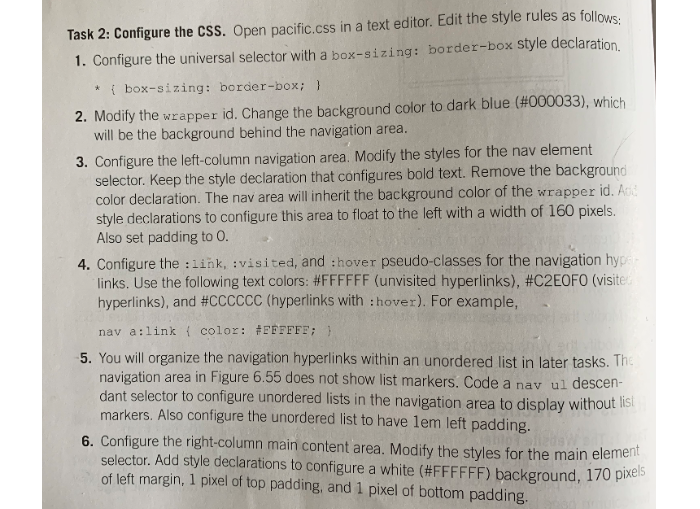
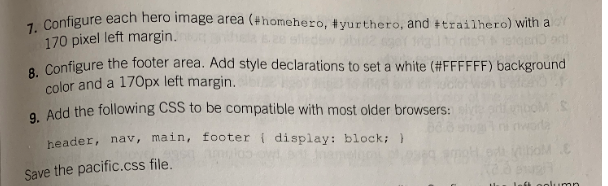
Task 2: Configure the CSS. Open pacific.css in a text editor. Edit the style rules as follows 1. Configure the universal selector with a box-sizing: border-box style declaration 2, Modify the wrapper id. Change the background color to dark blue (#000033), which 3. Configure the left-column navigation area. Modify the styles for the nav element *box-sizing: border-box; will be the background behind the navigation area. selector. Keep the style declaration that configures bold text. Remove the background color declaration. The nav area will inherit the background color of the wrapper id.A 60 pixels. style declarations to configure this area to float to the left with a width of 1 Also set padding to O 4. Configure the :link, :visited, and :hover pseudo-classes for the navigation hyp links. Use the following text colors. #FFFFFF (unvisited hyperlinks), #C2EOFO (visit hyperlinks), and #CCCCCC (hyperlinks with : hover). For example, nav a:link { color: #FFFFFF; } 5. You will organize the navigation hyperlinks within an unordered list in later tasks. Th navigation area in Figure 6.55 does not show list markers. Code a nav ul descen- dant selector to configure unordered lists in the navigation area to display without ist markers. Also configure the unordered list to have lem left padding. 6. Configure the right-column main content area. Modify the styles for the main element selector. Add style declarations to configure a white (#FFFFFF) background, 170 pixels of left margin, 1 pixel of top padding, and 1 pixel of bottom padding. configure each hero image area (#homehero, #yur thero, and t trailhero) with a 1. 170 pixel left margin. Configure the footer area. Add style declarations to set a white (#FFFFFF) background 8. color and a 170px left margin g. Add the following CSS to be compatible with most older browsers: hea ader, nav, main, footer display: block; Save the pacific.css file
Step by Step Solution
There are 3 Steps involved in it

Get step-by-step solutions from verified subject matter experts
 Study Help