







Question: Hi, I need your help class names should be same with introduction... I asked this question but answer is not looking same :) please help
Hi, I need your help class names should be same with introduction... I asked this question but answer is not looking same :) please help Thanks for all
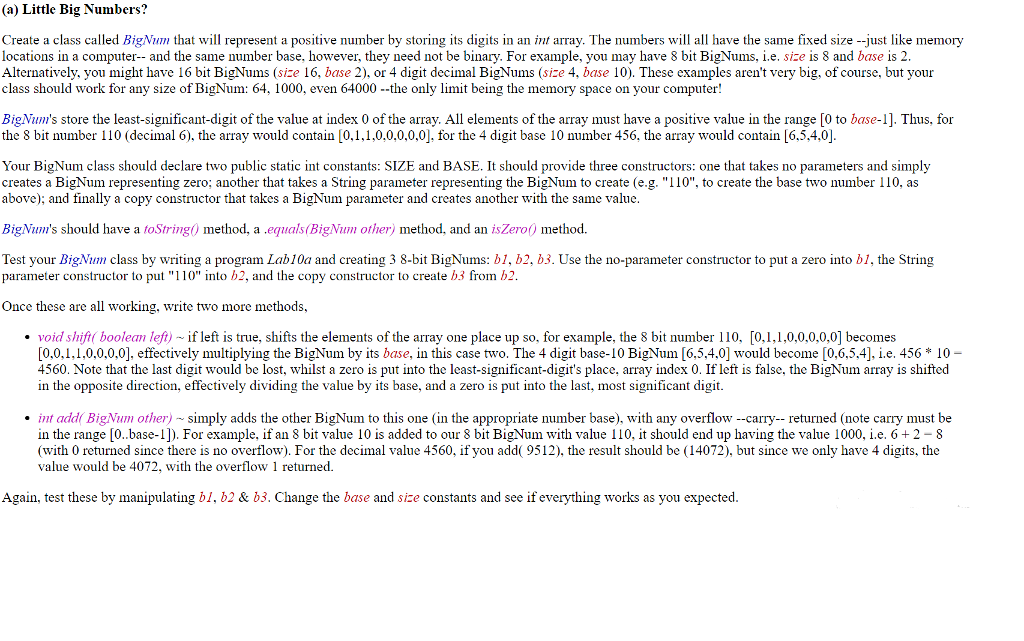
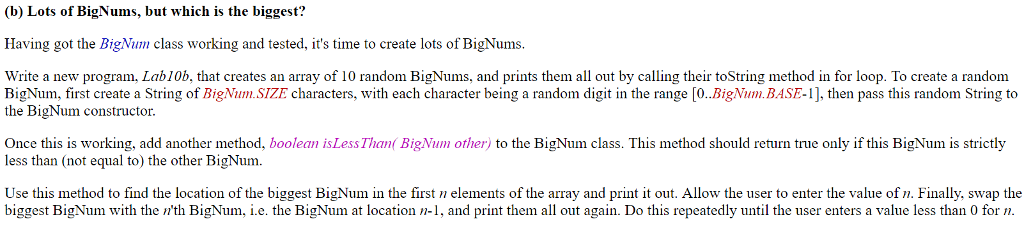
(a) Little Big Numbers? Create a class called BigNum that will represent a positive number by storing its digits in an int array. The numbers will all have the same fixed size --just like memory locations in a computer- and the same number base, however, they need not be binary. For example, you may have 8 bit BigNums, i.e. size is 8 and base is 2 Alternatively, you might have 16 bit BigNums (size 16, base 2), or 4 digit decimal BigNums (size 4, base 10). These examples aren't very big, of course, but your class should work for any size of BigNum: 64, 1000, even 64000 -the only limit being the memory space on your computer! BigNum's store the least-significant-digit of the value at index 0 of the array. All elements of the array must have a positive value in the range [0 to base-1]. Thus, for the 8 bit number 110 (decimal 6), the array would contain [0.1.1,0,0,0.0,0], for the 4 digit base 10 number 456, the array would contain [6,5,4,0] Your BigNum class should declare two public static int constants: SIZE and BASE. It should provide three constructors: one that takes no parameters and simply creates a BigNum representing zero; another that takes a String parameter representing the BigNum to create (e.g. "110", to create the base two number 110, as above); and finally a copy constructor that takes a BigNum parameter and creates another with the same value BigNum's should have a foString) method, a equals(BigNum other) method, and an isZero) method. Use the no-parameter constructor to put a zero into bi, the String Test your BigNum class by writing a program Lab10a and creating 3 8-bit BigNums: b1, b2, b3. parameter constructor to put "110" into h2, and the copy constructor to create b3 from b2 Once these are all working, write two more methods, void shift boolean left) if left is true, shifts the elements of the array one place up so, for example, the 8 bit number 110, [0,1,1,0,0,0,0,0] becomes [0.0,1,1,0.0,0,0], effectively multiplying the BigNum by its base, in this case two. The 4 digit base-10 BigNum[6,5.4,0 ould become [0,6,5,4], i.e. 456 *10- 4560. Note that the last digit would be lost, whilst a zero is put into the least-significant-digit's place, array index 0. If left is false, the BigNum array is shifted in the opposite direction, effectively dividing the value by its base, and a zero is put into the last, most significant digit. int add BigNum other) simply adds the other BigNum to this one (in the appropriate number base), with any overflow --carry-- returned (note carry must be in the range [0..base-1] For example, if an 8 bit value 10 is added to our 8 bit BigNum with value 110, it should end up having the value 1000, i.e. 6+2-8 (with 0 returned since there is no overflow). For the decimal value 4560, if you add( 9512), the result should be (14072), but since we only have 4 digits, the value would be 4072, with the overflow 1 returned. Again, test these by manipulating bI. b2 & b3. Change the base and size constants and see if everything works as you expected (a) Little Big Numbers? Create a class called BigNum that will represent a positive number by storing its digits in an int array. The numbers will all have the same fixed size --just like memory locations in a computer- and the same number base, however, they need not be binary. For example, you may have 8 bit BigNums, i.e. size is 8 and base is 2 Alternatively, you might have 16 bit BigNums (size 16, base 2), or 4 digit decimal BigNums (size 4, base 10). These examples aren't very big, of course, but your class should work for any size of BigNum: 64, 1000, even 64000 -the only limit being the memory space on your computer! BigNum's store the least-significant-digit of the value at index 0 of the array. All elements of the array must have a positive value in the range [0 to base-1]. Thus, for the 8 bit number 110 (decimal 6), the array would contain [0.1.1,0,0,0.0,0], for the 4 digit base 10 number 456, the array would contain [6,5,4,0] Your BigNum class should declare two public static int constants: SIZE and BASE. It should provide three constructors: one that takes no parameters and simply creates a BigNum representing zero; another that takes a String parameter representing the BigNum to create (e.g. "110", to create the base two number 110, as above); and finally a copy constructor that takes a BigNum parameter and creates another with the same value BigNum's should have a foString) method, a equals(BigNum other) method, and an isZero) method. Use the no-parameter constructor to put a zero into bi, the String Test your BigNum class by writing a program Lab10a and creating 3 8-bit BigNums: b1, b2, b3. parameter constructor to put "110" into h2, and the copy constructor to create b3 from b2 Once these are all working, write two more methods, void shift boolean left) if left is true, shifts the elements of the array one place up so, for example, the 8 bit number 110, [0,1,1,0,0,0,0,0] becomes [0.0,1,1,0.0,0,0], effectively multiplying the BigNum by its base, in this case two. The 4 digit base-10 BigNum[6,5.4,0 ould become [0,6,5,4], i.e. 456 *10- 4560. Note that the last digit would be lost, whilst a zero is put into the least-significant-digit's place, array index 0. If left is false, the BigNum array is shifted in the opposite direction, effectively dividing the value by its base, and a zero is put into the last, most significant digit. int add BigNum other) simply adds the other BigNum to this one (in the appropriate number base), with any overflow --carry-- returned (note carry must be in the range [0..base-1] For example, if an 8 bit value 10 is added to our 8 bit BigNum with value 110, it should end up having the value 1000, i.e. 6+2-8 (with 0 returned since there is no overflow). For the decimal value 4560, if you add( 9512), the result should be (14072), but since we only have 4 digits, the value would be 4072, with the overflow 1 returned. Again, test these by manipulating bI. b2 & b3. Change the base and size constants and see if everything works as you expected
Step by Step Solution
There are 3 Steps involved in it

Get step-by-step solutions from verified subject matter experts
 Study Help