







Question: Hi , I require the solution to this in MATLAB scripts. Please help, ot woll be great ly appreciated. An electronics shop has announced the
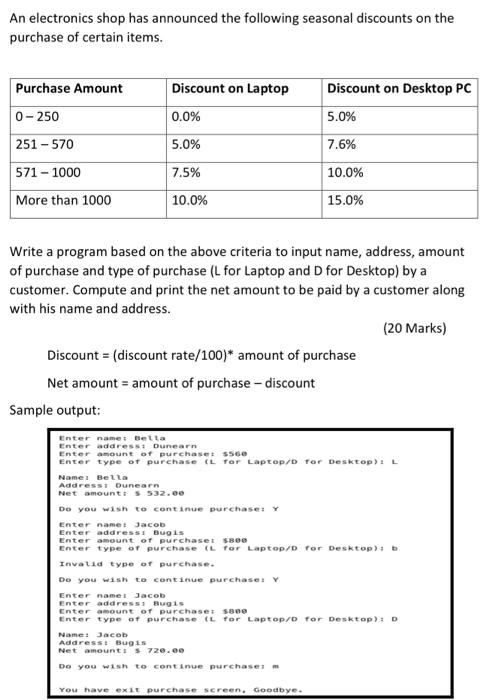
An electronics shop has announced the following seasonal discounts on the purchase of certain items. Purchase Amount 0-250 Discount on Laptop 0.0% Discount on Desktop PC 5.0% 251 - 570 5.0% 7.6% 571 - 1000 7.5% 10.0% 15.0% More than 1000 10.0% Write a program based on the above criteria to input name, address, amount of purchase and type of purchase (L for Laptop and D for Desktop) by a customer. Compute and print the net amount to be paid by a customer along with his name and address. (20 Marks) Discount = (discount rate/100)* amount of purchase Net amount = amount of purchase - discount Sample output: Enter namel Bella Enter address Dunearn Enter amount of purchaset 5560 Enter type of purchase (L for Laptop/D for Desktop): L Namel Bella Addresst Dunearn Net amount: 5532.00 Do you wish to continue purchase: Y Enter name: Jacob Enter address: Bugis Enter amount of purchaset see Enter type of purchase (L for Laptop/D For Desktop): Invalid type of purchase. Do you wish to continue purchase: Y Enter name! Jacob Enter address: Bugis Enter amount of purchase: 5800 Enter type of purchase it for Laptop/o For Desktop): D Nome: Jacob Address: Bugis Net Amount 5720.00 Do you wish to continue purchaser m You have exit purchase screen. Goodbye
Step by Step Solution
There are 3 Steps involved in it

Get step-by-step solutions from verified subject matter experts
 Study Help