







Question: Hi! Need help making a really simple HTML/JS page. Create the following page including the borders. Page should look as close to the sample as
Hi! Need help making a really simple HTML/JS page.
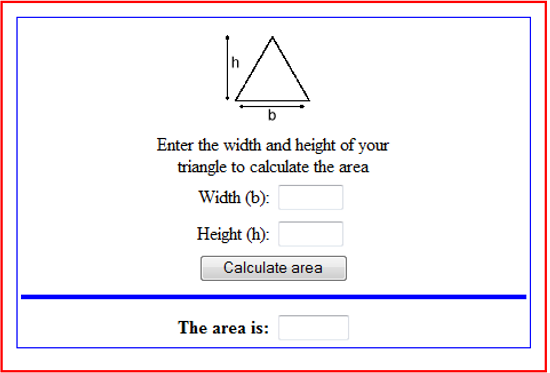
Create the following page including the borders. Page should look as close to the sample as possible.
Part 1
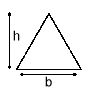
Image needs to be saved to your images folder
Here's the image:
Create a function using JavaScript that calculates the area of a triangle.
*b*h
Validate that the Width and Height are both numbers.
Validate that both he Width and Height are both greater than 0
Validate that neither the Width is more than 2X the Height or the Height is more than 2X the Width.
The function should be called from the onclick event of the Calculate Area button
The result should be stored in the text box at the bottom of the form and the result should be displayed in bold.
All formatting should be done in CSS and the style sheet should be external
Style sheet should be saved to your css folder
JavaScript Function should be in an external script file
External script page should be saved to your scripts folder
Save the file in your week 14 folder as homework20.html
Be sure to add a link to this from your index page
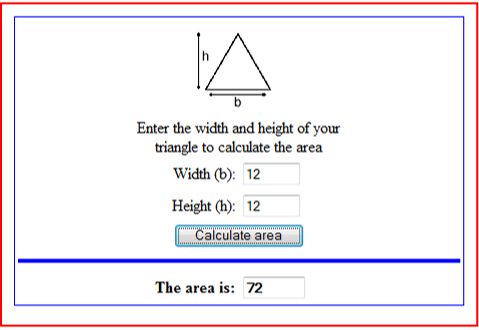
Sample screen shot after calculations shown below:
Part 2
Using the above form.add another section under the The Area is..
Add 5 input boxes horizonally. Make sure they all fit on one line.
Allow the user to enter 5 whole numbers.
Validate that they are all entered and are numbers.
Create another button on the form named Find Minimum number
Create an area to display the Minimum number.
Create another button the form name Find Maximum number
Create an area to display the Maximum number.
Part 3
Adding to part 2 (below it on the same form) add another text box.
Validate that it is a number greater than 100
Create a button that will Calculate the square root of the number.
Display the on an alert button The square root of (original number) is (the answer)
Take that answer and round it to a whole number.
Calculate the square root of that number.
Display on an alert button The square root of (number) is (the answer)
Repeat steps 5, 6, and 7 --- five times using an loop.
Enter the width and height of your triangle to calculate the area Width (b): Height (h): Calculate area The area is
Step by Step Solution
There are 3 Steps involved in it

Get step-by-step solutions from verified subject matter experts
 Study Help