Question: hi please help do theese : GCC & LLVM Comparison :Given a source file in C language. Compile the source file to binary using GCC
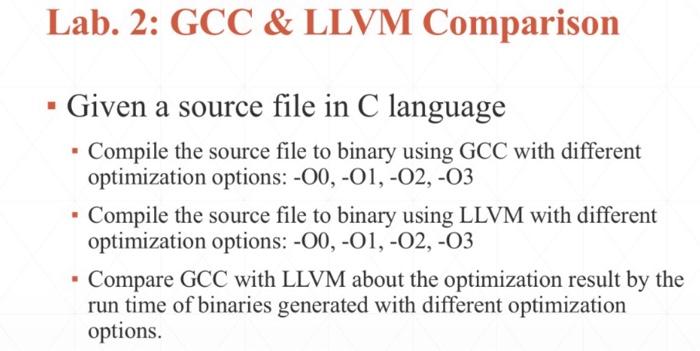
hi please help do theese : GCC & LLVM Comparison :Given a source file in C language. Compile the source file to binary using GCC with different optimization options: -00, -O1, -02, -03 ?
Compile the source file to binary using LLVM with different optimization options: -00, -O1, -02, -03 ?
Compare GCC with LLVM about the optimization result by the run time of binaries generated with different optimization options?
and send the screenshots of all progress
compare GCC with LLVM results ?
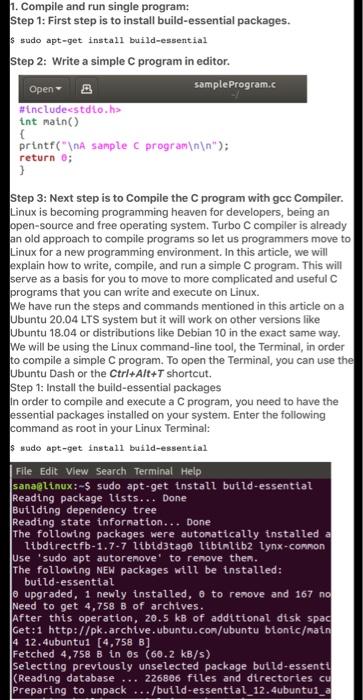
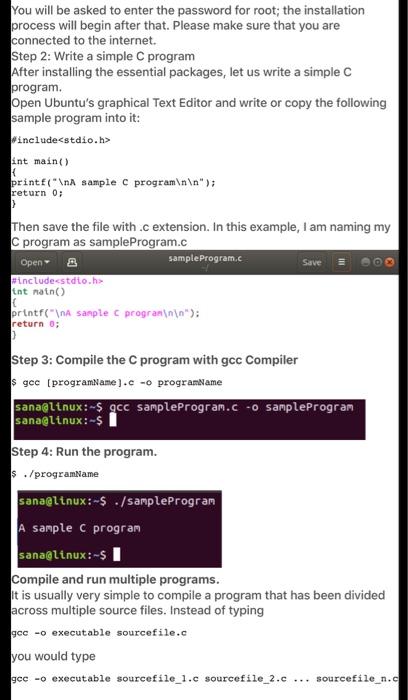
1. Compile and run single program: Step 1: First step is to install build-essential packages. $ sudo apt-get install build-essential Step 2: Write a simple C program in editor. Open B sample Program.c #include int main() { printf(" A sample program "); 1 return 0; Step 3: Next step is to Compile the program with gcc Compiler. Linux is becoming programming heaven for developers, being an open-source and free operating system. Turbo C compiler is already an old approach to compile programs so let us programmers move to Linux for a new programming environment. In this article, we will explain how to write, compile, and run a simple C program. This will serve as a basis for you to move to more complicated and useful programs that you can write and execute on Linux. We have run the steps and commands mentioned in this article on a Ubuntu 20.04 LTS system but it will work on other versions like Ubuntu 18.04 or distributions like Debian 10 in the exact same way. We will be using the Linux command-line tool, the Terminal, in order to compile a simple C program. To open the Terminal, you can use the Ubuntu Dash or the Ctrl+Alt+T shortcut. Step 1: Install the build-essential packages In order to compile and execute a C program, you need to have the essential packages installed on your system. Enter the following command as root in your Linux Terminal: $ sudo apt-get install build-essential File Edit View Search Terminal Help sana@linux:-$ sudo apt-get install build-essential Reading package lists... Done Building dependency tree Reading state information... Done The following packages were automatically installed a libdirectfb-1.7-7 libid3tage libinlib2 lynx-Connon Use "sudo apt autoremove to remove then. The following NEW packages will be installed: build-essential lo upgraded, 1 newly installed, e to remove and 167 no Need to get 4,758 B of archives. After this operation, 20.5 kB of additional disk spad Get:1 http://pk.archive.ubuntu.com/ubuntu bionic/main 14 12.4ubuntui (4,758 B] Fetched 4,758 B in Os (60.2 kB/s) selecting previously unselected package butld-essenti (Reading database 226886 files and directories cu Preparing to unpack .../build-essential_12.4ubuntui_a You will be asked to enter the password for root; the installation process will begin after that. Please make sure that you are connected to the internet. Step 2: Write a simple C program After installing the essential packages, let us write a simple C program. Open Ubuntu's graphical Text Editor and write or copy the following sample program into it: Winclude int main() return 0; printf(" A sample C program "); > Then save the file with .c extension. In this example, I am naming my C program as sample Program.c Open- Sample Program.c Save = include tnt nain printf(" A sample programinin"); return 0; Step 3: Compile the C program with gcc Compiler gec (programName}.c -o programlame sana@ltnux:-$ gcc sampleProgram.c -o sample Program sana@linux:-$ Step 4: Run the program. $ ./programName sana@linux:-$ ./sample Program A sample C program sana@linux:-5 Compile and run multiple programs. It is usually very simple to compile a program that has been divided across multiple source files. Instead of typing gec - executable sourcefile.c you would type gec -o executable sourcefile_1.c sourcefile_2.c ... sourcefile_n.c Lab. 2: GCC & LLVM Comparison Given a source file in C language Compile the source file to binary using GCC with different optimization options: -00, -01, -02, -03 Compile the source file to binary using LLVM with different optimization options: -00, -01, -02,-03 Compare GCC with LLVM about the optimization result by the run time of binaries generated with different optimization options









 Study Help