







Question: Hi, Please help me with the below task 'Draw a UML Class Diagram for the following requirements' and please check the example provided as well.
Hi,
Please help me with the below task 'Draw a UML Class Diagram for the following requirements' and please check the example provided as well.
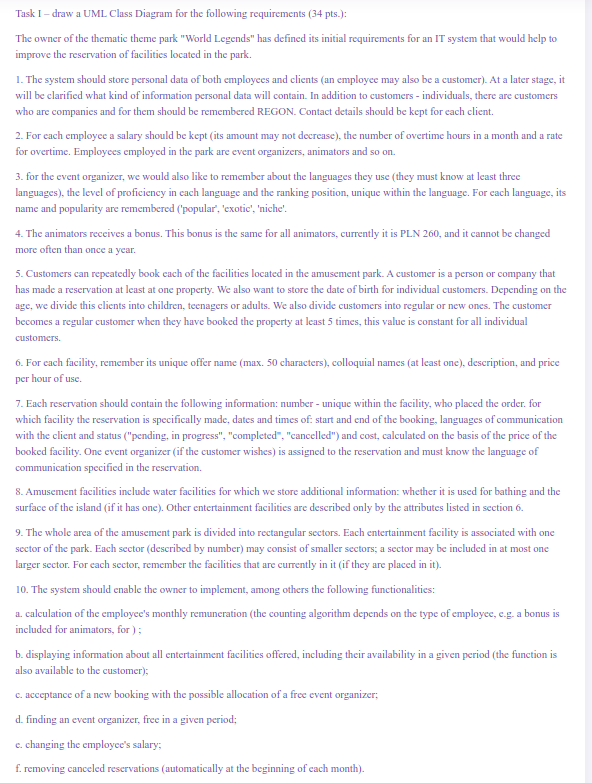
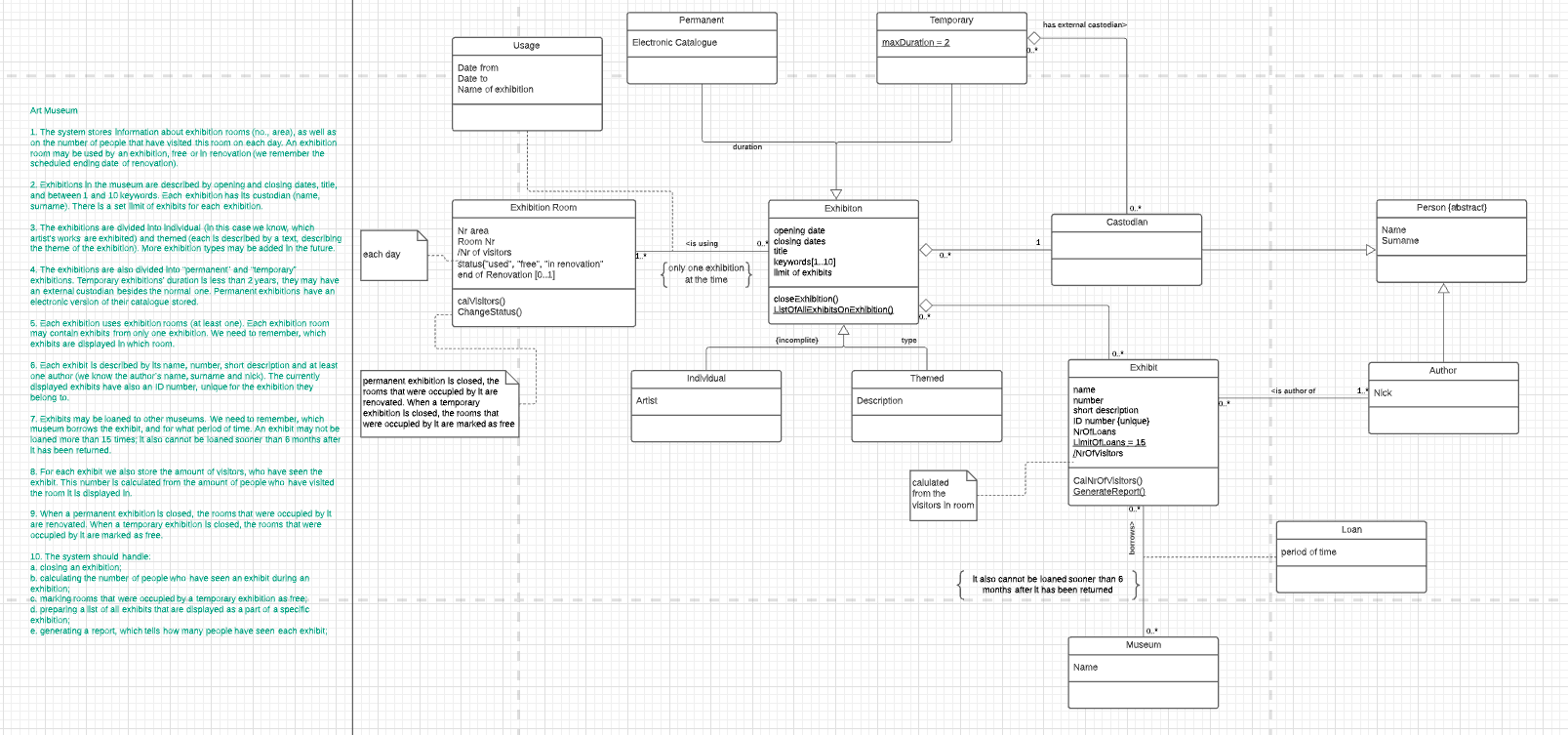
Task I-draw a UML Class Diagram for the following requirements (34 pts.): The owner of the thematic theme park "World Legends" has defined its initial requirements for an IT system that would help to improve the reservation of facilities located in the park. 1. The system should store personal data of both employees and clients (an employee may also be a customer). At a later stage, it will be clarified what kind of information personal data will contain. In addition to customers - individuals, there are customers who are companies and for them should be remembered REGON. Contact details should be kept for each client. 2. For each employee a salary should be kept (its amount may not decrease), the number of overtime hours in a month and a rate for overtime. Employees employed in the park are event organizers, animators and so on. 3. for the event organizer, we would also like to remember about the languages they use they must know at least three languages), the level of proficiency in each language and the ranking position, unique within the language. For each language, its name and popularity are remembered ('popular', 'exotic', 'niche'. 4. The animators receives a bonus. This bonus is the same for all animators, currently it is PLN 260, and it cannot be changed more often than once a year. 5. Customers can repeatedly book each of the facilities located in the amusement park. A customer is a person or company that has made a reservation at least at one property. We also want to store the date of birth for individual customers. Depending on the age, we divide this clients into children, teenagers or adults. We also divide customers into regular or new ones. The customer becomes a regular customer when they have booked the property at least 5 times, this value is constant for all individual customers. 6. For each facility, remember its unique offer name (max. 50 characters), colloquial names (at least one), description, and price per hour of use. 7. Each reservation should contain the following information: number - unique within the facility, who placed the order for which facility the reservation is specifically made, dates and times of start and end of the booking, languages of communication with the client and status ("pending, in progress","completed", "cancelled") and cost, calculated on the basis of the price of the booked facility. One event organizer (if the customer wishes) is assigned to the reservation and must know the language of communication specified in the reservation. 8. Amusement facilities include water facilities for which we store additional information: whether it is used for bathing and the surface of the island (if it has one). Other entertainment facilities are described only by the attributes listed in section 6. 9. The whole area of the amusement park is divided into rectangular sectors. Each entertainment facility is associated with one sector of the park. Each sector described by number) may consist of smaller sectors, a sector may be included in at most one larger sector. For each sector, remember the facilities that are currently in it (if they are placed in it). 10. The system should enable the owner to implement, among others the following functionalities: a. calculation of the employee's monthly remuneration (the counting algorithm depends on the type of employee, c.g. a bonus is included for animators, for); b. displaying information about all entertainment facilities offered, including their availability in a given period (the function is also available to the customer); c. acceptance of a new booking with the possible allocation of a free event organizer; d. finding an event organizer, free in a given period; c. changing the employee's salary, f. removing canceled reservations (automatically at the beginning of each month). Permanent Temporary Thas external castodian Usage Electronic Catalogue maxDuration = 2 b. Date from Date to Name of exhibition Art Museum 1. The system stores information about exhibition rooms (no, area), as well as on the number of people that have visited this room on each day. An exhibition room may be used by an exhibition, free or in renovation (we remember the scheduled ending date of renovation), duration 2. Exhibitions in the museum are described by opening and closing dates, title, and between 1 and 10 keywords. Each exhibition has its custodian (name, sumame). There is a set limit of exhibits for each exhibition Exhibition Room Exhibiton Person (abstract) 0... Castodian 3. The exhibitions are divided into Individual (In this case we know, which artist's works are exhibited) and themed (each is described by a text, describing the theme of the exhibition). More exhibition types may be added in the future. Name Sumame cis using 1 each day Nr area Room Nr /Nr of visitors Status( used", "free", "in renovation" end of Renovation 10.1] 1... opening date a closing dates title keywords[1..10] limit of exhibits 0. only one exhibition ( at the time 4. The exhibitions are also divided into permanent' and 'temporary exhibitions. Temporary exhibitions' duration is less than 2 years, they may have an external custodian besides the normal one, Permanent exhibitions have an electronic version of their catalogue stored calvisitors Change Status close Exhibition ListotAllExhibitsOnExhibition 0... 5. Each exhibition uses exhibition rooms at least one). Each exhibition room may contain exhibits from only one exhibition. We need to remember, which exhibits are displayed in which room. A 4 incomplite) type Exhibit Author 6. Each exhibit is described by its name, number, short description and at least one author (we know the author's name, surname and nick). The currently , displayed exhibits have also an ID number, unique for the exhibition they belong to Individual Themed cis author of 1. Nick permanent exhibition is closed, the rooms that were occupled by it are renovated. When a temporary exhibition is closed, the rooms that were occupled by it are marked as free Artist Description ... 7. Exhibits may be loaned to other museums. We need to remember, which museum borrows the exhibit, and for what perlod of time. An exhibit may not be Toaned more than 15 times. It also cannot be loaned sooner than 6 months after It has been returned name number short description ID number (unique) NrOfLoans LimitOfLoans 15 /NrOfvisitors 8. For each exhibit we also store the amount of visitors, who have seen the exhibit. This number is calculated from the amount of people who have visited the room it is displayed in calulated from the visitors in room CalNrofvisitors Generate Report 0.." Loan period of time 9. When a permanent exhibition is closed, the rooms that were occupied by It are renovated. When a temporary exhibition is closed, the rooms that were occupled by it are marked as free 10. The system should handle a. closing an exhibition; b. calculating the number of people who have seen an exhibit during an exhibition c. marking rooms that were occupied by a temporary exhibition as free d. preparing a list of all exhibits that are displayed as a part of a specific exhibition; e, generating a report, which tells how many people have seen each exhibit; It also cannot be loaned sooner than 6 months after it has been returned 0... Museum Name
Step by Step Solution
There are 3 Steps involved in it

Get step-by-step solutions from verified subject matter experts
 Study Help