







Question: Hi there! I have everything done except I cannot seem to do the bar graph. I am having trouble implementing it into my code, this
Hi there! I have everything done except I cannot seem to do the bar graph. I am having trouble implementing it into my code, this is what I have so far any help would be greatly appreciated!
/* * To change this license header, choose License Headers in Project Properties. * To change this template file, choose Tools | Templates * and open the template in the editor. */ package savingscalculatorviewer;
/** * * @author */ import javax.swing.*; import java.awt.*; import java.awt.event.ActionEvent; import java.security.InvalidParameterException; import javax.swing.JPanel; import java.awt.geom.Rectangle2D;
public class SavingsCalculatorViewer extends JPanel {
/** * @param args the command line arguments */ private int valuesSize; private double[] values; private static final int WIDTH = 300; private static final int HEIGHT = 300; public SavingsCalculatorViewer() { setPreferredSize(new Dimension(WIDTH, HEIGHT)); }
public void setCount(int count) { values = new double[count]; valuesSize = 0; repaint(); }
public void addValue(double v) { if (valuesSize == values.length) { return; }
values[valuesSize] = v; valuesSize++; repaint(); }
public void paintComponent(Graphics g) { super.paintComponent(g); Graphics2D g2 = (Graphics2D) g;
if (valuesSize == 0) { return; }
double max = values[0]; for (int i = 0; i max) { max = values[i]; } }
for (int i = 0; i
Rectangle2D.Double bar = new Rectangle2D.Double(i * getWidth() / values.length, getHeight() - height, width, height); g2.draw(bar); } } public static void main(String[] args) { // create a JFrame JFrame mWindow = new JFrame();
// Make Sure the Program Exits when the Frame Closes mWindow.setDefaultCloseOperation(JFrame.EXIT_ON_CLOSE);
// set the Title mWindow.setTitle("Simple Interest Calculator");
// set the Size mWindow.setSize(500, 500);
// Create a JPanel to Add Components JPanel container = new JPanel();
container.setLayout(new BoxLayout(container, BoxLayout.PAGE_AXIS));
// Create Labels and Text Fields for Input JLabel InitialAmountInSavingsAccount = new JLabel("Initial Amount In " + "Savings Account");
TextField InputAmountInSavingsAccount = new TextField();
// Create Labels and Text Fields for Input JLabel AnnualInterestRate = new JLabel("Annual Interest Rate");
TextField InputAnnualInterestRate = new TextField();
// Create Labels and Text Fields for Input JLabel NumberOfYears = new JLabel("Number of Years");
TextField InputNumberOfYears = new TextField();
// Result Text Area TextArea Result = new TextArea();
Result.setEditable(false);
// Creating Calculate Button Button Calculate = new Button("Calculate");
Calculate.addActionListener(new AbstractAction() {
@Override
public void actionPerformed(ActionEvent e) {
try {
Result.setText("");
// Get the Values From Input Fields Double savingAmount = Double.parseDouble(InputAmountInSavingsAccount.getText());
Double interestRate = Double.parseDouble(InputAnnualInterestRate.getText());
Double years = Double.parseDouble(InputNumberOfYears.getText());
// Check For Validity of Data if (savingAmount
throw new InvalidParameterException();
} else {
// Print Initial Amount Result.append("Initial Amount: $" + savingAmount + " ");
// Increment Each Year double increment = (savingAmount * interestRate) / 100.0;
// For Each Year Print the Simple Interest for (int i = 1; i
// Append the ith Year output to Text Area Result.append("After year " + i + ": $" + (savingAmount + increment * i) + " ");
}
}
} catch (Exception ex) {
// Show the Error of Input Data JOptionPane.showMessageDialog(container, "Incorrect Input Data!", "Error!", JOptionPane.ERROR_MESSAGE);
}
}
});
/* Add Components to JPanel
Add First Text Field*/ container.add(InitialAmountInSavingsAccount);
container.add(InputAmountInSavingsAccount);
// Add Second Text Field container.add(AnnualInterestRate);
container.add(InputAnnualInterestRate);
// Add Third Text Field container.add(NumberOfYears);
container.add(InputNumberOfYears);
// Add Calculate Button container.add(Calculate);
// Add Result Text Area container.add(Result);
// Add Panel to Main Window mWindow.add(container);
// Show Window mWindow.setVisible(true);
} }
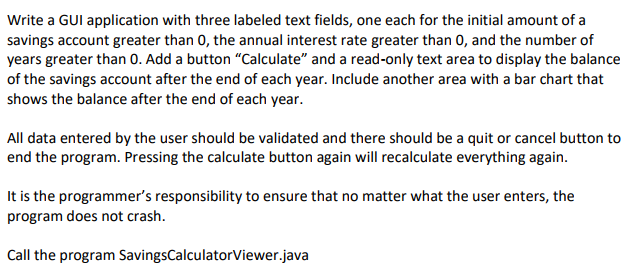
Write a GUI application with three labeled text fields, one each for the initial amount of a savings account greater than 0, the annual interest rate greater than 0, and the number of years greater than 0. Add a button "Calculate" and a read-only text area to display the balance of the savings account after the end of each year. Include another area with a bar chart that shows the balance after the end of each year All data entered by the user should be validated and there should be a quit or cancel button to end the program. Pressing the calculate button again will recalculate everything again. It is the programmer's responsibility to ensure that no matter what the user enters, the program does not crash. Call the program SavingsCalculatorViewer.java
Step by Step Solution
There are 3 Steps involved in it

Get step-by-step solutions from verified subject matter experts
 Study Help