







Question: hi this is an assembly code made in little computer 3 (lc3) code for this assignment that has an error i couldn't find, it either
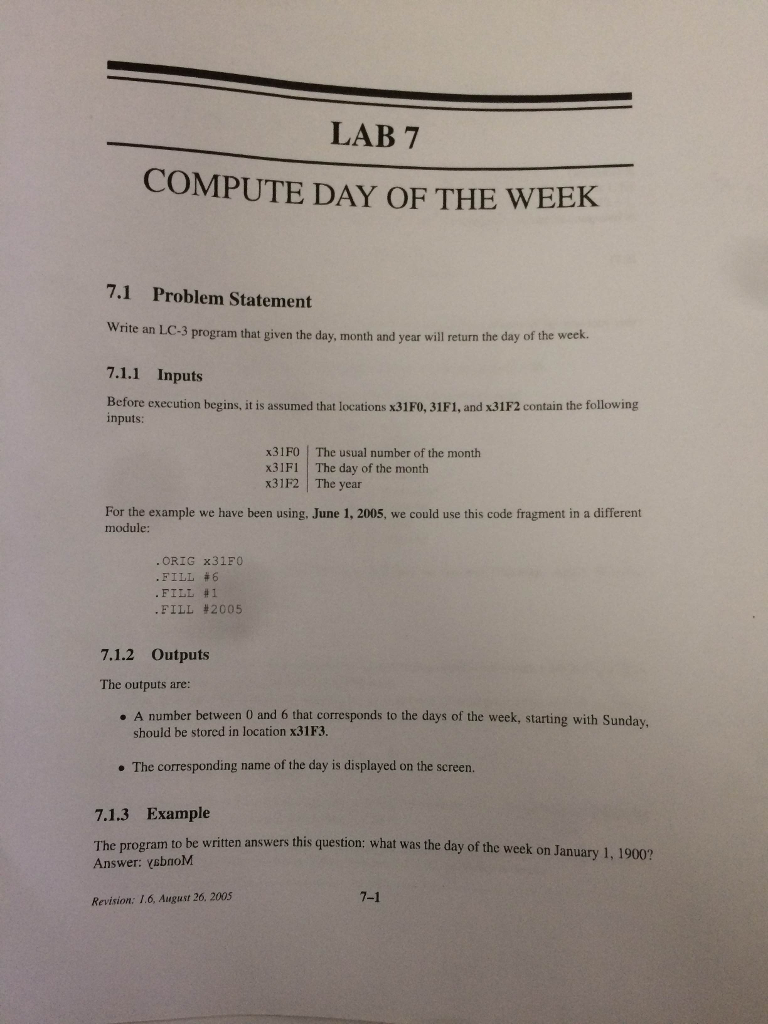

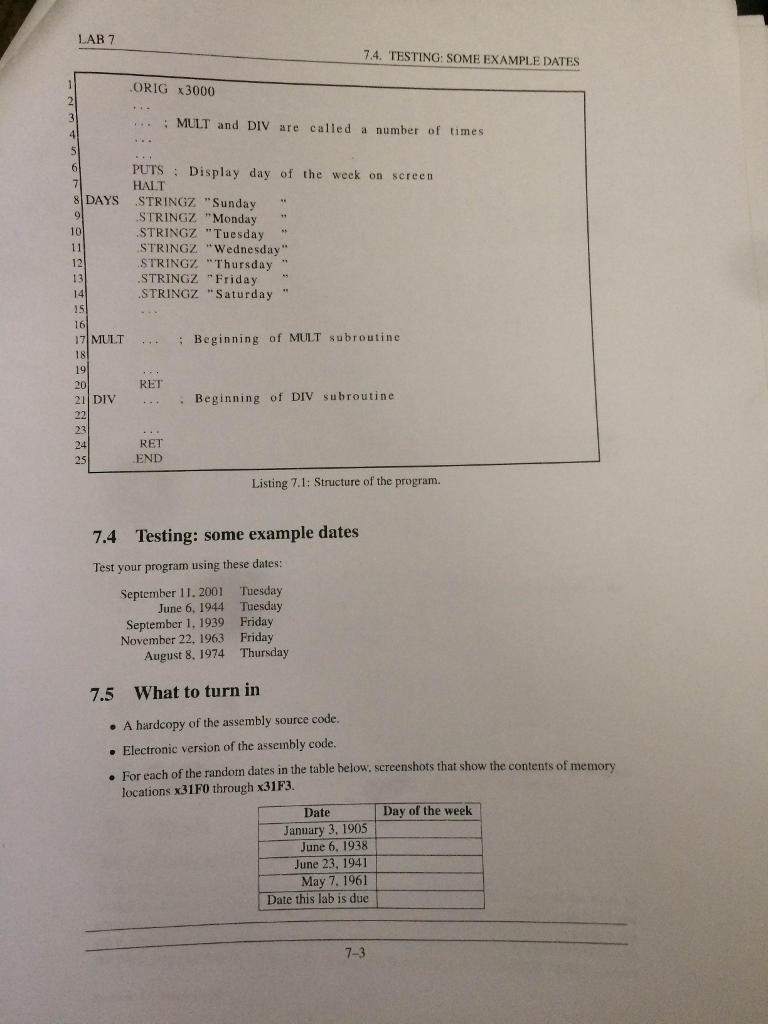
hi this is an assembly code made in little computer 3 (lc3) code for this assignment that has an error i couldn't find, it either doesn't fill a value in required memory space or gets stuck in a loop. please don't post an answer if you did not test it.
.ORIG x3000
LDI R3, MONTH ; m
LDI R4, DAY ; q (Day)
LDI R5, YEAR ;
;COMPUTE M
AND R1,R1,#0
AND R2,R2,#0
AND R6,R6,#0
ADD R1,R3,#0
ADD R1,R1,#-2
BRp MONTHIS2
ADD R1,R1,#12
MONTHIS2
ADD R1,R1,#0
STI R1,M
;COMPUTE D
AND R1,R1,#0
AND R2,R2,#0
AND R6,R6,#0
ADD R1,R5,#0
LD R2,N_100
JSR MOD
LDI R6,X_MOD_Y
STI R6,D
;compute c
AND R1,R1,#0
AND R2,R2,#0
AND R6,R6,#0
ADD R1,R5,#0
LD R2,N_100
JSR DIV
LDI R6,X_DIV_Y
STI R6,C
;COMPUTE THE FORMULA
AND R1,R1,#0
AND R2,R2,#0
AND R6,R6,#0 ; (13M-1)
LDI R1,M
ADD R2,R2,#13
JSR MULT
LDI R6,X_MUL_Y
ADD R6,R6,#-1
AND R1,R1,#0
AND R2,R2,#0
;(13M-1)/5
ADD R1,R6,#0
ADD R2,R2,#5
AND R6,R6,#0
JSR DIV
LDI R6,X_DIV_Y
ADD R6,R6,R4 ;K+(13M-1)/5
AND R1,R1,#0
AND R2,R2,#0
LDI R1,D
ADD R6,R6,R1 ;K+(13M-1)/5+D
AND R1,R1,#0
LDI R1,D
ADD R2,R2,#4 ;D/4
JSR DIV
AND R1,R1,#0
LDI R1,X_DIV_Y
ADD R6,R6,R1 ;K+(13M-1)/5+D +D/4
AND R1,R1,#0
AND R2,R2,#0
LDI R1,C
ADD R2,R1,R1 ;2C
NOT R2,R2
ADD R2,R2,#1
ADD R2,R2,#4 ;4-2C
JSR DIV
AND R1,R1,#0
LDI R1,X_DIV_Y
ADD R6,R6,R1 ;K+(13M-1)/5+D +D/4+C/4-2C
AND R1,R1,#0
AND R2,R2,#0
ADD R1, R6, #0
ADD R2, R2, #7
JSR MOD ; F mod 7
AND R0,R0,#0
AND R6,R6,#0
LDI R6, X_MOD_Y
STI R6,DAY_OF_THE_WEEK
LD R0,DAYS
ADD R0,R6,#0
PUTS
HALT
DAYS
.STRINGZ " Sunday "
.STRINGZ " Monday "
.STRINGZ " Tuesday "
.STRINGZ " Wendsday"
.STRINGZ " Thursday"
.STRINGZ " Friday "
.STRINGZ " Saturday"
DAY_OF_THE_WEEK .FILL x31F3
MONTH .FILL x31F0
DAY .FILL x31F1
YEAR .FILL x31F2
M .FILL x3100
D .FILL x3101
C .FILL x3102
X_MUL_Y .FILL x3103
X_DIV_Y .FILL x3104
X_MOD_Y .FILL x3105
N_100 .FILL #100
MULT
STI R1, SAVE_R1 ; Save registers
STI R2, SAVE_R2 ;
STI R3, SAVE_R3 ;
STI R4, SAVE_R4 ;
;STI R7, SAVE_R7
AND R4, R4, #0 ; Test the sign of X
ADD R1, R1, #0
BRn X_NEG ; If X is negative, change X to positive
BR #3
X_NEG
NOT R1, R1
ADD R1, R1, #1
NOT R4, R4
ADD R2, R2, #0
BRn Y_NEG ; If Y is negative, change Y to positive
BR #3 ; Change Y to positive
Y_NEG
NOT R2, R2
ADD R2, R2, #1
NOT R4, R4
AND R3, R3, #0
MULT_REPEAT
ADD R3, R3, R1 ; Perform addition on X
ADD R2, R2, #-1 ; Use R2 as the counter
BRnp MULT_REPEAT ; Continue loop while counter not equal to 0
ADD R4, R4, #0 ; Test the sign flag
BRn CHANGE_SIGN ; Change the result if sign flag is negative
BR #2
CHANGE_SIGN ; Change the sign of the result
NOT R3, R3
ADD R3, R3, #1
STI R3, X_MUL_Y ; Save the result
LDI R1, SAVE_R1 ; Restore registers
LDI R2, SAVE_R2 ;
LDI R3, SAVE_R3 ;
LDI R4, SAVE_R4 ;
RET
DIV
STI R1, SAVE_R1 ; Save registers
STI R2, SAVE_R2 ;
STI R3, SAVE_R3 ;
STI R4, SAVE_R4 ;
STI R5, SAVE_R5 ;
AND R3, R3, #0 ; Initialize the whole part counter
AND R5, R5, #0 ; Initialize the sign flag
ADD R1, R1, #0
BRn X_NEG_2 ; If X is negative, change X to positive
BR #3
X_NEG_2
NOT R1, R1
ADD R1, R1, #1
NOT R5, R5
ADD R2, R2, #0
BRn Y_NEG_2
BR #3
Y_NEG_2
NOT R2, R2
ADD R2, R2, #1
NOT R5, R5
NOT R4, R2 ; Initialize the decrement counter
ADD R4, R4, #1 ;
DIV_REPEAT
ADD R1, R1, R4 ; Subtract Y from X
BRn #2
ADD R3, R3, #1 ; Increment the whole number counter
BR DIV_REPEAT ; Continue loop while X is still greater than Y
ADD R5, R5, #0 ; Test the sign flag
BRn CHANGE_SIGN_2 ; Change the result if sign flag is negative
BR #2
CHANGE_SIGN_2 ; Change the sign of the result
NOT R3, R3
ADD R3, R3, #1
STI R3, X_DIV_Y ; Save the result
LDI R1, SAVE_R1 ; Restore registers
LDI R2, SAVE_R2 ;
LDI R3, SAVE_R3 ;
LDI R4, SAVE_R4 ;
LDI R5, SAVE_R5
RET
MOD
STI R1, SAVE_R1 ; Save registors
STI R2, SAVE_R2 ;
STI R3, SAVE_R3 ;
STI R4, SAVE_R4 ;
STI R5, SAVE_R5 ;
;STI R7, SAVE_R7
AND R5, R5, #0
ADD R1, R1, #0
BRn X_NEG_3 ; If X is negative, change X to positive
BR #3
X_NEG_3
NOT R1, R1
ADD R1, R1, #1
NOT R5, R5
ADD R2, R2, #0
BRn Y_NEG_3
BR #3
Y_NEG_3 ; If Y is negative, change Y to positive
NOT R2, R2
ADD R2, R2, #1
NOT R5, R5
NOT R3, R2 ; Initialize the decrement counter
ADD R3, R3, #1 ;
ADD R4, R1, #0 ; Initialize the modulo counter
MOD_REPEAT
ADD R1, R1, R3 ;
BRnz #2 ; If R3 cannot go into R1 exit loop
ADD R4, R4, R3 ; else continue to calculate modulo
BR MOD_REPEAT
STI R4, X_MOD_Y
LDI R1, SAVE_R1 ; Restore registers
LDI R2, SAVE_R2 ;
LDI R3, SAVE_R3 ;
LDI R4, SAVE_R4 ;
LDI R5, SAVE_R5 ;
;LDI R7, SAVE_R7 ;
RET
; Used to save and restore registers
SAVE_R1 .FILL x3500
SAVE_R2 .FILL x3501
SAVE_R3 .FILL x3502
SAVE_R4 .FILL x3503
SAVE_R5 .FILL x3504
SAVE_R6 .FILL x3505
SAVE_R7 .FILL x3506
.END
LAB 7 COMPUTE DAY oF THE WEEK. 7.1 Problem Statement Write an LC-3 program that given the day, month and year will return the day of the week. 7.1.1 Inputs Before execution begins, it is assumed that locations x31Fo, 31F1, and x31F2 contain the following inputs: x31F0 The usual number of the month x31F1 The day of the month x31F2 The year For the example we have been using, June 1, 2005, we could use this code fragment in a different module: ORIG 2x31F0 FILL 6 FILL a 1 FILL #2005 7.1.2 outputs The outputs are: A number between 0 and 6 that corresponds to the days of the week, starting with Sunday, should be location The corresponding name of the day is displayed on the screen. 7.1.3 Example The program to be written answers this question: what was the day of the week on January 1, 1900? Answer: YGbnoM Revision; 1.6, August 26, 2005
Step by Step Solution
There are 3 Steps involved in it

Get step-by-step solutions from verified subject matter experts
 Study Help