







Question: Hi, this project is for C# programming in Microsoft Visual Studio. I would greatly appreciate any help!! I attached the code I have so far
Hi, this project is for C# programming in Microsoft Visual Studio. I would greatly appreciate any help!! I attached the code I have so far however, I dont know if any of it is correct.
using System; using System.Collections.Generic; using System.Linq; using System.Text; using System.Threading.Tasks;
namespace Project2 { class shapecalc { static void Main(string[] args) { int choice, l, h, s, w, d1, d2, b, r, lb, sb; double area=0;
Console.WriteLine(" "); Console.WriteLine("Shape Area Calculator: "); Console.WriteLine("*****************************************************************"); Console.WriteLine(" ");
Console.WriteLine("Please select the number of the operation you would like to perform:"); Console.WriteLine("1. Circle"); Console.WriteLine("2. Square"); Console.WriteLine("3. Rectangle"); Console.WriteLine("4. Rhombus"); Console.WriteLine("5. Parallelogram"); Console.WriteLine("6. Trapezoid"); Console.WriteLine("7. Exit"); Console.WriteLine(" "); Console.WriteLine("********************************************************************"); Console.WriteLine("Select a shape type to calculate : "); choice = Convert.ToInt32(Console.ReadLine());
switch(choice)
static private void CalculateCircle() { Console.WriteLine("Enter the length of the radius of the Circle (-1 to exit back to menu) : "); r = double.Parse(Console.ReadLine()); Console.WriteLine("Area of Circle is:{0}", 3.14 * r * r); }
static private void CalculateRectangle() { Console.WriteLine("Enter the length of on side of the rectangle (-1to exit back to menu) : "); l = double.Parse(Console.ReadLine()); Console.WriteLine("Enter the width of the Rectangle"); w = double.Parse(Console.ReadLine()); Console.WriteLine("Area of rectangle is :{0}", l * w); } static private void CalculateSquare() { Console.WriteLine("Enter the length of one side of the square (-1 to exit back to menu) : "); s = double.Parse(Console.ReadLine()); Console.WriteLine("Area of Square is:{0}", s * s); } static private void CalculateRhombus() { Console.WriteLine("Enter the length of one diagonal of the rhombus (-1 to exit back to menu) : "); d1 = double.Parse(Console.ReadLine()); Console.WriteLine("Enter the length of the other diagonal of the rhombus (-1 to exit back to menu : "); d2 = double.Parse(Console.ReadLine()); Console.WriteLine("Area of the Rhombus is : {0}", (d1 * d2) / 2); }
static private void CalculateParallelogram() { Console.WriteLine("Enter the length of the base of the parallelogram (-1 to exit back to menu) : "); b = double.Parse(Console.ReadLine()); Console.WriteLine("Enter the height of the parallelogram (-1 to exit back to menu) : "); h = double.Parse(Console.ReadLine()); Console.WriteLine("Area of the Parallelogram is : {0}", b * h); } static private void CalculateTrapezoid() { Console.WriteLine("Enter the length of the large base of the trapezoid (-1 to exit back to menu) : "); lb = double.Parse(Console.ReadLine()); Console.WriteLine("Enter the length of the small base of the trapezoid (-1 to exit back to menu) : "); sb = double.Parse(Console.ReadLine()); Console.WriteLine("Enter the height of the trapezoid (-1 to exit back to menu) : "); h = double.Parse(Console.ReadLine()); Console.WriteLine("Area of the Parallelogram is : {0}", (lb + sb) * (h / 2)); } } }
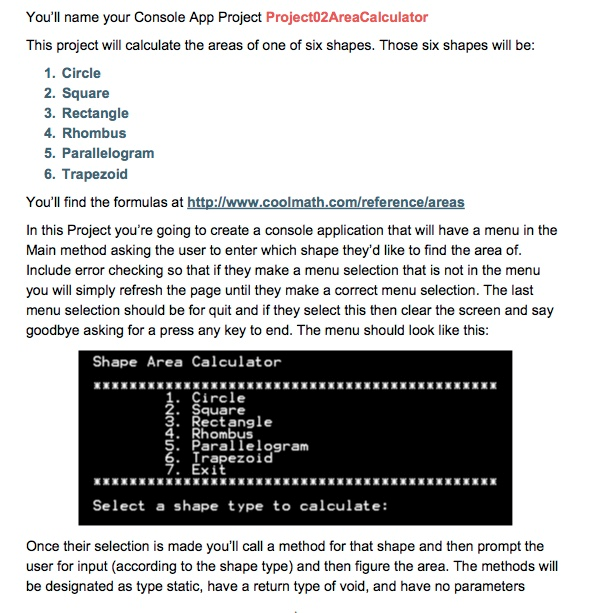
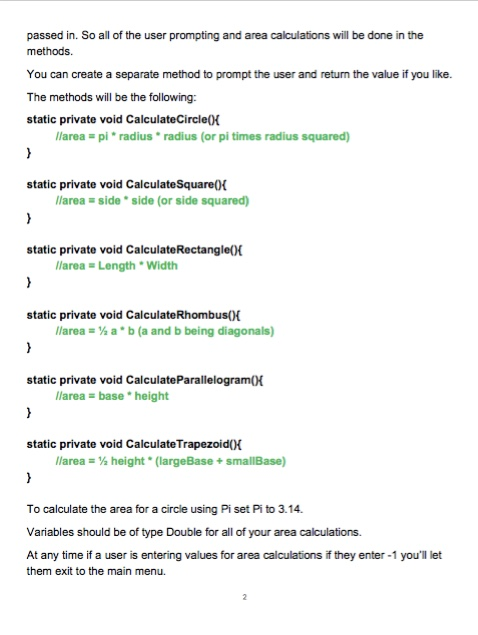
You name your Console App Project Project02AreaCalculator This project will calculate the areas of one of six shapes. Those six shapes will be 1. Circle 2. Square 3. Rectangle 4. Rhombus 5. Parallelogram 6. Trapezoid You'll find the formulas at http://www. coolmath. com/referencelareas In this Project you're going to create a console application that will have a menu in the Main method asking the user to enter which shape they'd like to find the area of include error checking so that if they make a menu selection that is not in the menu you will simply refresh the page until they make a correct menu selection. The last menu selection should be for quit and if they select this then clear the screen and say goodbye asking for a press any key to end. The menu should look like this: Shape Area Calculator 1. Circle Square 3. Rectangle Rhombus 5. Parallelogram Trapezoid 7. Exit Select a shape type to calculate: Once their selection is made you call a method for that shape and then prompt the user for input (according to the shape type) and then figure the area. The methods will be designated as type static, have a return type of void, and have no parameters
Step by Step Solution
There are 3 Steps involved in it

Get step-by-step solutions from verified subject matter experts
 Study Help