







Question: ************************************************************************** ***** Hmap.java ***** import java.util.Iterator; public class HMap implements MapInterface { protected MapEntry[] map; protected final int DEFCAP = 1000; // default capacity protected
**************************************************************************
***** Hmap.java *****
import java.util.Iterator;
public class HMap
{
protected MapEntry[] map;
protected final int DEFCAP = 1000; // default capacity
protected final double DEFLOAD = 0.75; // default load
protected int origCap; // original capacity
protected int currCap; // current capacity
protected double load;
protected int numPairs = 0; // number of pairs in this map
public HMap()
{
map = new MapEntry[DEFCAP];
origCap = DEFCAP;
currCap = DEFCAP;
load = DEFLOAD;
}
public HMap(int initCap, double initLoad)
{
map = new MapEntry[initCap];
origCap = initCap;
currCap = initCap;
load = initLoad;
}
private void enlarge()
// Increments the capacity of the map by an amount
// equal to the original capacity.
{
// create a snapshot iterator of the map and save current size
Iterator
int count = numPairs;
// create the larger array and reset variables
map = new MapEntry[currCap + origCap];
currCap = currCap + origCap;
numPairs = 0;
// put the contents of the current map into the larger array
MapEntry entry;
for (int n = 1; n
{
entry = i.next();
this.put((K)entry.getKey(), (V)entry.getValue());
}
}
public V put(K k, V v)
// If an entry in this map with key k already exists then the value
// associated with that entry is replaced by value v and the original
// value is returned; otherwise, adds the (k, v) pair to the map and
// returns null.
{
if (k == null)
throw new IllegalArgumentException("Maps do not allow null keys.");
MapEntry
int location = Math.abs(k.hashCode()) % currCap;
while ((map[location] != null) && !(map[location].getKey().equals(k)))
location = (location + 1) % currCap;
if (map[location] == null) // k was not in map
{
map[location] = entry;
numPairs++;
if ((float)numPairs/currCap > load)
enlarge();
return null;
}
else // k already in map
{
V temp = (V)map[location].getValue();
map[location] = entry;
return temp;
}
}
public V get(K k) throws NullPointerException
// If an entry in this map with a key k exists then the value associated
// with that entry is returned; otherwise null is returned.
{
if (k == null)
throw new IllegalArgumentException("Maps do not allow null keys.");
int location = Math.abs(k.hashCode()) % currCap;
while ((map[location] != null) && !(map[location].getKey().equals(k)))
location = (location + 1) % currCap;
try{
return (V)map[location].getValue();
}
catch(NullPointerException E){
System.out.println("ID not found.");
return null;
}
}
public V remove(K k)
// Throws UnsupportedOperationException.
{
throw new UnsupportedOperationException("HMap does not allow remove.");
}
public boolean contains(K k)
// Returns true if an entry in this map with key k exists;
// Returns false otherwise.
{
if (k == null)
throw new IllegalArgumentException("Maps do not allow null keys.");
int location = Math.abs(k.hashCode()) % currCap;
while (map[location] != null)
if (map[location].getKey().equals(k))
return true;
else
location = (location + 1) % currCap;
// if get this far then no current entry is associated with k
return false;
}
public int location(K k)
// Returns the actual location index if an entry in this map with key k exists;
// Returns -1 otherwise.
{
if (k == null)
throw new IllegalArgumentException("Maps do not allow null keys.");
int location = Math.abs(k.hashCode()) % currCap;
while (map[location] != null)
if (map[location].getKey().equals(k))
return location;
else
location = (location + 1) % currCap;
return -1;
}
public boolean isEmpty()
// Returns true if this map is empty; otherwise, returns false.
{
return (numPairs == 0);
}
public boolean isFull()
// Returns true if this map is full; otherwise, returns false.
{
return false; // An HMap is never full
}
public int size()
// Returns the number of entries in this map.
{
return numPairs;
}
private class MapIterator implements Iterator
// Provides a snapshot Iterator over this map.
// Remove is not supported and throws UnsupportedOperationException.
{
int listSize = size();
private MapEntry[] list = new MapEntry[listSize];
private int previousPos = -1; // previous position returned from list
public MapIterator()
{
int next = -1;
for (int i = 0; i
{
next++;
while (map[next] == null)
next++;
list[i] = map[next];
}
}
public boolean hasNext()
// Returns true if the iteration has more entries; otherwise returns false.
{
return (previousPos
}
public MapEntry
// Returns the next entry in the iteration.
// Throws NoSuchElementException - if the iteration has no more entries
{
if (!hasNext())
throw new IndexOutOfBoundsException("illegal invocation of next " +
" in HMap iterator. ");
previousPos++;
return list[previousPos];
}
public void remove()
// Throws UnsupportedOperationException.
// Not supported. Removal from snapshot iteration is meaningless.
{
throw new UnsupportedOperationException("Unsupported remove attempted on "
+ "HMap iterator. ");
}
}
public String toString(){
String s = "";
Iterator
int count = 0;
MapEntry
while(items.hasNext()){
item = items.next();
s += "First Choice: " + (((int)(item.key) % origCap) + "") + " Location: " + (location(item.key)+" ") + item + " ";
count++;
}
return s;
}
public Iterator
// Returns a snapshot Iterator over this map.
// Remove is not supported and throws UnsupportedOperationException.
{
return new MapIterator();
}
}
***** HMapDriver.java *****
public class HMapDriver {
public static void main(String[] args){
final int SIZE = Integer.valueOf(args[0]);
final int IDRANGE = 100001;
final int INITIALRANGE = 2;
ArrayList
ArrayList
double load;
int randomID;
String employeeInitials;
final String letters = "ABCDEFGHIJKLMNOPQRSTUVWXYZ";
long t_in, t_out;
Random myRandomID = new Random();
Random randomIndex = new Random();
String randomInitials = "", randomName = "";
HMap
test = new HMap
load = Double.valueOf(args[1]);
test.updateLoad(load);
//Test put and remove
test.put(10003, "IT");
System.out.println(test);
System.out.println(test.remove(10003, "IT"));
System.out.println(test);
System.out.println(test.remove(23, "MK"));
test.clearHMap();
int REPETITIONS = 1000;
t_in = System.nanoTime();
for(int k = 0; k
//compute randomIDs here:
for(int i = 0; i
randomID = myRandomID.nextInt(IDRANGE);
randomNumbers.add(randomID);
}
//make random ID names:
for(int i = 0; i
for(int j = 0; j
randomInitials += letters.charAt(randomIndex.nextInt(letters.length()));
}
randomNames.add(randomInitials);
randomInitials = "";
}
//Insert the employees
for(int n = 0; n
//Insert the SIZE MapEntries
randomID = randomNumbers.get(n);
randomName = randomNames.get(n);
test.put(randomID, randomName);
}
test.clearHMap();
}
t_out = System.nanoTime();
System.out.println(test);
System.out.println("Average runtime for insertion of " + SIZE
+ " items, with load factor: " + load
+ " is: " + ((t_out - t_in)/(double)REPETITIONS) + " after " + REPETITIONS + " iterations.");
}
}
***** MapEntry.java *****
public class MapEntry
@Override public String toString() // Returns a string representing this MapEntry. { return "Key : " + key + " Value: " + value; } }
***** MapInterface.java *****
import java.util.Iterator;
public interface MapInterface
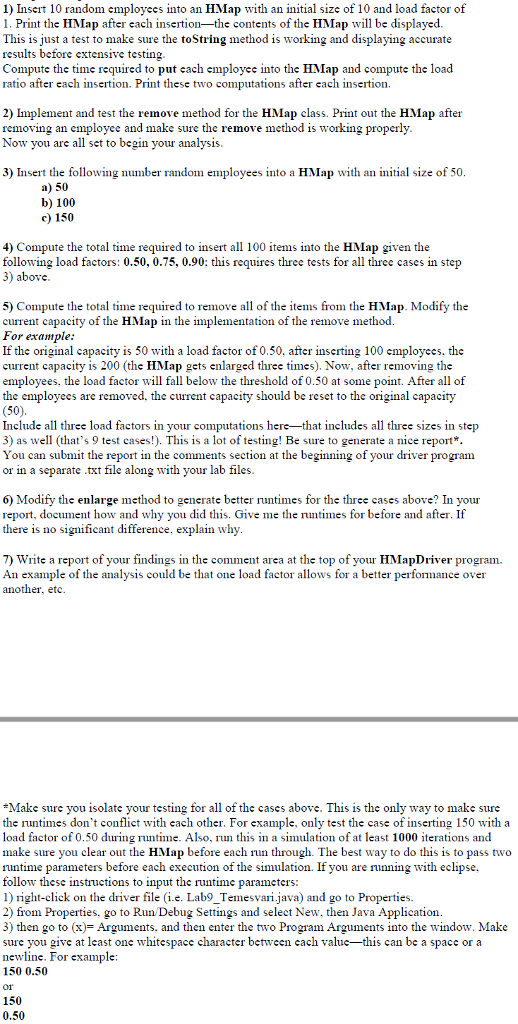
1) Insert 10 random employees into an HMap with an initial size of 10 and load factor of 1. Print the HMap after each insertion-the contents of the HMap will be displayed. This is just a test to make sure the toString method is working and displaying accurate results before extensive testing Compute the time required to put cach employec into the HMap and compute the load ratio after each insertion. Print these two computations a fter cach insertion 2) Implement and test the remove method for the HMap class. Print out the HMap after removing an employec and make sure the remove method is working properly Now you are all set to begin your analysis. 3) Insert the following number random employees into a HMap with an initial size of 50 a) 50 b) 100 c) 150 4) Compute the total time required to insert all 100 items into the HMap given the following load factors: 0.50, 0.75, 0.90; this requires three tests for all three cases in step 3) above 5) Compute the total time required to remove all of the items from the HMap. Modify the current capacity of the HMap in the implementation of the remove method. For example: If the original capacity is 50 with a load factor of 0.50, after inserting 100 employees, the current capacity is 200 (the HMap gets enlarged three times). Now, after removing the employees, the load factor will fall below the threshold of 0.50 at some point. After all of the employees are removed, the current capacity should be reset to the original capacity (50) Include all three load factors in your computations here-that includes all three sizes in step 3) as well (that's 9 test cases!. This is a lot of testing! Be sure to generate a nice report* You can submit the report in the comments section at the beginning of your driver program or in a separate txt file along with your lab files 6) Modify the enlarge method to generate better runtimes for the three cases above? In your report, document how and why you did this. Give me the runtimes for before and after. If there is no significant difference, explain why 7) Write a report of your findings in the comment area at the top of your HMapDriver program. An example of the analysis could be that one load factor allows for a better performance over another, etc *Make sure you isolate your testing for all of the cases above. This is the only way to make sure the runtimes don't conflict with each other. For example, only test the case of inserting 150 with a load factor of 0.50 during runtime. Also, run this in a simulation of at least 1000 iterations and make sure you clear out the HMap before each run through. The best way to do this is to pass two runtime parameters before each execution of the simulation If you are running with eclipse, follow these instructions to input the runtime parameters 1) right-click on the driver file (i.e. Lab9_Temesvari.java) and go to Properties. 2) from Properties, go to Run Debug Settings and select New, then Java Application 3) then go to (x)-Arguments, and then enter the two Program Arguments into the window. Make sure you give at least one whitespace character between cach valuc-this can be a space or a newline. For example 150 0.50 01 150 0.50 1) Insert 10 random employees into an HMap with an initial size of 10 and load factor of 1. Print the HMap after each insertion-the contents of the HMap will be displayed. This is just a test to make sure the toString method is working and displaying accurate results before extensive testing Compute the time required to put cach employec into the HMap and compute the load ratio after each insertion. Print these two computations a fter cach insertion 2) Implement and test the remove method for the HMap class. Print out the HMap after removing an employec and make sure the remove method is working properly Now you are all set to begin your analysis. 3) Insert the following number random employees into a HMap with an initial size of 50 a) 50 b) 100 c) 150 4) Compute the total time required to insert all 100 items into the HMap given the following load factors: 0.50, 0.75, 0.90; this requires three tests for all three cases in step 3) above 5) Compute the total time required to remove all of the items from the HMap. Modify the current capacity of the HMap in the implementation of the remove method. For example: If the original capacity is 50 with a load factor of 0.50, after inserting 100 employees, the current capacity is 200 (the HMap gets enlarged three times). Now, after removing the employees, the load factor will fall below the threshold of 0.50 at some point. After all of the employees are removed, the current capacity should be reset to the original capacity (50) Include all three load factors in your computations here-that includes all three sizes in step 3) as well (that's 9 test cases!. This is a lot of testing! Be sure to generate a nice report* You can submit the report in the comments section at the beginning of your driver program or in a separate txt file along with your lab files 6) Modify the enlarge method to generate better runtimes for the three cases above? In your report, document how and why you did this. Give me the runtimes for before and after. If there is no significant difference, explain why 7) Write a report of your findings in the comment area at the top of your HMapDriver program. An example of the analysis could be that one load factor allows for a better performance over another, etc *Make sure you isolate your testing for all of the cases above. This is the only way to make sure the runtimes don't conflict with each other. For example, only test the case of inserting 150 with a load factor of 0.50 during runtime. Also, run this in a simulation of at least 1000 iterations and make sure you clear out the HMap before each run through. The best way to do this is to pass two runtime parameters before each execution of the simulation If you are running with eclipse, follow these instructions to input the runtime parameters 1) right-click on the driver file (i.e. Lab9_Temesvari.java) and go to Properties. 2) from Properties, go to Run Debug Settings and select New, then Java Application 3) then go to (x)-Arguments, and then enter the two Program Arguments into the window. Make sure you give at least one whitespace character between cach valuc-this can be a space or a newline. For example 150 0.50 01 150 0.50
Step by Step Solution
There are 3 Steps involved in it

Get step-by-step solutions from verified subject matter experts
 Study Help