







Question: Home Com C Write A R ATIBWC Solved T W sa prelax file:///C:/Users/17202/AppData/local/Packages/Microsoft MicrosoftEdge_8wekyb3debbwe/TempState/Downloads/prelab_05%203).pdf - Online Priceline.com G Google - + Rt to page Page
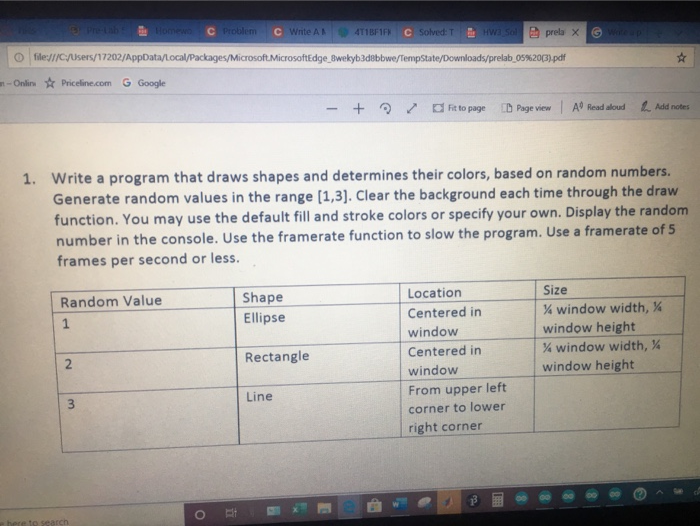
Home Com C Write A R ATIBWC Solved T W sa prelax file:///C:/Users/17202/AppData/local/Packages/Microsoft MicrosoftEdge_8wekyb3debbwe/TempState/Downloads/prelab_05%203).pdf - Online Priceline.com G Google - + Rt to page Page view A Read aloud Add notes 1. Write a program that draws shapes and determines their colors, based on random numbers. Generate random values in the range (1,3). Clear the background each time through the draw function. You may use the default fill and stroke colors or specify your own. Display the random number in the console. Use the framerate function to slow the program. Use a framerate of 5 frames per second or less. Random Value Shape Ellipse Size window width, % window height % window width, % window height Location Centered in window Centered in window From upper left corner to lower right corner Rectangle Line Home Com C Write A R ATIBWC Solved T W sa prelax file:///C:/Users/17202/AppData/local/Packages/Microsoft MicrosoftEdge_8wekyb3debbwe/TempState/Downloads/prelab_05%203).pdf - Online Priceline.com G Google - + Rt to page Page view A Read aloud Add notes 1. Write a program that draws shapes and determines their colors, based on random numbers. Generate random values in the range (1,3). Clear the background each time through the draw function. You may use the default fill and stroke colors or specify your own. Display the random number in the console. Use the framerate function to slow the program. Use a framerate of 5 frames per second or less. Random Value Shape Ellipse Size window width, % window height % window width, % window height Location Centered in window Centered in window From upper left corner to lower right corner Rectangle Line
Step by Step Solution
There are 3 Steps involved in it

Get step-by-step solutions from verified subject matter experts
 Study Help