







Question: Home Insert Draw Page Layout Formulas Data Review View Tell me Share Comments abc DC Spelling v E Thesaurus 2 a. Translate Check Delete Notes
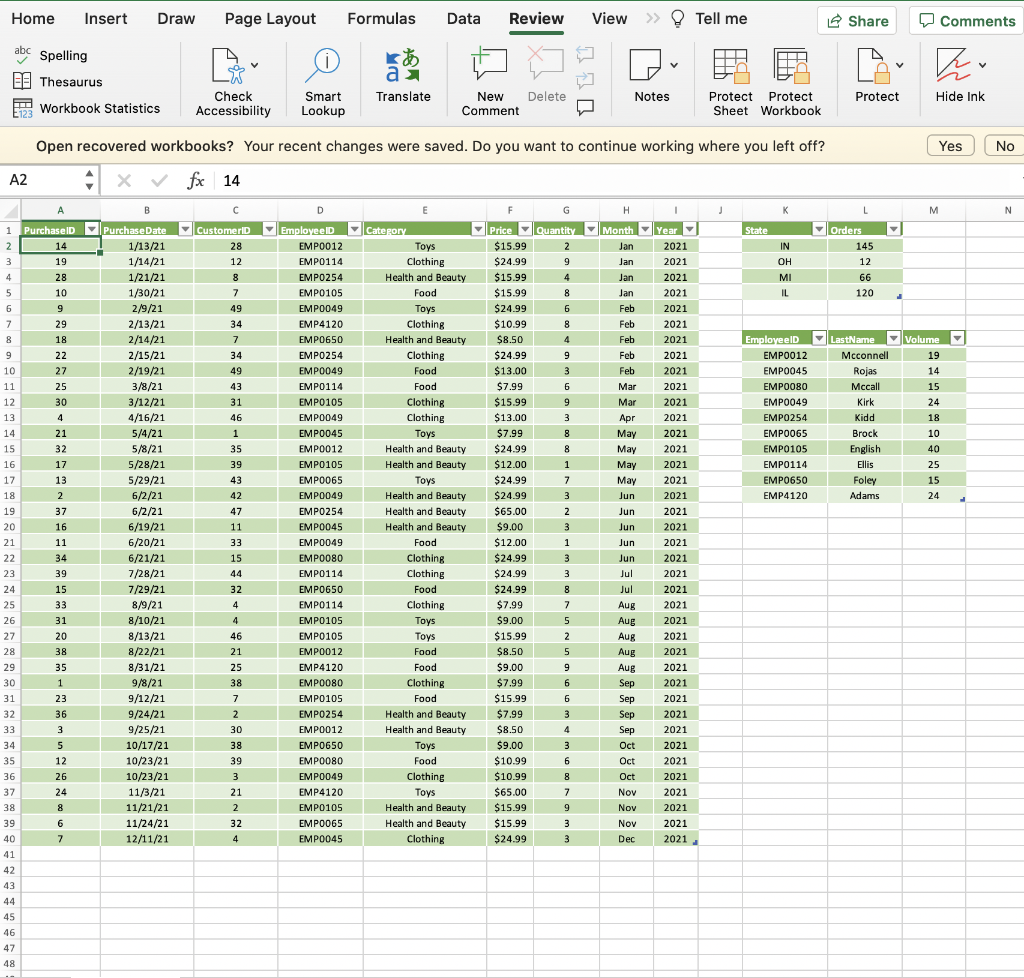
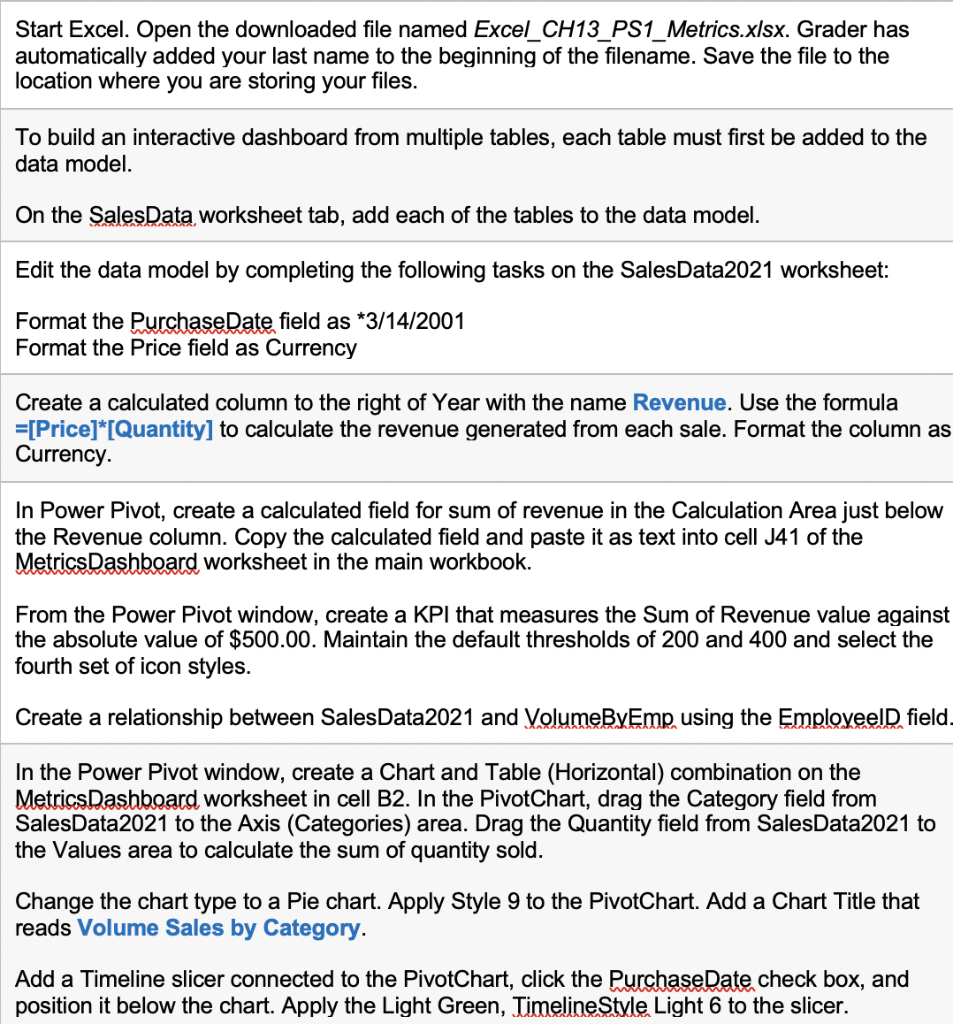
Home Insert Draw Page Layout Formulas Data Review View Tell me Share Comments abc DC Spelling v E Thesaurus 2 a. Translate Check Delete Notes New Comment Protect Workbook Statistics Hide Ink Accessibility Smart Lookup Protect Protect Sheet Workbook No N 28 2021 $13.00 **2*423 Open recovered workbooks? Your recent changes were saved. Do you want to continue working where you left off? Yes A2 X fx 14 14 A B D E G H 1 L M 1 Purchase Purchase Date ID Customer Employee Category Price Quantity Month Year State Orders 2 14 1/13/21 EMP0012 Toys $15.99 2 Jan 2021 IN 145 3 19 1/14/21 12 EMPO114 Clothing $24.99 9 Jan OH 12 4 28 1/21/21 8 EMPO254 Health and Beauty $15.99 4 Jan 10 re 2021 MI 66 5 10 1/30/21 7 EMPO105 Food $15.99 8 Jan 2021 IL 120 6 9 2/9/21 49 EMP0049 Toys $24.99 6 Feb 2021 7 29 2011 2/13/21 34 EMP4120 Clothing 8 $10.99 Feb 2010 - 2021 8 18 --- 2/14/21 7 EMP0650 Health and Beauty $8.50 4 Feb 2021 Employeel LastName Volume 9 22 2/15/21 34 EMPO254 Clothing $24.99 9 Feb 2021 . .. EMPO012 Mcconnell 19 10 27 2/19/21 49 - EMP0049 Food $13.00 3 Feb 2021 1 EMP0045 Rojas 14 11 25 3/8/21 43 EMP0114 Food $7.99 6 Mar 2021 EMPO080 Mccall 15 12 30 3/12/21 31 EMPO105 EMPO105 Clothing $15. $15.99 9 Viel 2021 40 Mar EMP0049 Kirk 24 13 4 A651 4/16/21 46 AC EMP0049 Clothing 3 Ar 2021 3 Apr 2021 vidd EMPO254 Kidd 14 21 1 1 5/4/21 EMP0045 Toys $7.99 8 May M 2021 15. EMP0065 Brock 15 32 5/8/21 35 EMPO012 Health and Beauty $24.99 8 Mau May 2021 EMPO105 English 16 17 5/28/21 39 EMP0105 $12.00 *** Health and Beauty 1 - May 2021 EMP0114 Ellis 17 13 5/29/21 --- 43 EMP0065 Toys $24.99 7 .. May 2021 EMP0650 Foley e 18 2 6/2/21 42 EMP0049 Health and Beauty $24.99 2004 3 Jun 2021 EMP4120 Adams 19 37 - - 6/2/21 47 EMPO254 Health and Beauty $65.00 2 Jun 2021 . 20 16 6/19/21 11 EMP0045 Health and Beauty $9.00 3 Jun 2021 21 chobi 11 6/20/21 33 EMP0049 Food Food $12.00 1 Jun 2021 22 34 en 6/21/21 15 EMP0080 EMBER Clothing Clothing $24.99 3 Jun 2021 23 39 20 7/28/21 44 EMPO114 Clothing $24.99 3 Jul 2021 15 24 15 22 32 7/29/21 EMP0650 Food $ 8 Jul 2021 2021 25 25 33 8/9/21 4 EMP0114 + Clothing $7.99 7 $7.99 Aug 2021 . 26 31 8/10/21 4 EMP0105 Toys $9.00 5 Aue Aug 2021 2024 27 20 20 8/13/21 46 Toys EMP0105 * 2 2 $15.99 Toys 2021 Aug 4 2021 28 38 8/22/21 21 8/22/21 21 Food $8.50 $8.50 5 Aug 2021 24 29 35 8/31/21 25 2 EMP4120 Food 9 Gree $9.00 12.00 nus Aug 30 2021 1 1 9/8/21 38 EMP0080 Clothing $7.99 6 Sep 2021 31 my 23 31 9/12/21 7 1412 EMPO105 Food $15.99 6 Sep 2021 . 32 32 36 9/24/21 2 EMPO254 Health and Beauty $7.99 3 Sep 2021 33 3 9/25/21 30 EMPO012 Health and Beauty . $8.50 4 Sep 2021 34 5 10/17/21 38 EMP0650 Toys $9.00 3 *** Oct 2021 35 29 were 12 10/23/21 39 EMP0080 Food $10.99 6 "" Oct 2021 36 26 10/23/21 3 EMP0049 Clothing $10.99 8 Oct 2021 37 24 11/3/21 21 EMP4120 Toys $65.00 7 Nov 2021 38 8 11/21/21 MOOC 2 EMPO105 Health and Beauty $15.99 9 Nov 2021 39 6 11/24/21 32 EMP0065 Health and Beauty $15.99 3 3 Nov 2021 . 40 7 12/11/21 4 EMP0045 Clothing $24.99 3 Dec 2021 41 42 43 44 45 46 47 48 $24.99 EMPO Start Excel. Open the downloaded file named Excel_CH13_PS1_Metrics.xlsx. Grader has automatically added your last name to the beginning of the filename. Save the file to the location where you are storing your files. To build an interactive dashboard from multiple tables, each table must first be added to the data model. On the SalesData worksheet tab, add each of the tables to the data model. Edit the data model by completing the following tasks on the SalesData2021 worksheet: Format the Purchase Date field as *3/14/2001 Format the Price field as Currency Create a calculated column to the right of Year with the name Revenue. Use the formula =[Price]*[Quantity] to calculate the revenue generated from each sale. Format the column as Currency In Power Pivot, create a calculated field for sum of revenue in the Calculation Area just below the Revenue column. Copy the calculated field and paste it as text into cell J41 of the Metrics Dashboard worksheet in the main workbook. From the Power Pivot window, create a KPI that measures the Sum of Revenue value against the absolute value of $500.00. Maintain the default thresholds of 200 and 400 and select the fourth set of icon styles. Create a relationship between Sales Data2021 and VolumeByEmp using the Employeeld field. In the Power Pivot window, create a Chart and Table (Horizontal) combination on the Metrics Dashboard worksheet in cell B2. In the PivotChart, drag the Category field from SalesData2021 to the Axis (Categories) area. Drag the Quantity field from SalesData2021 to the Values area to calculate the sum of quantity sold. Change the chart type to a Pie chart. Apply Style 9 to the PivotChart. Add a Chart Title that reads Volume Sales by Category. Add a Timeline slicer connected to the PivotChart, click the Purchase Date check box, and position it below the chart. Apply the Light Green, Timeline Style Light 6 to the slicer. Home Insert Draw Page Layout Formulas Data Review View Tell me Share Comments abc DC Spelling v E Thesaurus 2 a. Translate Check Delete Notes New Comment Protect Workbook Statistics Hide Ink Accessibility Smart Lookup Protect Protect Sheet Workbook No N 28 2021 $13.00 **2*423 Open recovered workbooks? Your recent changes were saved. Do you want to continue working where you left off? Yes A2 X fx 14 14 A B D E G H 1 L M 1 Purchase Purchase Date ID Customer Employee Category Price Quantity Month Year State Orders 2 14 1/13/21 EMP0012 Toys $15.99 2 Jan 2021 IN 145 3 19 1/14/21 12 EMPO114 Clothing $24.99 9 Jan OH 12 4 28 1/21/21 8 EMPO254 Health and Beauty $15.99 4 Jan 10 re 2021 MI 66 5 10 1/30/21 7 EMPO105 Food $15.99 8 Jan 2021 IL 120 6 9 2/9/21 49 EMP0049 Toys $24.99 6 Feb 2021 7 29 2011 2/13/21 34 EMP4120 Clothing 8 $10.99 Feb 2010 - 2021 8 18 --- 2/14/21 7 EMP0650 Health and Beauty $8.50 4 Feb 2021 Employeel LastName Volume 9 22 2/15/21 34 EMPO254 Clothing $24.99 9 Feb 2021 . .. EMPO012 Mcconnell 19 10 27 2/19/21 49 - EMP0049 Food $13.00 3 Feb 2021 1 EMP0045 Rojas 14 11 25 3/8/21 43 EMP0114 Food $7.99 6 Mar 2021 EMPO080 Mccall 15 12 30 3/12/21 31 EMPO105 EMPO105 Clothing $15. $15.99 9 Viel 2021 40 Mar EMP0049 Kirk 24 13 4 A651 4/16/21 46 AC EMP0049 Clothing 3 Ar 2021 3 Apr 2021 vidd EMPO254 Kidd 14 21 1 1 5/4/21 EMP0045 Toys $7.99 8 May M 2021 15. EMP0065 Brock 15 32 5/8/21 35 EMPO012 Health and Beauty $24.99 8 Mau May 2021 EMPO105 English 16 17 5/28/21 39 EMP0105 $12.00 *** Health and Beauty 1 - May 2021 EMP0114 Ellis 17 13 5/29/21 --- 43 EMP0065 Toys $24.99 7 .. May 2021 EMP0650 Foley e 18 2 6/2/21 42 EMP0049 Health and Beauty $24.99 2004 3 Jun 2021 EMP4120 Adams 19 37 - - 6/2/21 47 EMPO254 Health and Beauty $65.00 2 Jun 2021 . 20 16 6/19/21 11 EMP0045 Health and Beauty $9.00 3 Jun 2021 21 chobi 11 6/20/21 33 EMP0049 Food Food $12.00 1 Jun 2021 22 34 en 6/21/21 15 EMP0080 EMBER Clothing Clothing $24.99 3 Jun 2021 23 39 20 7/28/21 44 EMPO114 Clothing $24.99 3 Jul 2021 15 24 15 22 32 7/29/21 EMP0650 Food $ 8 Jul 2021 2021 25 25 33 8/9/21 4 EMP0114 + Clothing $7.99 7 $7.99 Aug 2021 . 26 31 8/10/21 4 EMP0105 Toys $9.00 5 Aue Aug 2021 2024 27 20 20 8/13/21 46 Toys EMP0105 * 2 2 $15.99 Toys 2021 Aug 4 2021 28 38 8/22/21 21 8/22/21 21 Food $8.50 $8.50 5 Aug 2021 24 29 35 8/31/21 25 2 EMP4120 Food 9 Gree $9.00 12.00 nus Aug 30 2021 1 1 9/8/21 38 EMP0080 Clothing $7.99 6 Sep 2021 31 my 23 31 9/12/21 7 1412 EMPO105 Food $15.99 6 Sep 2021 . 32 32 36 9/24/21 2 EMPO254 Health and Beauty $7.99 3 Sep 2021 33 3 9/25/21 30 EMPO012 Health and Beauty . $8.50 4 Sep 2021 34 5 10/17/21 38 EMP0650 Toys $9.00 3 *** Oct 2021 35 29 were 12 10/23/21 39 EMP0080 Food $10.99 6 "" Oct 2021 36 26 10/23/21 3 EMP0049 Clothing $10.99 8 Oct 2021 37 24 11/3/21 21 EMP4120 Toys $65.00 7 Nov 2021 38 8 11/21/21 MOOC 2 EMPO105 Health and Beauty $15.99 9 Nov 2021 39 6 11/24/21 32 EMP0065 Health and Beauty $15.99 3 3 Nov 2021 . 40 7 12/11/21 4 EMP0045 Clothing $24.99 3 Dec 2021 41 42 43 44 45 46 47 48 $24.99 EMPO Start Excel. Open the downloaded file named Excel_CH13_PS1_Metrics.xlsx. Grader has automatically added your last name to the beginning of the filename. Save the file to the location where you are storing your files. To build an interactive dashboard from multiple tables, each table must first be added to the data model. On the SalesData worksheet tab, add each of the tables to the data model. Edit the data model by completing the following tasks on the SalesData2021 worksheet: Format the Purchase Date field as *3/14/2001 Format the Price field as Currency Create a calculated column to the right of Year with the name Revenue. Use the formula =[Price]*[Quantity] to calculate the revenue generated from each sale. Format the column as Currency In Power Pivot, create a calculated field for sum of revenue in the Calculation Area just below the Revenue column. Copy the calculated field and paste it as text into cell J41 of the Metrics Dashboard worksheet in the main workbook. From the Power Pivot window, create a KPI that measures the Sum of Revenue value against the absolute value of $500.00. Maintain the default thresholds of 200 and 400 and select the fourth set of icon styles. Create a relationship between Sales Data2021 and VolumeByEmp using the Employeeld field. In the Power Pivot window, create a Chart and Table (Horizontal) combination on the Metrics Dashboard worksheet in cell B2. In the PivotChart, drag the Category field from SalesData2021 to the Axis (Categories) area. Drag the Quantity field from SalesData2021 to the Values area to calculate the sum of quantity sold. Change the chart type to a Pie chart. Apply Style 9 to the PivotChart. Add a Chart Title that reads Volume Sales by Category. Add a Timeline slicer connected to the PivotChart, click the Purchase Date check box, and position it below the chart. Apply the Light Green, Timeline Style Light 6 to the slicer
Step by Step Solution
There are 3 Steps involved in it

Get step-by-step solutions from verified subject matter experts
 Study Help