







Question: home / study / engineering / computer science / questions and answers / //////////////////java programming help////////////////////////////... Your question has been answered Let us know if
home / study / engineering / computer science / questions and answers / //////////////////java programming help////////////////////////////...
Your question has been answered
Let us know if you got a helpful answer. Rate this answer
Question: //////////////////Java Programming help///////////...
Bookmark
//////////////////Java Programming help////////////////////////////
Write a program that that displays a dialog box show a message and a randomly chosen color. This random color is to be used as the background color of a JFrame window which should appear after OK is selected. The window should ask your name and thank you for playing once Enter is pressed.
//////////////////////////////////////////////////////////////////////////////////////////
Include
*JFrame Class *Java Components *JLabel Components *Component Listeners *Inner Classes *JButton Components *Dialog Boxes and JOptionPane Class *Color
///////////////////////////////////////////////////////////////////////////////////////
Utilize showMessageDialog to output the message shown in the sample at the bottom. A random color should be output with each run Upon clicking OK Create a JFrame window o Set the background and label text color as shown in sample below o Include a label asking to enter name (see sample) o Include a textfield to get input for name (see sample) o Upon hitting Enter on the keyboard, output thank you message to include the name entered as per sample at bottom Use an inner class for the listener Mimic the same session precisely. Pay attention to colors of the window and label.
///////////////////////////////////////////////////////////////////////////////////////
Sample Output
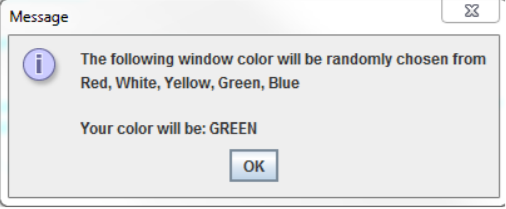
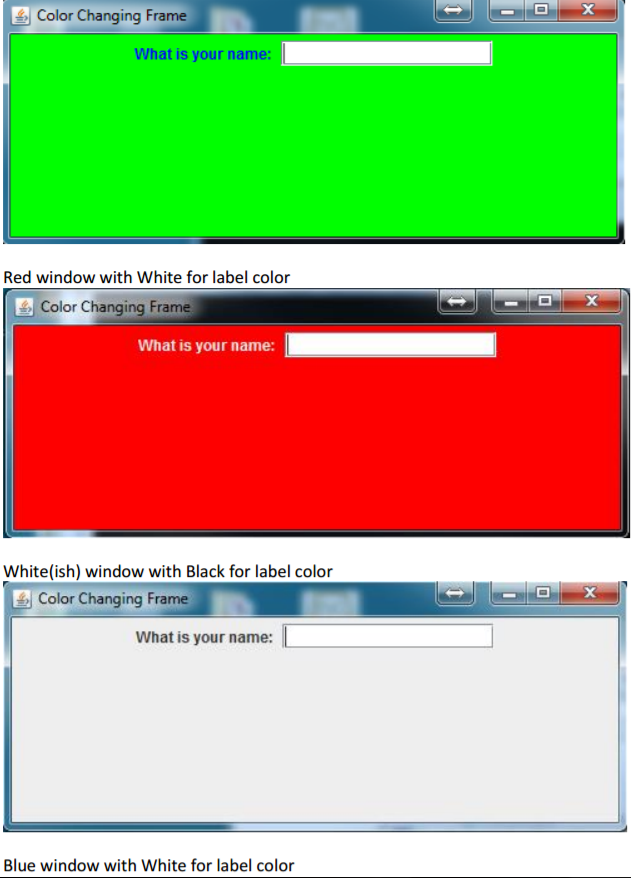
//////////////////////////////////////////////////////////////////////////////////////////////
I have the code and it works there is just some slight things I'm not sure how to add.
////////////////////////////////////////////////////////////////////////////////////
import javax.swing.*; import java.awt.*; import java.awt.event.*; import java.util.Random;
public class LiFiUnit7Ch17 extends JFrame { private static final int WIDTH = 300; // width private static final int HEIGHT = 200; // height JLabel label; // label to ask for name JTextField textField; // textbox for prompt JFrame frame; // frame for title
public LiFiUnit7Ch17(Color color, Color fontColors) { setLayout(new FlowLayout()); // Layout label = new JLabel("What is your name: "); // prompt Container con = getContentPane(); setDefaultCloseOperation(EXIT_ON_CLOSE); // close when hit X con.setBackground(color); con.add(label); label.setForeground(fontColors); // forground textField = new JTextField(15); // text box con.add(textField); textField.addActionListener(new ButtonListener()); // button listener setSize(WIDTH, HEIGHT); setVisible(true); }
public static void main(String[] args) { LiFiUnit7Ch17 myFrame = null; Random r = new Random(); int rand = r.nextInt(5); // chosen at random 0 - 4 String colorText = ""; // This string is used to display the selected color name if (rand == 0) // random selector for 0 - 4 of colors, if else statements { myFrame = new LiFiUnit7Ch17(Color.GREEN, Color.BLUE); // constructor colorText = "Green"; } else if (rand == 1) { myFrame = new LiFiUnit7Ch17(Color.RED, Color.WHITE); colorText = "Red"; } else if (rand == 2) { myFrame = new LiFiUnit7Ch17(Color.WHITE, Color.BLACK); colorText = "White"; } else if (rand == 3) { myFrame = new LiFiUnit7Ch17(Color.BLUE, Color.WHITE); colorText = "Blue"; } else if (rand == 4) { myFrame = new LiFiUnit7Ch17(Color.YELLOW, Color.BLACK); colorText = "Yellow"; } // end ifs if (myFrame != null) { JOptionPane.showMessageDialog(null, "The following window color will be randomly chosen from Red, White, Yellow, Green, Blue Your color will be " + colorText); // give random color }
}
private class ButtonListener implements ActionListener { // inner class for event handling public void actionPerformed(ActionEvent e) { // action event { JFrame frame = new JFrame("Color changing frame"); // this doesn't work???? String message; // personalized message message = "Thanks for playing " + textField.getText(); // gets the name entered textField.setText(""); textField.setVisible(false); label.setText(message); } // end action performed } // end inner
} } // end class
////////////////////////////////////////////////////////////////////////////
1. The title of the second window should be 'Color Changing Frame' using JFrame I assume?(First time working with it so not entirely sure.)
2. The second window should pop up after hitting the OK button. (Second one is the color ones) But in my code they both pop up at once.
comments are appreciated but not required.
Message i) The following window color will be randomly chosen from Red, White, Yellow, Green, Blue Your color will be: GREEN OK
Step by Step Solution
There are 3 Steps involved in it

Get step-by-step solutions from verified subject matter experts
 Study Help