







Question: Homework 6 - Chess Database GUI Using domain objects designed to work with JavaFX, and writing a simple GUI in JavaFX. Write a GUI program
Homework 6 - Chess Database GUI
Using domain objects designed to work with JavaFX, and writing a simple GUI in JavaFX.
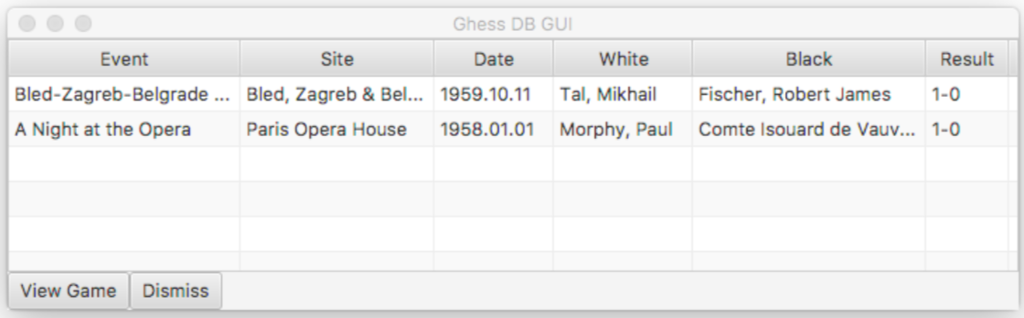
Write a GUI program in a file named ChessGui.java that displays the metadata of ChessGame (s), one per line, of each game in ChessDb in a TableView (https://docs.oracle.com/javase/8/javafx/api/javafx/scene/control/TableView.html). In the bottom of the main screen should be two buttons: View and Dismiss.
View should be disabled if no game is selected in the table. If a game is selected, View should be enabled and, when clicked, should show a dialog box with the metadata and moves of the selected game. This dialog may be as simple as you wish.
Dismiss should exit the program. Your main screen should look something like this:
Extras.
Add a search feature to your GUI that allows the user to search for games by a specific player, or games that Black won, or any other useful thing you can think of.
Add a field for Opening to ChessGame that is automatically calculated from the moves of the game. In addition to any games you add in the step below, recognize the following openings: Giuoco Piano (https://en.wikipedia.org/wiki/Giuoco_Piano), Ruy Lopez (https://en.wikipedia.org/wiki/Ruy_Lopez), Sicilian Defence (https://en.wikipedia.org/wiki/Sicilian_Defence), Queens Gambit (https://en.wikipedia.org/wiki/Queen%27s_Gambit), Indian Defence (https://en.wikipedia.org/wiki/Indian_Defence), and Philidor Defence (https://en.wikipedia.org/wiki/Philidor_Defence)
Re-use or re-write your PGN reader from hw1 and incorporate it into your GUI so that, in addition to the games in ChessDb, all the games in PGN files in the same directory as your ChessGui are also displayed in the table.
If you add the ability read PGN files to your GUI, please submit your test PGN files as attachments with your submission so we can test your code with the same files.
Tips.
Tips and Considerations
The JavaFx API (https://docs.oracle.com/javase/8/javafx/api/index.html) contains everything that will be needed See the email example application EmailMessage.java, EmailDb.java, EmailGui.java.
--------------------------------------------------ChessGame.java-----------------------------------------------------
import java.util.ArrayList; import java.util.List; import javafx.beans.property.SimpleStringProperty; import javafx.beans.property.StringProperty; public class ChessGame { private StringProperty event = new SimpleStringProperty(this, "NA"); private StringProperty site = new SimpleStringProperty(this, "NA"); private StringProperty date = new SimpleStringProperty(this, "NA"); private StringProperty white = new SimpleStringProperty(this, "NA"); private StringProperty black = new SimpleStringProperty(this, "NA"); private StringProperty result = new SimpleStringProperty(this, "NA"); private List moves; public ChessGame(String event, String site, String date, String white, String black, String result) { this.event.set(event); this.site.set(site); this.date.set(date); this.white.set(white); this.black.set(black); this.result.set(result); moves = new ArrayList(); } public void addMove(String move) { moves.add(move); } public String getMove(int n) { return moves.get(n - 1); } public String getEvent() { return event.get(); } public String getSite() { return site.get(); } public String getDate() { return date.get(); } public String getWhite() { return white.get(); } public String getBlack() { return black.get(); } public String getResult() { return result.get(); } } --------------------------------------------------ChessDb.java-----------------------------------------------------
import java.util.ArrayList; import java.util.List; public class ChessDb { private List games; public ChessDb() { games = new ArrayList(); games.add(morphyIsouard()); games.add(talFischer()); } public List getGames() { return games; } private ChessGame morphyIsouard() { ChessGame game = new ChessGame( "A Night at the Opera", "Paris Opera House", "1958.01.01", "Morphy, Paul", "Comte Isouard de Vauvenargues and Karl II, Duke of Brunswick", "1-0" ); game.addMove("e4 e5"); game.addMove("Nf3 d6"); game.addMove("d4 Bg4"); game.addMove("dxe5 Bxf3"); game.addMove("Qxf3 dxe5"); game.addMove("Bc4 Nf6"); game.addMove("Qb3 Qe7"); game.addMove("Nc3 c6"); game.addMove("Bg5 b5"); game.addMove("Nxb5 cxb5"); game.addMove("Bxb5+ Nbd7"); game.addMove("O-O-O Rd8"); game.addMove("Rxd7 Rxd7"); game.addMove("Rd1 Qe6"); game.addMove("Bxd7+ Nxd7"); game.addMove("Qb8+ Nxb8"); game.addMove("Rd8#"); return game; } private ChessGame talFischer() { ChessGame game = new ChessGame( "Bled-Zagreb-Belgrade Candidates", "Bled, Zagreb & Belgrade YUG", "1959.10.11", "Tal, Mikhail", "Fischer, Robert James", "1-0" ); game.addMove("d4 Nf6"); game.addMove("c4 g6"); game.addMove("Nc3 Bg7"); game.addMove("e4 d6"); game.addMove("Be2 O-O"); game.addMove("Nf3 e5"); game.addMove("d5 Nbd7"); game.addMove("Bg5 h6"); game.addMove("Bh4 a6"); game.addMove("O-O Qe8"); game.addMove("Nd2 Nh7"); game.addMove("b4 Bf6"); game.addMove("Bxf6 Nhxf6"); game.addMove("Nb3 Qe7"); game.addMove("Qd2 Kh7"); game.addMove("Qe3 Ng8"); game.addMove("c5 f5"); game.addMove("exf5 gxf5"); game.addMove("f4 exf4"); game.addMove("Qxf4 dxc5"); game.addMove("Bd3 cxb4"); game.addMove("Rae1 Qf6"); game.addMove("Re6 Qxc3"); game.addMove("Bxf5+ Rxf5"); game.addMove("Qxf5+ Kh8"); game.addMove("Rf3 Qb2"); game.addMove("Re8 Nf6"); game.addMove("Qxf6+ Qxf6"); game.addMove("Rxf6 Kg7"); game.addMove("Rff8 Ne7"); game.addMove("Na5 h5"); game.addMove("h4 Rb8"); game.addMove("Nc4 b5"); game.addMove("Ne5 1-0"); return game; } } --------------------------------------------------EmailMessage.java-----------------------------------------------------
/** * An oversimplified email message class. */ public class EmailMessage { private String from; private String subject; private String to; private String body; public EmailMessage(String from, String to, String subject, String body) { this.from = from; this.to = to; this.subject = subject; this.body = body; } public String getFrom() { return from; } public String getSubject() { return subject; } public String getTo() { return to; } public String getBody() { return body; } } --------------------------------------------------EmailDb.java-----------------------------------------------------
import java.util.ArrayList; import java.util.List; public class EmailDb { private List emails; public EmailDb() { emails = new ArrayList(); emails.add(new EmailMessage("alice@aol.com", "bob@aol.com", "Coolness", "We're on the coolest email domain!")); emails.add(new EmailMessage("chen@mail.com", "druhv@mail.com","NSA", "Google noes all are bidness.")); //it should be @ no space g mail emails.add(new EmailMessage("ellie@hotmail.com", "faruq@hotmail.com", "Cold", "Definitely not hot after MS bought it.")); emails.add(new EmailMessage("gerd@msn.com", "harsitha@msn.com","Default", "Srsly?")); } public List getEmails() { return emails; } } 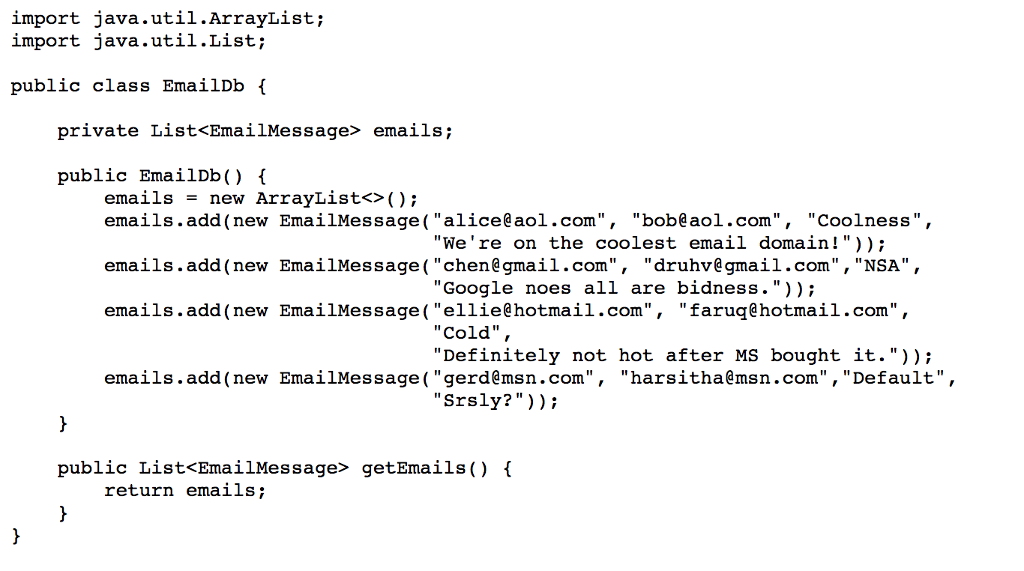
--------------------------------------------------EmailGui.java-----------------------------------------------------
import javafx.application.Application; import javafx.application.Platform; import javafx.beans.binding.Bindings; import javafx.collections.FXCollections; import javafx.collections.ObservableList; import javafx.scene.Scene; import javafx.scene.control.Alert; import javafx.scene.control.Button; import javafx.scene.control.TableColumn; import javafx.scene.control.TableView; import javafx.scene.control.cell.PropertyValueFactory; import javafx.scene.layout.HBox; import javafx.scene.layout.VBox; import javafx.stage.Stage; public class EmailGui extends Application { @Override public void start(Stage stage) { EmailDb emailDb = new EmailDb(); ObservableList emails = FXCollections.observableArrayList(emailDb.getEmails()); TableView table = createTable(emails); Button viewButton = new Button("View Message"); viewButton.setOnAction(e -> { EmailMessage msg = table.getSelectionModel().getSelectedItem(); viewDialog(msg); }); viewButton.disableProperty() .bind(Bindings.isNull(table.getSelectionModel().selectedItemProperty())); Button dismissButton = new Button("Dismiss"); dismissButton.setOnAction(e -> Platform.exit()); HBox buttonBox = new HBox(); buttonBox.getChildren().addAll(viewButton, dismissButton); VBox vbox = new VBox(); vbox.getChildren().addAll(table, buttonBox); Scene scene = new Scene(vbox); stage.setScene(scene); stage.setTitle("Email GUI"); stage.show(); } private TableView createTable(ObservableList emails) { TableView table = new TableView(); table.setItems(emails); TableColumn fromCol = new TableColumn("From"); fromCol.setCellValueFactory(new PropertyValueFactory("from")); TableColumn toCol = new TableColumn("To"); toCol.setCellValueFactory(new PropertyValueFactory("to")); TableColumn subjectCol = new TableColumn("Subject"); subjectCol.setCellValueFactory(new PropertyValueFactory("subject")); table.getColumns().setAll(fromCol, toCol, subjectCol); return table; } private void viewDialog(EmailMessage msg) { Alert alert = new Alert(Alert.AlertType.INFORMATION); alert.setTitle(msg.getSubject()); alert.setHeaderText(String.format("From: %s%nTo: %s%nSubject: %s", msg.getFrom(), msg.getTo(), msg.getSubject())); alert.setContentText(msg.getBody()); alert.showAndWait(); } } Ghess DB GU Event Site Date White Result Bled-Zagreb-Belgrade A Night at the Opera Bled, Zagreb & Bel... 1959.10.11 Tal, Mikhail Fischer, Robert James10 Paris Opera House 1958.01.01 Morphy, Paul Comte Isouard de Vauv... 1-0 View Game Dismiss Ghess DB GU Event Site Date White Result Bled-Zagreb-Belgrade A Night at the Opera Bled, Zagreb & Bel... 1959.10.11 Tal, Mikhail Fischer, Robert James10 Paris Opera House 1958.01.01 Morphy, Paul Comte Isouard de Vauv... 1-0 View Game Dismiss
Step by Step Solution
There are 3 Steps involved in it

Get step-by-step solutions from verified subject matter experts
 Study Help