







Question: Homework Assignment Chapter 4b Create a Java Project folder named Chap4b Create a class named Student 1. The Student class will contain private instance
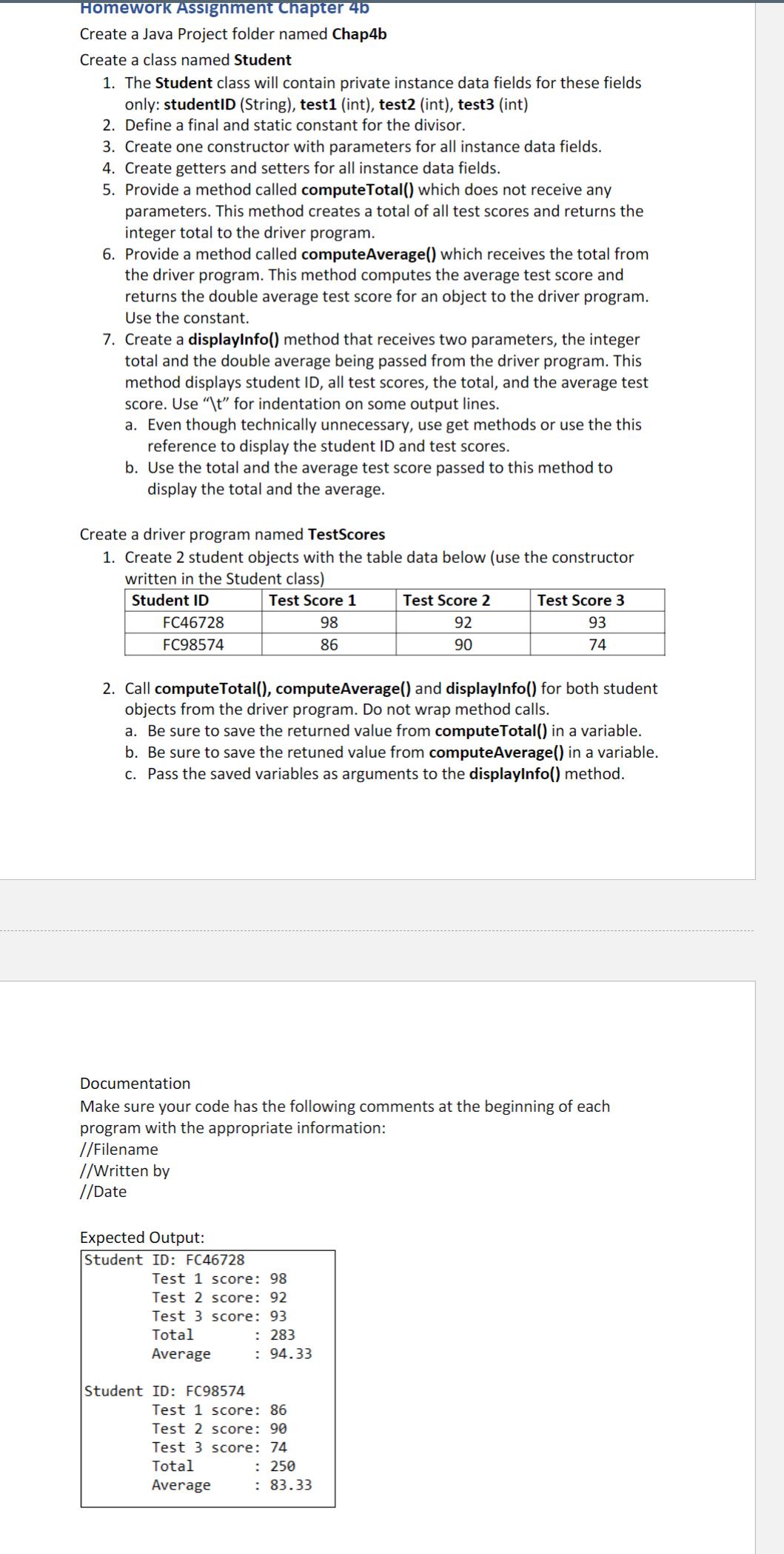
Homework Assignment Chapter 4b Create a Java Project folder named Chap4b Create a class named Student 1. The Student class will contain private instance data fields for these fields only: studentID (String), test1 (int), test2 (int), test3 (int) 2. Define a final and static constant for the divisor. 3. Create one constructor with parameters for all instance data fields. 4. Create getters and setters for all instance data fields. 5. Provide a method called compute Total() which does not receive any parameters. This method creates a total of all test scores and returns the integer total to the driver program. 6. Provide a method called computeAverage() which receives the total from the driver program. This method computes the average test score and returns the double average test score for an object to the driver program. Use the constant. 7. Create a displayInfo() method that receives two parameters, the integer total and the double average being passed from the driver program. This method displays student ID, all test scores, the total, and the average test score. Use "\t" for indentation on some output lines. a. Even though technically unnecessary, use get methods or use the this reference to display the student ID and test scores. b. Use the total and the average test score passed to this method to display the total and the average. Create a driver program named TestScores 1. Create 2 student objects with the table data below (use the constructor written in the Student class) Student ID FC46728 FC98574 Test Score 1 98 Test Score 2 92 Test Score 3 93 86 90 74 2. Call computeTotal(), computeAverage() and displayInfo() for both student objects from the driver program. Do not wrap method calls. a. Be sure to save the returned value from computeTotal() in a variable. b. Be sure to save the retuned value from computeAverage() in a variable. c. Pass the saved variables as arguments to the displayInfo() method. Documentation Make sure your code has the following comments at the beginning of each program with the appropriate information: //Filename //Written by //Date Expected Output: Student ID: FC46728 Test 1 score: 98 Test 2 score: 92 Test 3 score: 93 Total : 283 Average Student ID: FC98574 : 94.33 Test 1 score: 86 Test 2 score: 90 Total Test 3 score: 74 : 250 Average : 83.33
Step by Step Solution
3.45 Rating (155 Votes )
There are 3 Steps involved in it
import javautilthis is imported data using scannerimport javautilScanner class Student this is final ... View full answer

Get step-by-step solutions from verified subject matter experts
 Study Help