







Question: How can i put leading zeroes for all numeric values except the tax on this program. CorpetBill.java D-ProjMain.java 2 import java.text.DecimalFormat; 3 import java.util.Randon 4
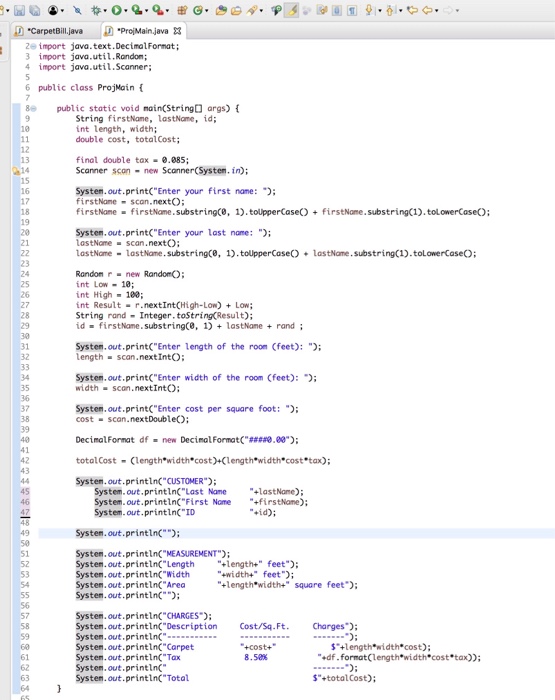
"CorpetBill.java D-ProjMain.java 2 import java.text.DecimalFormat; 3 import java.util.Randon 4 import java.util.Scanner 6 public class ProjMain public static void nain(String args) String firstNane, lastName, id; int length, width; double cost, totalCost; 12 13 final double tax0.885 Scanner scon new Scanner(System.in); 15 16 Systen.out.print( Enter your first nane: firstNane scan.nextO; firstNane- firstName. substring(, 1).tolpperCase) +firstName.substring(1).tolowerCose 18 19 System.out.print("Enter your last nane: ); lastNome- scan.nextO; LastName-lastName. substring(, 1).toupperCaseLastNome.substringC1).tolowerCaseO Randon r- new RandonO; nt Low 18; nt High-100 int Result- r.nextIntCHigh-Low) Low; String rand-Integer. toString(Result); id-first Name.substringe, 1) +lastNamerand System,out.print("Enter length of the room (feet): "; length scan.next IntO; 32 34 35 36 System,out.print("Enter width of the room (feet): width scan.nextIntO: System,out.print("Enter cost per square foot: ; cost scan.nextDoubleO; 38 Decinalformat df new Decinalfonnat("####0.00"); total Cost Clength width cost)+Clength width costtax); System.out.printlnC" CUSTOMER System. out.println"Last NamelastNane); System.out.printin"First Nome +irstName); System.out.println ID +id) System.out.println( System.out.printlnC"MEASUREMENT Systen.out . printin("Length +length+" feet"); System, out.printlnC"Width System.out.printlnC Area Systen.out.println: +widths" feet); "+length*width" square feet) System.out.println" CHARGES) System.out.printlnC"Description Cost/Sq.Ft. Charges; Systen, out.println") Systen.out.printlnC Carpet System.out.println"Tax System, out.println Systen.out.println" Total $+length width cost); -Cost+ 8,50% $"+totalCost)
Step by Step Solution
There are 3 Steps involved in it

Get step-by-step solutions from verified subject matter experts
 Study Help