







Question: How can I read the csv file : student.cs with colums SID CID Grade but ONLY EXTRACT THE ROWS WHERE Grade= B+ or better .
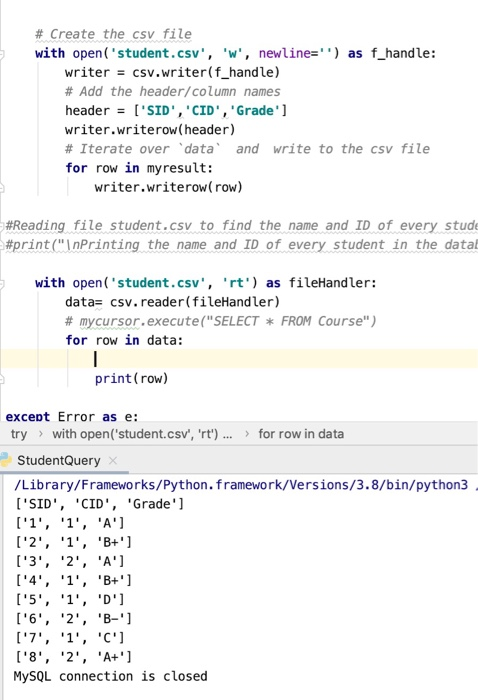
# Create the csv file with open('student.csv', 'w', newline='') as f_handle: writer = csv.writer(f_handle) # Add the header/column names header = ['SID', 'CID', 'Grade'] writer.writerow(header) # Iterate over data and write to the csv file for row in my result: writer.writerow( row) #Reading file student.csv to find the name and ID of every stude #print(" Printing the name and ID of every student in the data with open('student.csv', 'rt') as fileHandler: data= csv. reader(fileHandler) # mycursor.execute("SELECT * FROM Course") for row in data: print (row) except Error as e: try > with open('student.csv', 'rt') ... > for row in data StudentQuery /Library/Frameworks/Python. framework/Versions/3.8/bin/python3 ['SID', 'CID', 'Grade'] ['1', '1', 'A'] ['2', '1', 'B+'] ['3', '2', 'A') ['4', '1', 'B+'] ['5', '1', 'D') ['6', '2', 'B-'] ['7', '1', 'C'] ['8', '2', 'A+'] MySQL connection is closed
Step by Step Solution
There are 3 Steps involved in it

Get step-by-step solutions from verified subject matter experts
 Study Help