







Question: How can I solve this? I need a step by step explanation for my command prompt please. Applying the Daubert Standard to Forensic Evidence (4e)
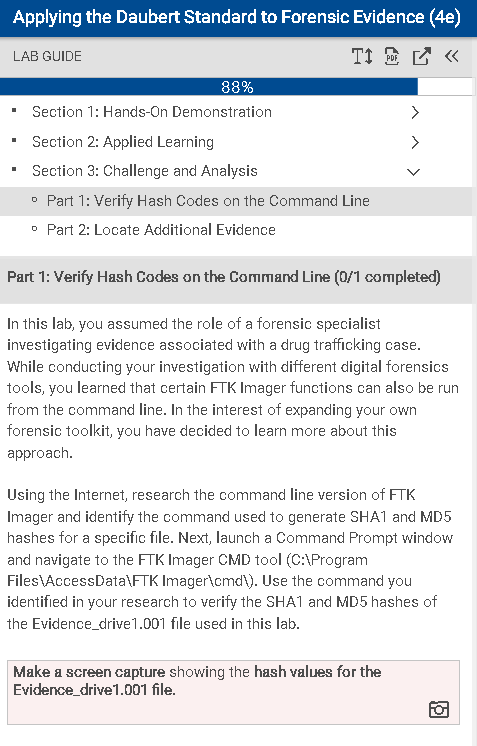
Applying the Daubert Standard to Forensic Evidence (4e) T < LAB GUIDE 88% Section 1: Hands-On Demonstration Section 2: Applied Learning Section 3: Challenge and Analysis Part 1: Verify Hash Codes on the Command Line Part 2: Locate Additional Evidence PDF Part 1: Verify Hash Codes on the Command Line (0/1 completed) In this lab, you assumed the role of a forensic specialist investigating evidence associated with a drug trafficking case. While conducting your investigation with different digital forensics tools, you learned that certain FTK Imager functions can also be run from the command line. In the interest of expanding your own forensic toolkit, you have decided to learn more about this approach. Using the Internet, research the command line version of FTK Imager and identify the command used to generate SHA1 and MD5 hashes for a specific file. Next, launch a Command Prompt window and navigate to the FTK Imager CMD tool (C:\Program Files\AccessData\FTK Imager\cmd\). Use the command you identified in your research to verify the SHA1 and MD5 hashes of the Evidence_drive1.001 file used in this lab. Make a screen capture showing the hash values for the Evidence_drive1.001 file.
Step by Step Solution
There are 3 Steps involved in it
To complete this lab you need to verify hash codes SHA1 and MD5 for the provided file Evidencedrive1001 using the command line version of FTK Imager B... View full answer

Get step-by-step solutions from verified subject matter experts
 Study Help