







Question: How can I use IF Function in excel to get the outputs of this function? I used =IF(C7>$E$3,8*(C7-$E$3)^(1.5),0) but it gives me everything equal to
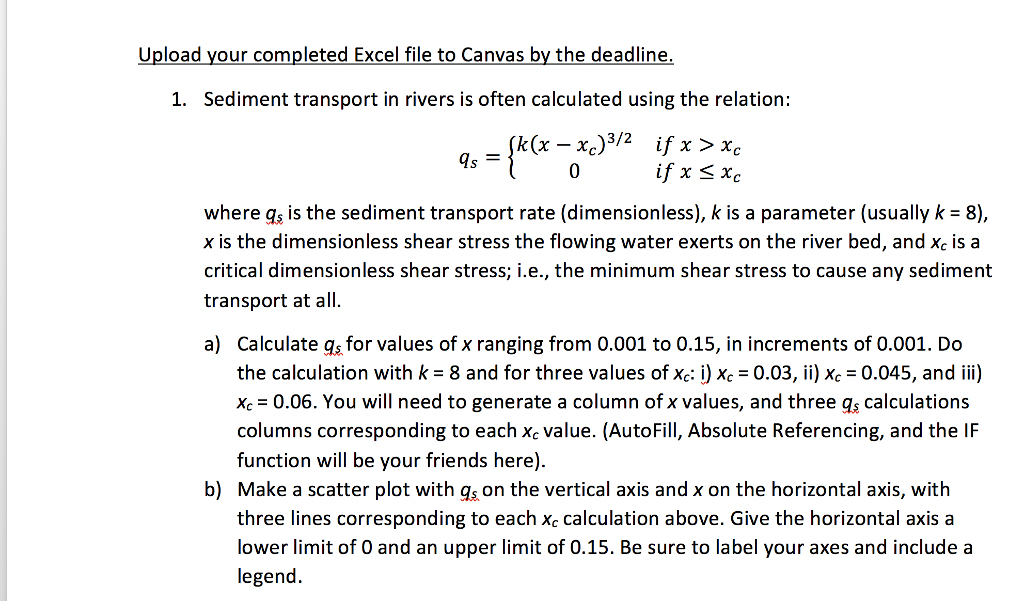 How can I use IF Function in excel to get the outputs of this function? I used =IF(C7>$E$3,8*(C7-$E$3)^(1.5),0) but it gives me everything equal to zero.
Upload your completed Excel file to Canvas by the deadline 1. Sediment transport in rivers is often calculated using the relation: 0 if x sxe where qs is the sediment transport rate (dimensionless), k is a parameter (usually k- 8) x is the dimensionless shear stress the flowing water exerts on the river bed, and xc is a critical dimensionless shear stress; i.e., the minimum shear stress to cause any sediment transport at all. a) Calculate gs for values of x ranging from 0.001 to 0.15, in increments of 0.001. Do the calculation with k-8 and for three values of Xc:) Xc-0.03, ii) Xc-0045, and iii) xc 0.06. You will need to generate a column of x values, and three gs calculations columns corresponding to each xc value. (AutoFill, Absolute Referencing, and the IF function will be your friends here). Make a scatter plot with gs on the vertical axis and x on the horizontal axis, with three lines corresponding to each xc calculation above. Give the horizontal axis a lower limit of 0 and an upper limit of 0.15. Be sure to label your axes and include a legend. b)
Step by Step Solution
There are 3 Steps involved in it

Get step-by-step solutions from verified subject matter experts
 Study Help