







Question: How code is organized can affect performance in a pipelined processor. Let us assume a pipelined version of the processor developed in the project,
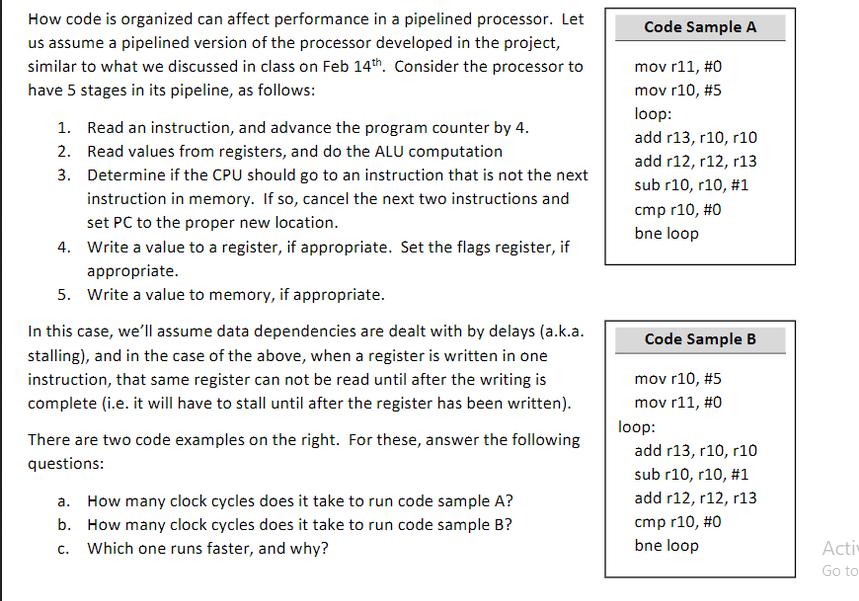
How code is organized can affect performance in a pipelined processor. Let us assume a pipelined version of the processor developed in the project, similar to what we discussed in class on Feb 14th. Consider the processor to have 5 stages in its pipeline, as follows: 1. Read an instruction, and advance the program counter by 4. Read values from registers, and do the ALU computation 2. 3. Determine if the CPU should go to an instruction that is not the next instruction in memory. If so, cancel the next two instructions and set PC to the proper new location. 4. Write a value to a register, if appropriate. Set the flags register, if appropriate. 5. Write a value to memory, if appropriate. In this case, we'll assume data dependencies are dealt with by delays (a.k.a. stalling), and in the case of the above, when a register is written in one instruction, that same register can not be read until after the writing is complete (i.e. it will have to stall until after the register has been written). There are two code examples on the right. For these, answer the following questions: a. How many clock cycles does it take to run code sample A? b. How many clock cycles does it take to run code sample B? c. Which one runs faster, and why? Code Sample A mov r11, #0 mov r10 , #5 loop: add r13, r10, r10 add r12, r12, r13 sub r10, r10, #1 cmp r10 , #0 bne loop Code Sample B mov r10, #5 mov r11, #0 loop: add r13, r10, r10 sub r10, r10, #1 add r12, r12, r13 cmp r10, #0 bne loop Acti Go to
Step by Step Solution
There are 3 Steps involved in it
a For Code Sample A it takes 7 clock cycles to run the entire loop Explanation 1 mov r11 0 1 clock c... View full answer

Get step-by-step solutions from verified subject matter experts
 Study Help