







Question: how Create a power point presentation with script for the following: Mobile vs Wireless Technology begin { tabular } { | c | c
how Create a power point presentation with script for the following: Mobile vs Wireless Technology
begintabularccc
hline multicolumncMobile vs Wireless Techology
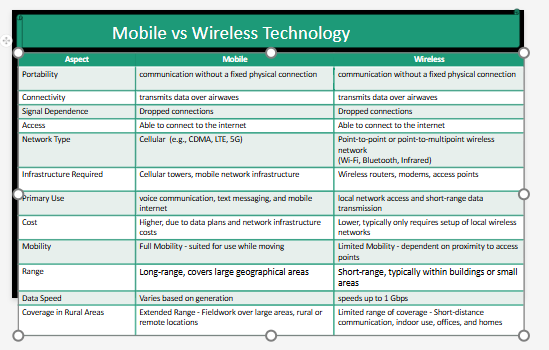
hline Aspect & Mobile & Wireless
hline Portability & communication without a fixed physical connection & communication without a fixed physical connection
hline Connectivity & transerits data over airwaves & transmits data over airwaves
hline Sigral Dependence & Dropped connections & Drapped cannections
hline Access & Able to connect to the internet & Able to connect to the internet
hline Network Type & Cellular eg CDMA, LTE, G & begintabularl
Pointtopoint or pointtornultipoint wireless network
WiFi Bluetooth, Infrared
endtabular
hline Infrastructure Required & Cellular towers, mobile network infrastructure & Wireless routers, moderns, access points
hline Primary Use & voice commurication, text messaging, and mabile internet & local network access and shortrange data transmission
hline Cost & Higher, due to data plans and network infrastructure costs & Lower, typically only requires setup of local wireless networks
hline Mobility & Full Mability suited for use while moving & Limited Mablitydependent an proximity to access points
hline Range & Longrange, covers large geographical areas & Shortrange, typically within buildings or small areas
hline Data Speed & Varies based on generation & speeds up to Gbps
hline Coverage in Rural Areas & Extended Range Fieldwork over large areas, rural or remote locations & Limited range of coverage Shortdistance communication, indoor use, affices, and homes
hline
endtabular
Step by Step Solution
There are 3 Steps involved in it
1 Expert Approved Answer
Step: 1 Unlock

Question Has Been Solved by an Expert!
Get step-by-step solutions from verified subject matter experts
Step: 2 Unlock
Step: 3 Unlock
 Study Help