







Question: how do i add Mode 321 123 highlights even# odd# *5 I already have the rest , please let me know if you need more
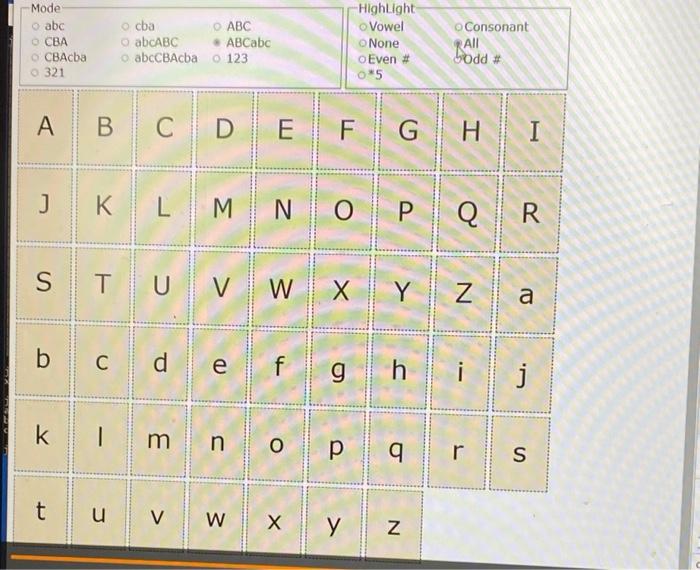
\begin{tabular}{lllllll:lll} J & K & L & M & N & O & P & Q & R \\ \hline \end{tabular} \begin{tabular}{ll:l:l|l|l|l|l|l|l} S & T & U & V & W & X & Y & Z & a \\ \hline \end{tabular} \begin{tabular}{lllll|l|l|l|l|l|l|l} b & c & d & e & f & g & h & i & j \end{tabular} klmnopqrs \begin{tabular}{|c|c|c|c|c|c|c|} \hlinet & u & v & w & x & y & z \\ \hline \end{tabular} \begin{tabular}{lllllll:lll} J & K & L & M & N & O & P & Q & R \\ \hline \end{tabular} \begin{tabular}{ll:l:l|l|l|l|l|l|l} S & T & U & V & W & X & Y & Z & a \\ \hline \end{tabular} \begin{tabular}{lllll|l|l|l|l|l|l|l} b & c & d & e & f & g & h & i & j \end{tabular} klmnopqrs \begin{tabular}{|c|c|c|c|c|c|c|} \hlinet & u & v & w & x & y & z \\ \hline \end{tabular}
Step by Step Solution
There are 3 Steps involved in it

Get step-by-step solutions from verified subject matter experts
 Study Help