Question: how do i do the first sheet ?? Tom is evaluating his monthly bills to determine the effect of changes he could potentially make to

how do i do the first sheet ?? how do i do the first sheet ?? Tom is evaluating
how do i do the first sheet ?? Tom is evaluating
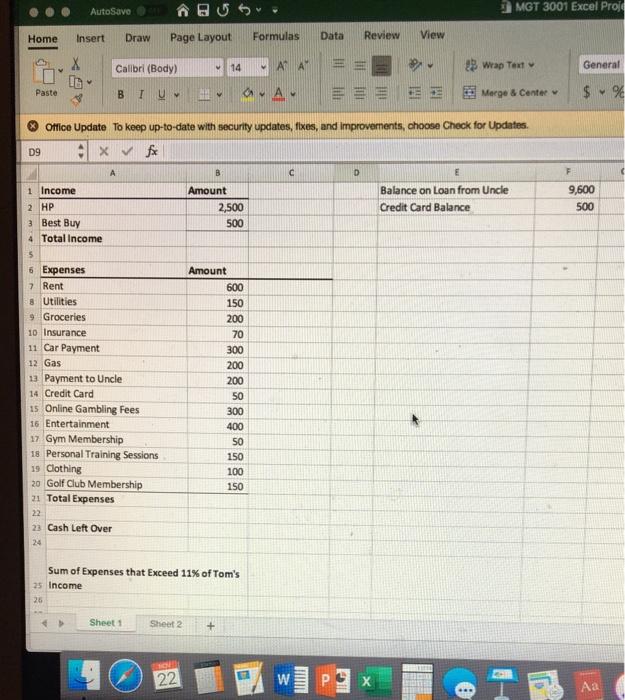
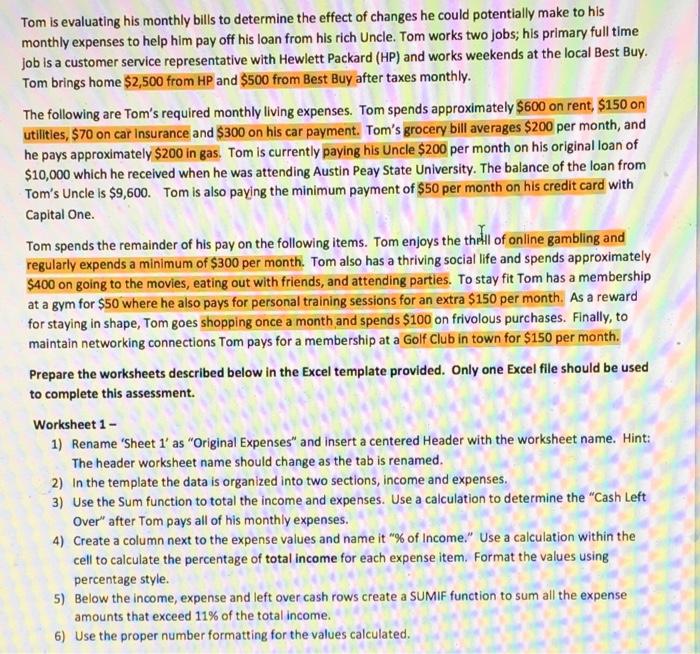
Tom is evaluating his monthly bills to determine the effect of changes he could potentially make to his monthly expenses to help him pay off his loan from his rich Uncle. Tom works two jobs; his primary full time job is a customer service representative with Hewlett Packard (HP) and works weekends at the local Best Buy. Tom brings home $2,500 from HP and $500 from Best Buy after taxes monthly. The following are Tom's required monthly living expenses. Tom spends approximately $600 on rent, $150 on utilities, $70 on car Insurance and $300 on his car payment. Tom's grocery bill averages $200 per month, and he pays approximately $200 in gas. Tom is currently paying his Uncle $200 per month on his original loan of $10,000 which he received when he was attending Austin Peay State University. The balance of the loan from Tom's Uncle is $9,600. Tom is also paying the minimum payment of $50 per month on his credit card with Capital One. Tom spends the remainder of his pay on the following items. Tom enjoys the thell of online gambling and regularly expends a minimum of $300 per month. Tom also has a thriving social life and spends approximately $400 on going to the movies, eating out with friends, and attending parties. To stay fit Tom has a membership at a gym for $50 where he also pays for personal training sessions for an extra $150 per month. As a reward for staying in shape, Tom goes shopping once a month and spends $100 on frivolous purchases. Finally, to maintain networking connections Tom pays for a membership at a Golf Club in town for $150 per month. Prepare the worksheets described below in the Excel template provided. Only one Excel file should be used to complete this assessment. Worksheet 1 - 1) Rename 'Sheet 1' as "Original Expenses" and insert a centered Header with the worksheet name. Hint: The header worksheet name should change as the tab is renamed. 2) In the template the data is organized into two sections, income and expenses. 3) Use the Sum function to total the income and expenses. Use a calculation to determine the "Cash Left Over" after Tom pays all of his monthly expenses. 4) Create a column next to the expense values and name it "% of Income." Use a calculation within the cell to calculate the percentage of total income for each expense item. Format the values using percentage style. 5) Below the income, expense and left over cash rows create a SUMIF function to sum all the expense amounts that exceed 11% of the total income. 6) Use the proper number formatting for the values calculated. AutoSave MGT 3001 Excel Proj Home Insert Draw Page Layout Formulas Data Review View Calibri (Body) 14 ADAM 23 Wrap Text X 10 General Paste A w Merge & Center $ % Office Update To keep up-to-date with security updates, fixes, and improvements, choose Check for Updates D9 x A B D E F Amount 2,500 500 Balance on Loan from Uncle Credit Card Balance 9,600 500 1 Income 2 HP 3 Best Buy 4 Total Income 5 6 Expenses 7 Rent 8 Utilities 9 Groceries 10 Insurance 11 Car Payment 12 Gas 13 Payment to Uncle 14 Credit Card 1s Online Gambling Fees 16 Entertainment 17 Gym Membership 18 Personal Training Sessions 19 Clothing 20 Golf Club Membership 21 Total Expenses 22 23 Cash Left Over Amount 600 150 200 70 300 200 200 50 300 400 SO 150 100 150 Sum of Expenses that Exceed 11% of Tom's 25 Income 26 Sheet Sheet2 + 22 W P ..

Step by Step Solution

There are 3 Steps involved in it

1 Expert Approved Answer
Step: 1 Unlock blur-text-image

Question Has Been Solved by an Expert!

Get step-by-step solutions from verified subject matter experts

Step: 2 Unlock
Step: 3 Unlock

Students Have Also Explored These Related General Management Questions!