







Question: How do I do this C++ in Unix Environment assignment? Here is some sample code // sample code to use string (to input and to
How do I do this C++ in Unix Environment assignment?
Here is some sample code
// sample code to use string (to input and to output) in c++
// You may use c++ string class and method to parse input string
// to split it into each command & options separated by '|' pipe-character.
//
#include
#include
#include
int main()
{
std::string s;
while (std::cin >> s && s != "end"){
std::cout
}
std::cout
}
=========================================================================
{cslinux1:~/cs3377} g++ map0.cpp -o map0
{cslinux1:~/cs3377} ./map0
hello
hello
yes
yes
end
** end of program **
// in your main to get input string in a loop to be processed.
//
//
char buf[1024];
int pid, status;
while (getinput(buf, sizeof(buf)))
{
buf[strlen(buf) - 1] = '\0';
if(strstr(buf, "|") != NULL)
{
// and more code here.
// c program for input string to be parsed and processed in a loop
//
char *getinput(char *buffer, size_t buflen)
{
printf("$$ ");
return fgets(buffer, buflen, stdin);
}
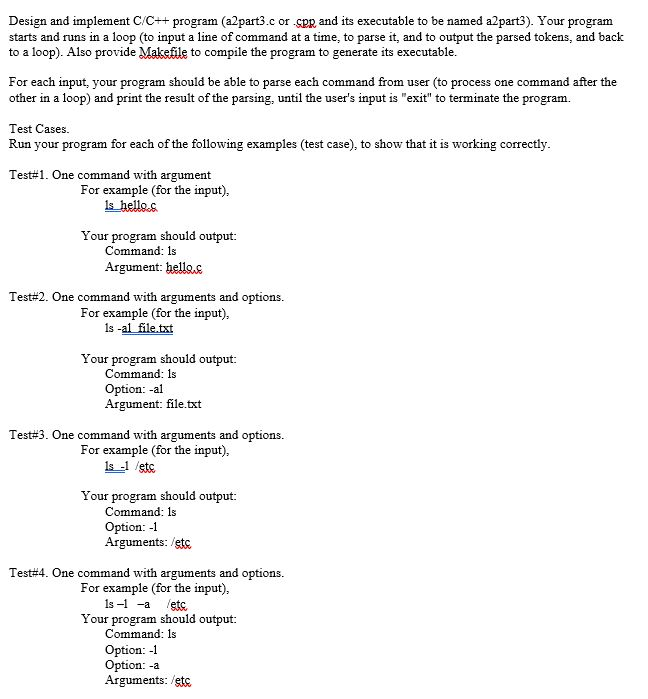
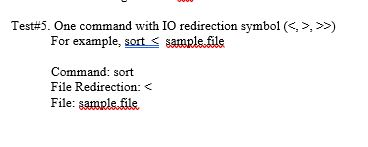
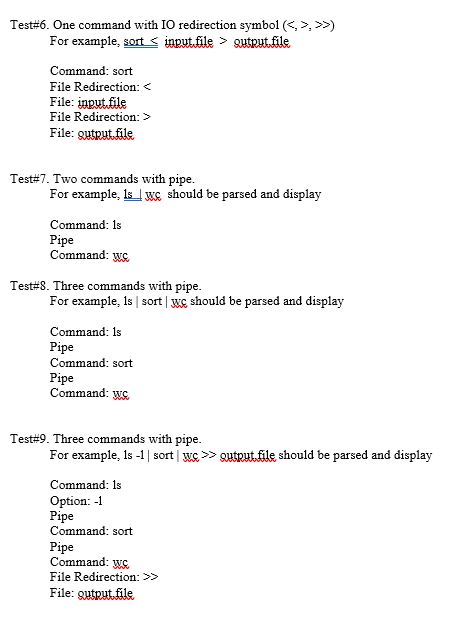
Design and implement C/C++ program (a2part3.c or spp and its executable to be named a2part3). Your program starts and runs in a loop (to input a line of command at a time, to parse it, and to output the parsed tokens, and back to a loop). Also provide Makefle to compile the program to generate its executable. For each input, your program should be able to parse each command from user (to process one command after the other in a loop) and print the result of the parsing, until the user's input is "exit" to terminate the program. Test Cases. Run your program for each of the following examples (test case), to show that it is working correctly Test#1. One command with argument For example (for the input), is hello.s Your program should output: Command: 1s Argument: bellec Test#2. One command with arguments and options. For example (for the input), Is -al file.txt Your program should output: Command: 1s Option: -al Argument: file.txt Test#3. One command with arguments and options. For example (for the input), s-1 etc Your program should output: Command: 1s Option: 1 Arguments: /etc. Test#4. One command with arguments and options. For example (for the input), 1s-1 -a etc Your program should output: Command: ls Option: -1 Option: -a Arguments: etc. Tes5. One command with 10 redirection symbol (, >>) For example, sort s sample.fle Command: sort File Redirection: , >) For example, sort s inputile> gutputfile Command: sort File Redirection: File: gutputfile Test#7. Two commands with pipe For example, ls luc should be parsed and display Command: 1s Pipe Command: W Test#8. Three commands with pipe For example, Is sort c should be parsed and display Command: 1s Pipe Command: sort Pipe Command: wc. Test#9. Three commands with pipe For example, 1s -1 sort wc>> gutputfile should be parsed and display Command: 1s Option: 1 Pipe Command: sort Pipe Command: ws File Redirection: >> File: gutputfile
Step by Step Solution
There are 3 Steps involved in it

Get step-by-step solutions from verified subject matter experts
 Study Help