







Question: How do I do this. Making sure that the entire Grid is 6 5 0 x 4 0 0 and these are the x and
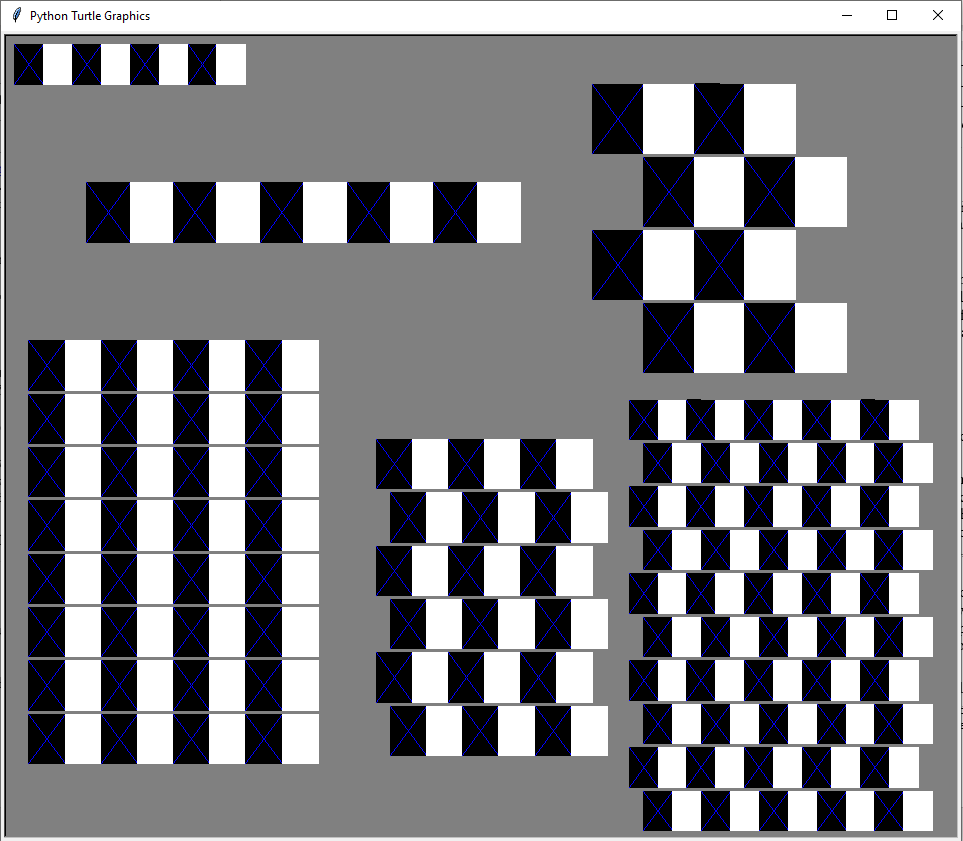
How do I do this. Making sure that the entire Grid is x and these are the x and y along with the number of pairs for each of the sets of boxes. and and and and and and make sure that the boxes have a blue x in the middle and make the boxes sizes, in the same order as the coordinates, size size size size size and size and make sure to follow these requirements:
After writing the function for a row, create a function that produces multiple rows a grid
The grid consists of pairs of rows, with the second row shifted in the xdirection relative to the first.
Each grid is squareshaped, and the number of pairs defines the number of rows and columns.
The box size is consistent, with each box being a square.
The offset for the second row in each pair defines how far to the right the row should be shifted.
Example: In the grid on the lowerleft, there is no offset for the second row.
In the upperright grid, the second row is shifted by the size of one box, forming a checkerboard pattern.
Other grids may have an offset between these two, creating an optical illusion.
Line separation: Each pair of lines in the grid should have a gap referred to as "mortar"
The mortar simulates the gray background seen between layers of brick.
Mortar thickness is important for the visual effect use pixels for separation
Use a program constant to allow easy modification of the mortar value.
Step by Step Solution
There are 3 Steps involved in it
1 Expert Approved Answer
Step: 1 Unlock

Question Has Been Solved by an Expert!
Get step-by-step solutions from verified subject matter experts
Step: 2 Unlock
Step: 3 Unlock
 Study Help