







Question: How do I do this steps on excel documents YO16XL BU01 GRADERPS4_AS Housekeeping 1.4 Project Description: The Painted Paradise Resort Kamp: Spa takes great pride
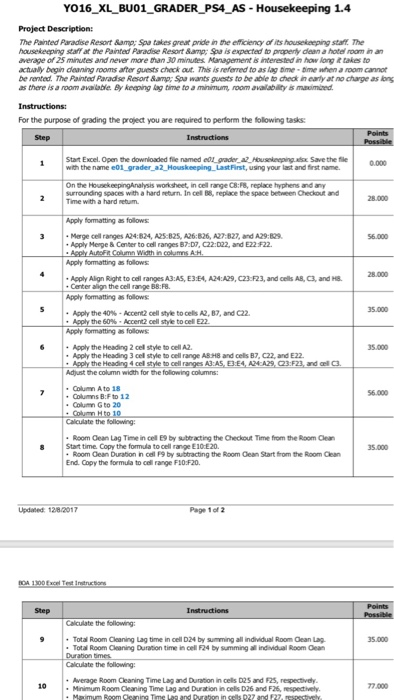
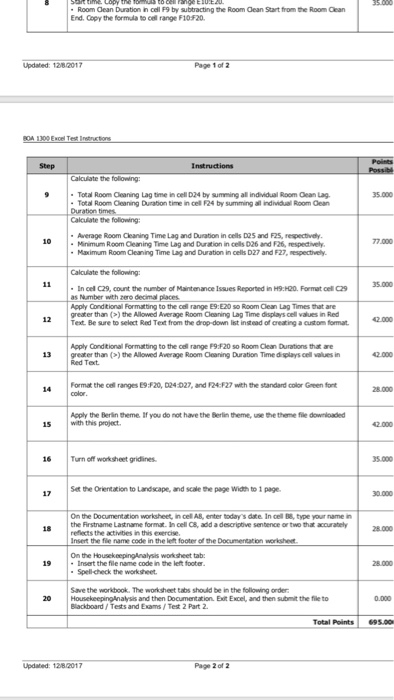
YO16XL BU01 GRADERPS4_AS Housekeeping 1.4 Project Description: The Painted Paradise Resort Kamp: Spa takes great pride in the eficiency of its housekeeping staff The housekeeping staff at the Painted Paradise Resort & Spa is expected to property dlean a hotel room in an average of 25 minutes and never more man 30 minutes Management is interested in how long it takes to actually begn dearing rooms after guests check at. This is referred to as lag me when a room cannot be rented. The Painted Paradse Resort Samp; Spa wants guests to be able to check in early at no charge as long as there is a room avalable By keeping kag time to a minimum, room avalability i mnoimired For the purpose of grading the project you are required to perform the folowing tasks Step Stat Excel, Open the downloaded flie named dugider_e-Hausolmrp Save the file 0.000 On the HousekeepingAnalysis worksheet, in cell range C8:FB, replace hyphens and any surrounding spaces with a hard return. In cel B8, replace the space between Checkout and Time with a hard retum Apply fomatting as follows Marge cell ranges A24:824, A25-B25, A26:826, A27 B27, and A29 829 Apply Merge & Center to cell ranges B7:D?, C22:022, and E22 F22. 56.000 Apply formatting as follows Apply Align Right to cel ranges A3 AS, E3 E4, A24: A29, C23F23, and cels AB, C3, and H8 Center align the cell range B8:FB. Apply fomatting as follows Aply the 40% . Accert2 cel style tocels A2, B7, and C22. 5.000 Apply fomatting as follows Apply the Heading 2 cel style to cell A2 Apply the Heading 3 cel style to cell range Ab48 and cels B7, C22, and E22. pply the Heading 4 cel style to cell ranges A3:A 5.000 Adjust the column width for the following columns Column A to 56.000 Columns B:F to 12 Columm G to 20 Calculate the following Room Cean Lag Time in cel E9 by subtracting the Checkout Time from the Room Clea 8 Start time. Copy the formula to cell range E10 E20. Room Gean Duration in cell F9 by subtracting the Room Cean Start from the Room Clean End. Copy the formulia to cell range F10:F20 Updated 128 2017 Page 1 of 2 Total Room Cleaning Lag time in cell D24 by summing all individual Room Clean Lag. Total Room Cleaning Duration time in cel F24 by summing all individual Room Cean 35.000 Calculate the following Average Room Cleaning Time Lag and Duration in cells D25 and F25, respectively Minimum Room Cleaning Time Lag and Duration in cels D26 and F26, respectively 10 77.000 YO16XL BU01 GRADERPS4_AS Housekeeping 1.4 Project Description: The Painted Paradise Resort Kamp: Spa takes great pride in the eficiency of its housekeeping staff The housekeeping staff at the Painted Paradise Resort & Spa is expected to property dlean a hotel room in an average of 25 minutes and never more man 30 minutes Management is interested in how long it takes to actually begn dearing rooms after guests check at. This is referred to as lag me when a room cannot be rented. The Painted Paradse Resort Samp; Spa wants guests to be able to check in early at no charge as long as there is a room avalable By keeping kag time to a minimum, room avalability i mnoimired For the purpose of grading the project you are required to perform the folowing tasks Step Stat Excel, Open the downloaded flie named dugider_e-Hausolmrp Save the file 0.000 On the HousekeepingAnalysis worksheet, in cell range C8:FB, replace hyphens and any surrounding spaces with a hard return. In cel B8, replace the space between Checkout and Time with a hard retum Apply fomatting as follows Marge cell ranges A24:824, A25-B25, A26:826, A27 B27, and A29 829 Apply Merge & Center to cell ranges B7:D?, C22:022, and E22 F22. 56.000 Apply formatting as follows Apply Align Right to cel ranges A3 AS, E3 E4, A24: A29, C23F23, and cels AB, C3, and H8 Center align the cell range B8:FB. Apply fomatting as follows Aply the 40% . Accert2 cel style tocels A2, B7, and C22. 5.000 Apply fomatting as follows Apply the Heading 2 cel style to cell A2 Apply the Heading 3 cel style to cell range Ab48 and cels B7, C22, and E22. pply the Heading 4 cel style to cell ranges A3:A 5.000 Adjust the column width for the following columns Column A to 56.000 Columns B:F to 12 Columm G to 20 Calculate the following Room Cean Lag Time in cel E9 by subtracting the Checkout Time from the Room Clea 8 Start time. Copy the formula to cell range E10 E20. Room Gean Duration in cell F9 by subtracting the Room Cean Start from the Room Clean End. Copy the formulia to cell range F10:F20 Updated 128 2017 Page 1 of 2 Total Room Cleaning Lag time in cell D24 by summing all individual Room Clean Lag. Total Room Cleaning Duration time in cel F24 by summing all individual Room Cean 35.000 Calculate the following Average Room Cleaning Time Lag and Duration in cells D25 and F25, respectively Minimum Room Cleaning Time Lag and Duration in cels D26 and F26, respectively 10 77.000
Step by Step Solution
There are 3 Steps involved in it

Get step-by-step solutions from verified subject matter experts
 Study Help