







Question: How do I do this using python? A memory game is played (and scored) as follows Random numbers between 0 and 10 (both inclusive) are
How do I do this using python?
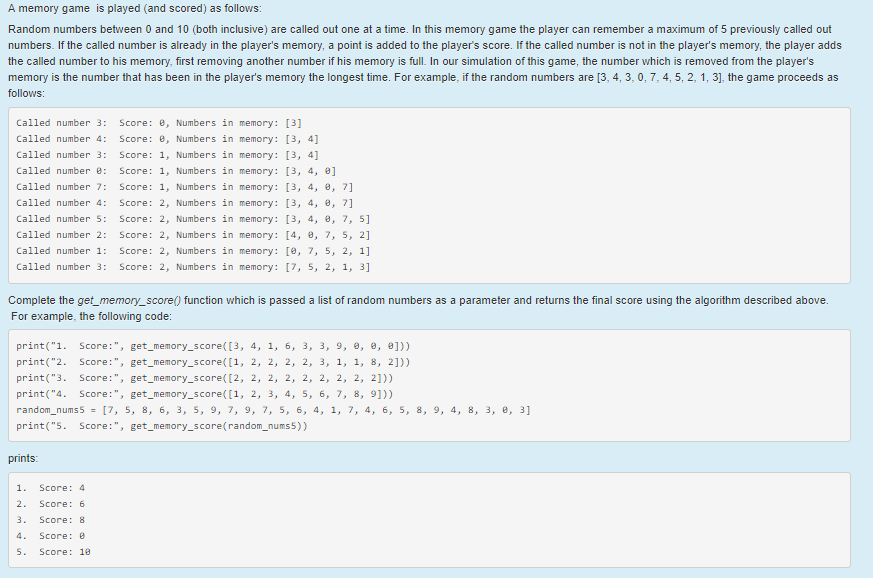
A memory game is played (and scored) as follows Random numbers between 0 and 10 (both inclusive) are called out one at a time. In this memory game the player can remember a maximum of 5 previously called out numbers. If the called number is already in the player's memory, a point is added to the player's score. If the called number is not in the player's memory, the player adds the called number to his memory, first removing another number if his memory is full. In our simulation of this game, the number which is removed from the player's memory is the number that has been in the player's memory the longest time. For example, if the random numbers are [3, 4, 3, 0, 7, 4, 5, 2, 1, 3], the game proceeds as follows Called number 3 Score: 8, Numbers in memory: [3] Called number 4: Score: 8, Numbers in memory: [3, 4] Called number 3 Score: 1, Numbers in memory: [3, 4] Called number 8 Score: Numbers in memory: [3, 4, ] Called number 7: Score: 1 Numbers in memory: [3, 4, 8, 71 Called number 4: Score: 2, Numbers in memory: [3, 4, 8, 71 Called number 5: Score: 2, Numbers in memory: [3, 4, 8, 7, 5] Called number 2: Score: 2, Numbers in memory: [4, e, 7, 5, 2] Called number 1: Score: 2, Numbers in memory: [, 7, 5, 2, 1] Called number 3 Score: 2, Numbers in memory: [7, 5, 2, 1, 3] Complete the get_memory_score) function which is passed a list of random numbers as a parameter and returns the final score using the algorithm described above. For example, the following code print("1 Score:", get_memory_score([3, 4, 1, 6, 3, 3, 9, 8, e, e])) print("2. Score:", get_memory_score([1, 2, 2, 2, 2, 3, 1, 1, 8, 2])) print("3. Score:", get_memory_score([2, 2, 2, 2, 2, 2, 2, 2, 2])) print("4. Score:", get_memory_score([1, 2, 3, 4, 5, 6, 7, 8, 9])) random_nums5 [7, 5, 8, 6, 3, 5, 9, 7, 9, 7, 5, 6, 4, 1, 7, 4, 6, 5, 8, 9, 4, 8, 3, 8, 3] print("S. Score:", get_memory_score (random_nums5)) prints 1. Score: 4 2. Score: 6 3. Score: 8 4. Score: e 5. Score: 18
Step by Step Solution
There are 3 Steps involved in it

Get step-by-step solutions from verified subject matter experts
 Study Help