







Question: How do I fix this problem? I have String nameEntered = input.nextLine(); at line 28. The goal of this problem is learn how to use
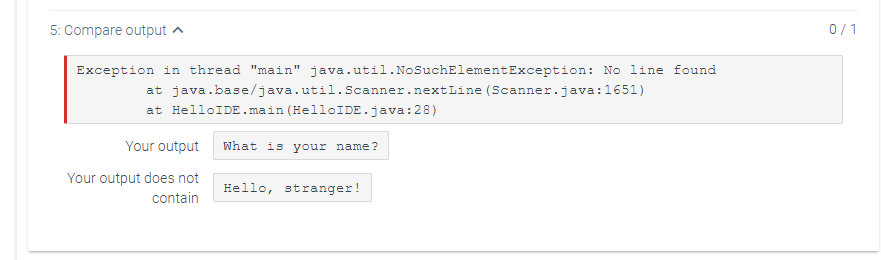
How do I fix this problem? I have String nameEntered = input.nextLine(); at line 28.
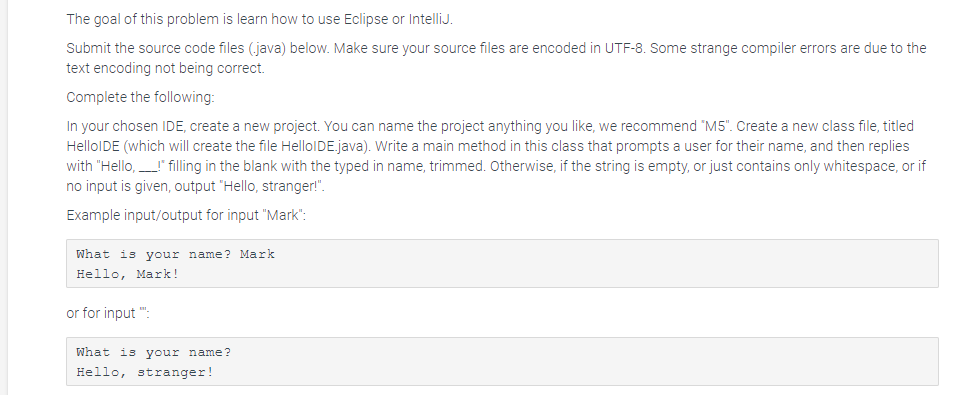
The goal of this problem is learn how to use Eclipse or IntelliJ. Submit the source code files (java) below. Make sure your source files are encoded in UTF-8. Some strange compiler errors are due to the text encoding not being correct. Complete the following: In your chosen IDE, create a new project. You can name the project anything you like, we recommend "M5". Create a new class file, titled HelloIDE (which will create the file HelloIDE.java). Write a main method in this class that prompts a user for their name, and then replies with "Hello, __!" filling in the blank with the typed in name, trimmed. Otherwise, if the string is empty, or just contains only whitespace, or if no input is given, output "Hello, stranger!". Example input/output for input "Mark": What is your name? Mark Hello, Mark! or for input": What is your name? Hello, stranger! 5: Compare output ^ 0/1 Exception in thread "main" java.util.NoSuchElementException: No line found at java.base/java.util.Scanner.nextLine (Scanner.java:1651) at HelloIDE.main (HelloIDE.java:28) Your output What is your name? Your output does not contain Hello, stranger
Step by Step Solution
There are 3 Steps involved in it

Get step-by-step solutions from verified subject matter experts
 Study Help