







Question: How do I get this code to pass using these intructions: / / / / #include #include #include apex _ code.h #include using namespace
How do I get this code to pass using these intructions:
#include
#include
#include "apexcode.h
#include
using namespace std;
void minutestohourtimestringstream &cin, stringstream &cout
int minutes;
cin minutes;
int hours minutes ;
int minutesremainder minutes ;
hours ;
cout hours : minutesremainder endl;
Place code for translating minutes to hour time
Pretend this is your main function and you can use cincout
as you would in main.
If you want to print to the console for debugging use std::cout.
Use cout for your final solution.
First you want to get user input with cin
Do any needed calculations
Create output with cout
void numberstohourtimestringstream& cin, stringstream& cout
int hours ;
int minutes ;
int seconds ;
char colonSign;
Pretend this is your main function and you can use cincout
reading input
cin hours colonSign minutes colonSign seconds;
hours minutes ;
minutes ;
hours seconds ;
seconds ;
hours ;
keep hours within to for hour time
hours hours ;
output hours, minutesm seconds
Use cout for your final solution.
cout hours : minutes seconds endl;
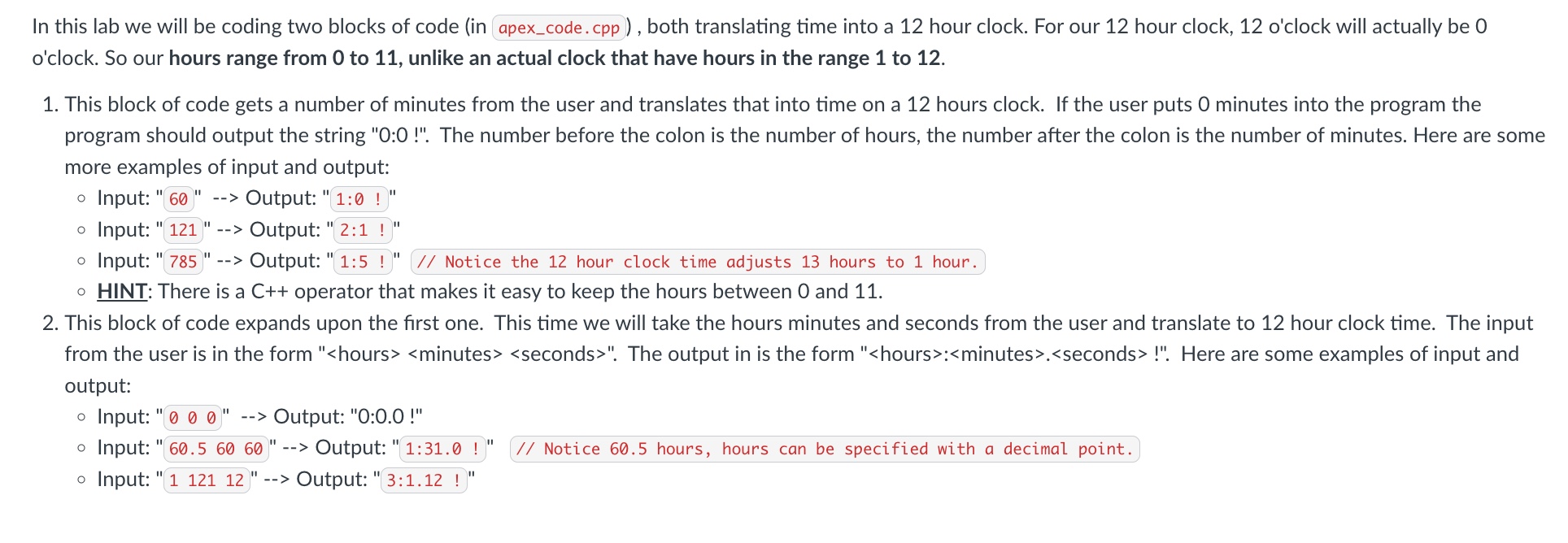
in this lab we will be coding two blocks of code in apexcode.cpp both translating time into a hour clock. For our hour clock, o'clock will actually be
o'clock. So our hours range from to unlike an actual clock that have hours in the range to
This block of code gets a number of minutes from the user and translates that into time on a hours clock. If the user puts minutes into the program the
program should output the string : The number before the colon is the number of hours, the number after the colon is the number of minutes. Here are some
more examples of input and output:
Input: Output:
Input: Output:
Input: Output: : Notice the hour clock time adjusts hours to hour.
HINT: There is a C operator that makes it easy to keep the hours between and
This block of code expands upon the first one. This time we will take the hours minutes and seconds from the user and translate to hour clock time. The input
from the user is in the form
Step by Step Solution
There are 3 Steps involved in it
1 Expert Approved Answer
Step: 1 Unlock

Question Has Been Solved by an Expert!
Get step-by-step solutions from verified subject matter experts
Step: 2 Unlock
Step: 3 Unlock
 Study Help