







Question: How do I go about coding this? I have some of the code written, but Im confused on how to complete the assignment. The comments
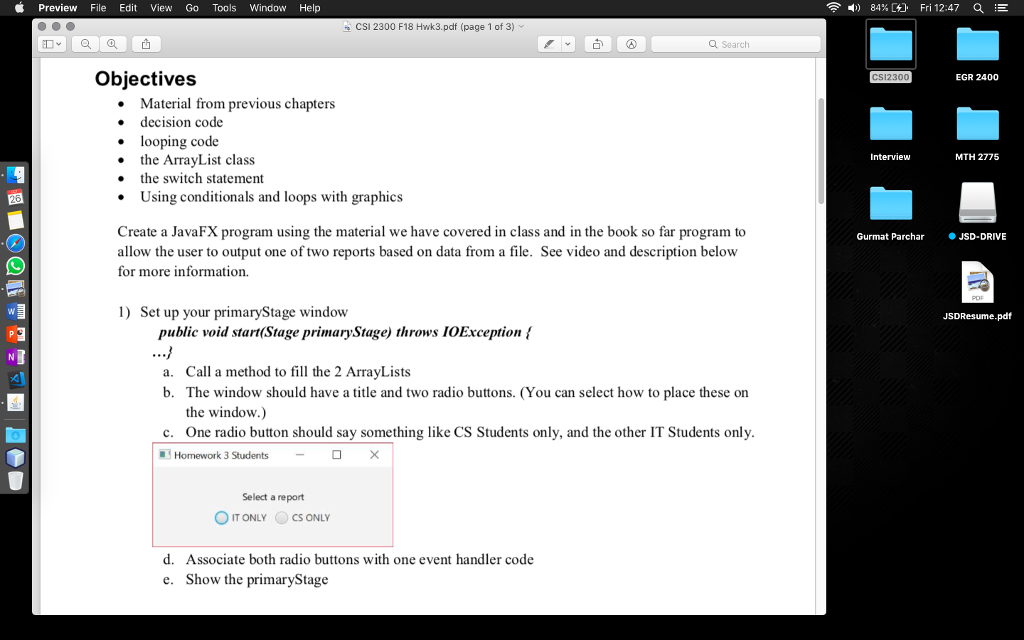
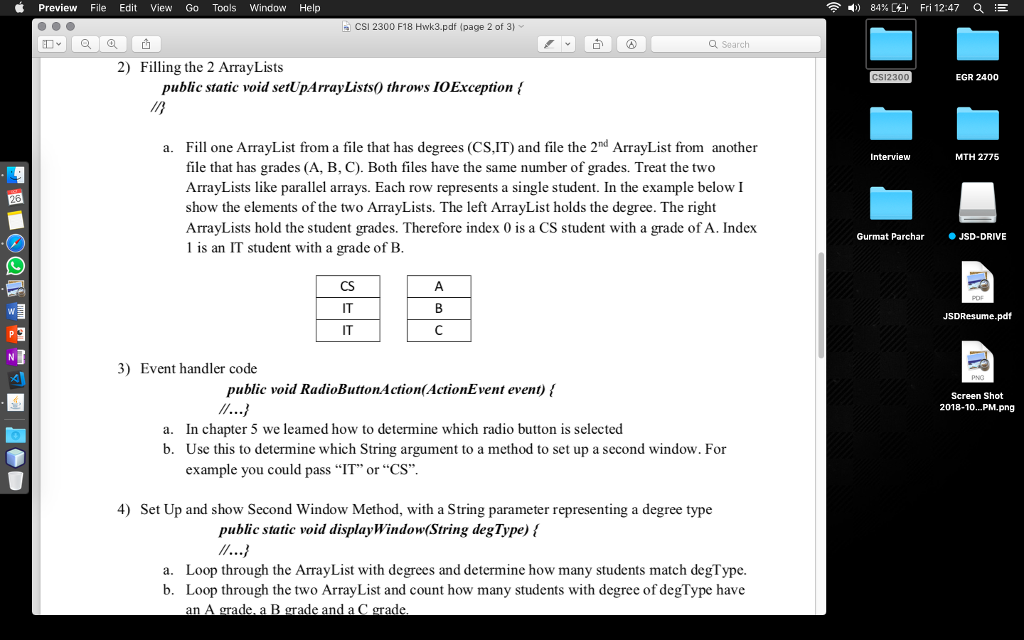
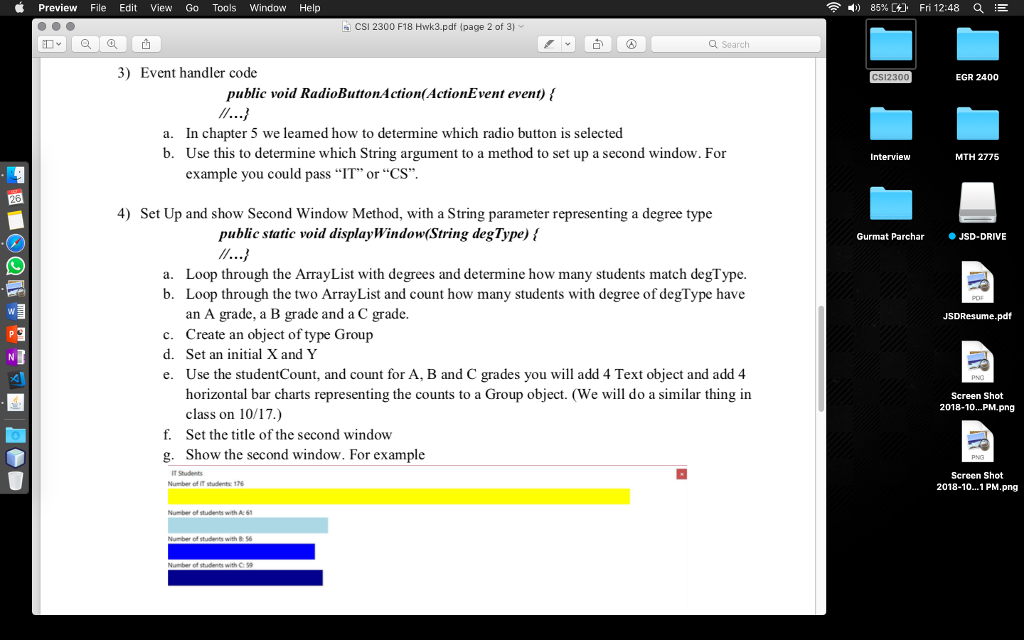 How do I go about coding this? I have some of the code written, but Im confused on how to complete the assignment. The comments are the instructions for the program.
package hw3_jasvant_dosanjh; import java.io.File; import java.io.IOException; import java.util.ArrayList; import java.util.Scanner; import javafx.application.Application; import javafx.event.ActionEvent; import javafx.event.EventHandler; import javafx.scene.Group; import javafx.scene.Scene; import javafx.scene.control.Button; import javafx.scene.control.RadioButton; import javafx.scene.control.ToggleGroup; import javafx.scene.layout.StackPane; import javafx.stage.Stage; public class HW3_Jasvant_Dosanjh extends Application { @Override public void start(Stage primaryStage) throws IOException { /* a. Call a method to fill the 2 ArrayLists b. The window should have a title and two radio buttons. (You can select how to place these on the window.) c. One radio button should say something like CS Students only, and the other IT Students only. d. Associate both radio buttons with one event handler code e. Show the primaryStage */ RadioButton IT = new RadioButton("IT Students"); RadioButton CS = new RadioButton("CS Students"); IT.setLayoutX(200); IT.setLayoutY(200); CS.setLayoutX(600); CS.setLayoutY(200); Group radioRoot = new Group(IT, CS); Scene scene = new Scene(radioRoot, 600, 399); primaryStage.setTitle("Homework 3 Students"); primaryStage.setScene(scene); primaryStage.show(); } //Filling the 2 ArrayLists public static void setUpArrayLists() throws IOException { /* Fill one ArrayList from a file that has degrees (CS,IT) and file the 2nd ArrayList from another file that has grades (A, B, C). Both files have the same number of grades. Treat the two ArrayLists like parallel arrays. Each row represents a single student. In the example below I show the elements of the two ArrayLists. The left ArrayList holds the degree. The right ArrayLists hold the student grades. Therefore index 0 is a CS student with a grade of A. Index 1 is an IT student with a grade of B. */ Scanner grades = new Scanner(new File("grades.txt")); Scanner degrees = new Scanner(new File("degrees.txt")); ArrayList grdList = new ArrayList(); while (grades.hasNext()){ grdList.add(grades.next()); } grades.close(); ArrayList degList = new ArrayList(); while (degrees.hasNext()){ degList.add(degrees.next()); } degrees.close(); } //Event handler code public void RadioButtonAction(ActionEvent event) { /* In chapter 5 we learned how to determine which radio button is selected Use this to determine which String argument to a method to set up a second window. For example you could pass IT or CS */ } //Set up and show Second Window Method, with a String parameter representing a degree type public static void displayWindow(String degType) { /* a. Loop through the ArrayList with degrees and determine how many students match degType. b. Loop through the two ArrayList and count how many students with degree of degType have an A grade, a B grade and a C grade. c. Create an object of type Group d. Set an initial X and Y e. Use the studentCount, and count for A, B and C grades you will add 4 Text object and add 4 horizontal bar charts representing the counts to a Group object. (We will do a similar thing in class on 10/17.) f. Set the title of the second window g. Show the second window. */ int countA = 0; int countB = 0; int countC = 0; ArrayList studCount = new ArrayList(); Group grp = new Group(); grp.setLayoutX(100); grp.setLayoutY(100); while (studCount.hasNext()){ studCount = grades.nextLine(); switch (studCount){ case "A": countA++; break; case "B": countB++; break; case "C": countC++; break; } } primaryStage.setTitle("Homework 3 Students"); primaryStage.setScene(scene); primaryStage.show(); } /** * @param args the command line arguments */ public static void main(String[] args) { launch(args); } }
Preview File Edit View Go Tools Window Help a, -) 84%C%). Fri 12:47 a E CSI 2300 F18 Hwk3.pdf (page 1 of 3) Q Search Objectives EGR 2400 Material from previous chapters decision code looping code Interview MTH 2775 the ArrayList class e the switch statement . Using conditionals and loops with graphic Create a JavaFX program using the material we have covered in class and in the book so far program to allow the user to output one of two reports based on data from a file. See video and description below for more information. Gurmat Parchar JSD-DRIVE 1) Set up your primaryStage window JSDResume.pd public void start(Stage primaryStage) throws IOException ! Call a method to fill the 2 ArrayLists The window should have a title and two radio buttons. (You can select how to place these on the window.) One radio button should say something like CS Students only, and the other IT Students only a. b. c. Homework 3 StudentsDO Select a report OITONLYCS ONLY d. Associate both radio buttons with one event handler code Show the primaryStage e. Preview File Edit View Go Tools Window Help a, -) 84%C%). Fri 12:47 a E CSI 2300 F18 Hwk3.pdf (page 1 of 3) Q Search Objectives EGR 2400 Material from previous chapters decision code looping code Interview MTH 2775 the ArrayList class e the switch statement . Using conditionals and loops with graphic Create a JavaFX program using the material we have covered in class and in the book so far program to allow the user to output one of two reports based on data from a file. See video and description below for more information. Gurmat Parchar JSD-DRIVE 1) Set up your primaryStage window JSDResume.pd public void start(Stage primaryStage) throws IOException ! Call a method to fill the 2 ArrayLists The window should have a title and two radio buttons. (You can select how to place these on the window.) One radio button should say something like CS Students only, and the other IT Students only a. b. c. Homework 3 StudentsDO Select a report OITONLYCS ONLY d. Associate both radio buttons with one event handler code Show the primaryStage e
Step by Step Solution
There are 3 Steps involved in it

Get step-by-step solutions from verified subject matter experts
 Study Help