







Question: How do I implement the SLR _ parse _ table in the following section of code? / / Generate the SLR Parsing Table ( Action
How do I implement the SLRparsetable in the following section of code?
Generate the SLR Parsing Table Action and Goto tables
void SLRparsetablesconst vector& grammar
cout
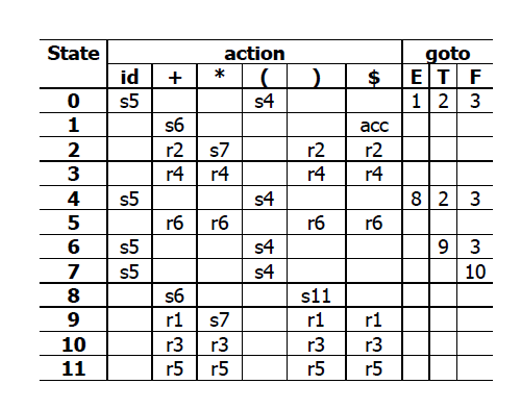
SLR Parsing Table Action and Goto:
;
Pseudocode for table construction
For each state in canonicalCollection:
For each item in the state:
if item is A a where a is terminal:
actionTablestateas nextState
if item is A :
for each symbol in FollowA:
actionTablestatesymbolr rule number
if item is S S :
actionTablestate$ "acc"
For each nonterminal A:
if Gotostate A is nonempty:
gotoTablestateA nextState
Followup for In CProgrammingI am attempting to implement the following grammar:
Basic Grammar
EET
ET
TTF
TF
FE
Fid
Into the following algorithms:
Please implement the following algorithms
iClosureI
iiFollowS
iiiGotoStateX
ivCanonicalSetI
vSLRparsetablesgrammar
Please test your algorithmvusing the basic grammar and output the following ActionandGoto Table.
begintabularcccccccccc
hline multirowtState & multicolumncaction & multicolumncgoto
hline & id & & & & & $ & E & T & F
hline & s & & & s & & & & &
hline & & s & & & & acc & & &
hline & & r & s & & r & r & & &
hline & & r & r & & r & r & & &
hline & s & & & s & & & & &
hline & & r & r & & r & r & & &
hline & s & & & s & & & & &
hline & s & & & s & & & & &
hline & & s & & & s & & & &
hline & & r & s & & r & r & & &
hline & & r & r & & r & r & & &
hline & & r & r & & r & r & & &
hline
endtabular
Step by Step Solution
There are 3 Steps involved in it
1 Expert Approved Answer
Step: 1 Unlock

Question Has Been Solved by an Expert!
Get step-by-step solutions from verified subject matter experts
Step: 2 Unlock
Step: 3 Unlock
 Study Help