







Question: How do I make this code output the exact same thing as shown in the picture whenever I search for the rank? Sandeep Scary Creatures
How do I make this code output the exact same thing as shown in the picture whenever I search for the rank? 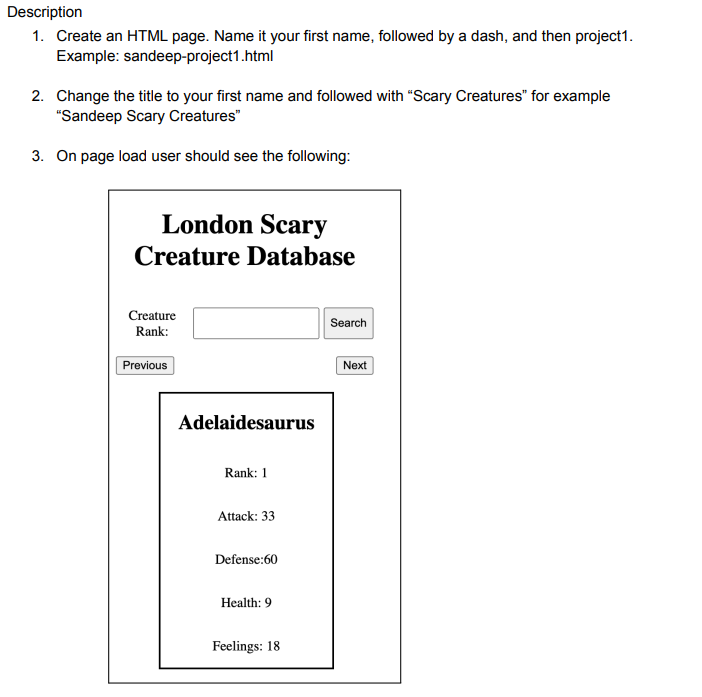
London scary creature database
| Creature | Rank | Attack | Defense | Health | Feelings |
|---|
const tableBody = document.getElementById('tableBody');
const rankInput = document.getElementById('rank');
const prevBtn = document.getElementById('prevBtn');
const nextBtn = document.getElementById('nextBtn');
let currentCreatureIndex = 0;
let creatureData = [];
fetch(
'https://gist.githubusercontent.com/sandeep728/c7402151ee87f3b89bd272c97b8e6b37/raw/c934af6afe49f0aa66a61a8dc49c3d44fa95978a/london-cards'
)
.then((response) => response.json())
.then((data) => {
creatureData = data;
displayCreature(0);
})
.catch((error) => {
console.log('Error:', error);
});
function displayCreature(index) {
const creature = creatureData[index];
const { name, rank, attack, defense, health, feelings } = creature;
tableBody.innerHTML = `
`;
rankInput.value = rank;
currentCreatureIndex = index;
if (index === 0) {
prevBtn.disabled = true;
} else {
prevBtn.disabled = false;
}
if (index === creatureData.length - 1) {
nextBtn.disabled = true;
} else {
nextBtn.disabled = false;
}
}
function searchCreature(event) {
event.preventDefault();
const rank = parseInt(rankInput.value);
const index = creatureData.findIndex(
(creature) => creature.rank === rank
);
if (index !== -1) {
displayCreature(index);
} else {
alert(`Creature with rank ${rank} not found.`);
}
}
function prevCreature() {
displayCreature(currentCreatureIndex - 1);
}
function nextCreature() {
displayCreature(currentCreatureIndex + 1);
}
document.querySelector('form').addEventListener('submit', searchCreature);
prevBtn.addEventListener('click', prevCreature);
nextBtn.addEventListener('click', nextCreature);
Description 1. Create an HTML page. Name it your first name, followed by a dash, and then project1. Example: sandeep-project1.html 2. Change the title to your first name and followed with "Scary Creatures" for example "Sandeep Scary Creatures" 3. On page load user should see the following
Step by Step Solution
There are 3 Steps involved in it

Get step-by-step solutions from verified subject matter experts
 Study Help