Question: how do i modify it so i can add text sample code is above need to modify it dont know how to please help!!!!! how
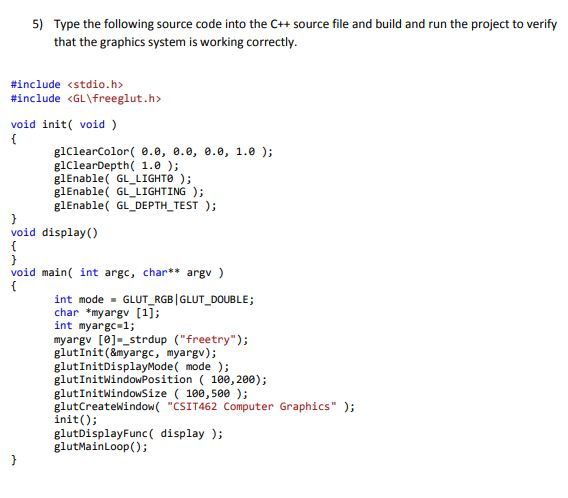
how do i modify it so i can add text sample code is above need to modify it dont know how to please help!!!!!
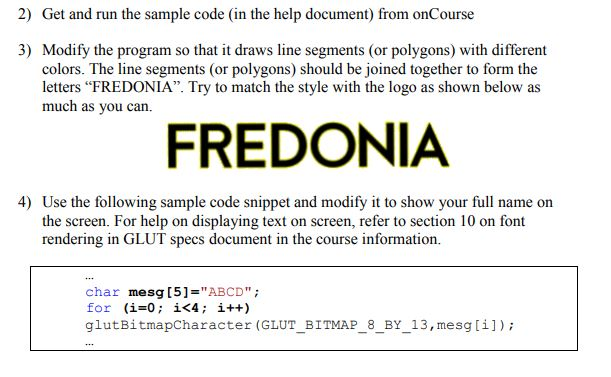
how the hell do i do this??? where in the code posted above to i put this little piece of code. please help!!!!! use visual studio 2017 along with opengl and freeglut
5) Type the following source code into the C++ source file and build and run the project to verify that the graphics system is working correctly #include #include void init( void ) glClearColor .0, 0.0, .0, 1.0 ); glClearDepth( 1.0); glEnable( GL LIGHTe; glEnable( GL LIGHTING): glEnable GL DEPTH TEST); void display) void main( int argc, char** argv) int mode GLUT RGB GLUT DOUBLE; char *my argv [1] int myargc 1; myargv [e]-_strdup ("freetry"); glutInit (&myargc, myargv); glutInitDisplayMode( mode; glutInitwindowPosition 100,200); glutInitwindowsize ( 100,500); glutCreatewindow "CSIT462 Computer Graphics"); nit; glutDisplayFunc ( display); glutMainLoop); 5) Type the following source code into the C++ source file and build and run the project to verify that the graphics system is working correctly #include #include void init( void ) glClearColor .0, 0.0, .0, 1.0 ); glClearDepth( 1.0); glEnable( GL LIGHTe; glEnable( GL LIGHTING): glEnable GL DEPTH TEST); void display) void main( int argc, char** argv) int mode GLUT RGB GLUT DOUBLE; char *my argv [1] int myargc 1; myargv [e]-_strdup ("freetry"); glutInit (&myargc, myargv); glutInitDisplayMode( mode; glutInitwindowPosition 100,200); glutInitwindowsize ( 100,500); glutCreatewindow "CSIT462 Computer Graphics"); nit; glutDisplayFunc ( display); glutMainLoop)









 Study Help