Question: How do I store a vector from a file and then copy it to another and then display it? I'm doing function 1... My code
How do I store a vector from a file and then copy it to another and then display it? I'm doing function 1...

My code so far:
#include #include #include "CheckInput.h"" #include #include using namespace std; void displayMenu(); vector createCopy(vector& list);
int main() {
displayMenu(); int pick; while (pick = getIntRange(1,6)) { if (pick == 1) { cout createCopy(vector &list) { fstream file; string input; file.open("grades.txt", ios::in); vector copy; if (file) { while (getline(file, input)) { if (input.size > 0) { for(int i =0; i void displayMenu() { cout
it's a txt file containing just numbers.
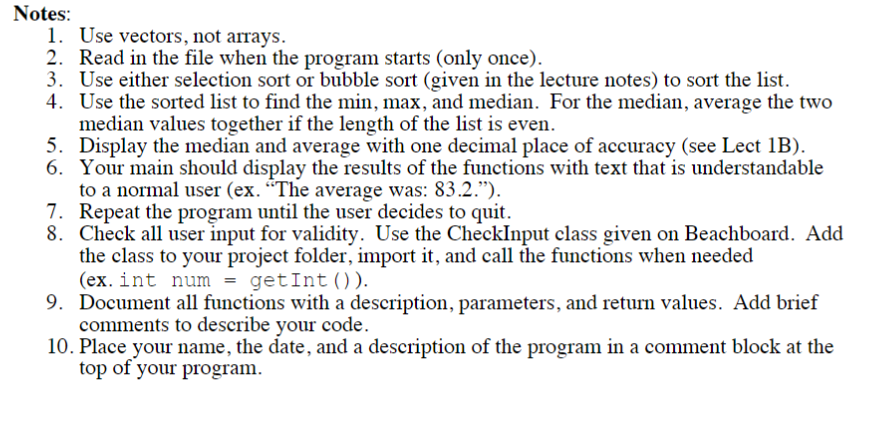
A professor wants to perform some statistical calculations on his midterm grades. The grades are stored in a file named "grades.txt, and the values range from 0-100. Assume you do not know how many grades are in the file (ie. your program should work with any length file). Use a vector to store the grades. Read the values from the file and add each grade to the list. Create the following functions: 1. Populate Grades - construct the vector, read in the file, add the grades to the vector, and then return the list. Notes: 1. Use vectors, not arrays. 2. Read in the file when the program starts (only once). 3. Use either selection sort or bubble sort (given in the lecture notes) to sort the list. 4. Use the sorted list to find the min, max, and median. For the median, average the two median values together if the length of the list is even. 5. Display the median and average with one decimal place of accuracy (see Lect 1B). 6. Your main should display the results of the functions with text that is understandable to a normal user (ex. "The average was: 83.2."). 7. Repeat the program until the user decides to quit. 8. Check all user input for validity. Use the CheckInput class given on Beachboard. Add the class to your project folder, import it, and call the functions when needed (ex. int num = getInt (). 9. Document all functions with a description, parameters, and return values. Add brief comments to describe your code. 10. Place your name, the date, and a description of the program in a comment block at the top of your program. A professor wants to perform some statistical calculations on his midterm grades. The grades are stored in a file named "grades.txt, and the values range from 0-100. Assume you do not know how many grades are in the file (ie. your program should work with any length file). Use a vector to store the grades. Read the values from the file and add each grade to the list. Create the following functions: 1. Populate Grades - construct the vector, read in the file, add the grades to the vector, and then return the list. Notes: 1. Use vectors, not arrays. 2. Read in the file when the program starts (only once). 3. Use either selection sort or bubble sort (given in the lecture notes) to sort the list. 4. Use the sorted list to find the min, max, and median. For the median, average the two median values together if the length of the list is even. 5. Display the median and average with one decimal place of accuracy (see Lect 1B). 6. Your main should display the results of the functions with text that is understandable to a normal user (ex. "The average was: 83.2."). 7. Repeat the program until the user decides to quit. 8. Check all user input for validity. Use the CheckInput class given on Beachboard. Add the class to your project folder, import it, and call the functions when needed (ex. int num = getInt (). 9. Document all functions with a description, parameters, and return values. Add brief comments to describe your code. 10. Place your name, the date, and a description of the program in a comment block at the top of your program









 Study Help