



Question: How do i take steps to do these 13) Go to the sheet called Faculty Data (3). Do not format the data into an Excel
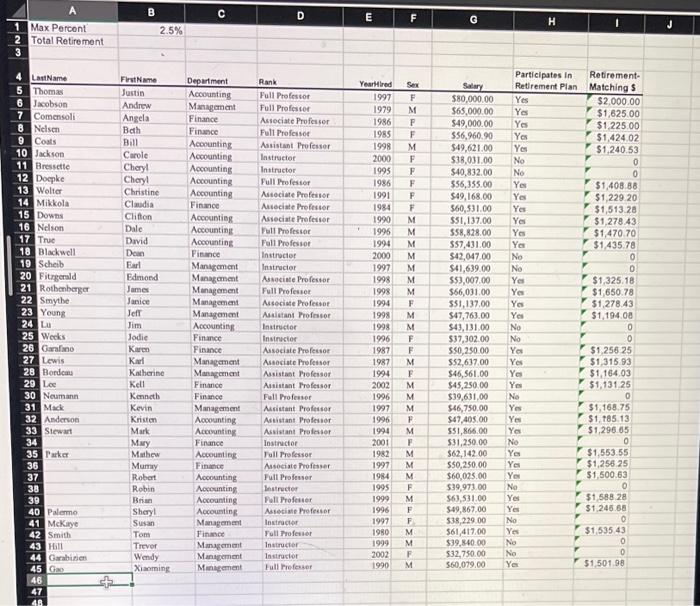
13) Go to the sheet called Faculty Data (3). Do not format the data into an Excel table. Use the subtotals command to determine the average salary for each faculty rank. Each rank has only one average salary. Once you see your results, use the Move or Copy Sheet technique to create a duplicate of the work that you just did. Place the new copy right after the Faculty Data (3) sheet. Rename the newly copied sheet so that its new name is Average Salary by Rank. Save your work. Make a screenshot printout of this sheet and label the screenshot printout as Average Salary by Rank. 14) Return to the Faculty Data (3) sheet. Use the Level 2 Outline button to hide the individual faculty members, leaving only the average salary for each rank. Rename this worksheet to Collapsed Average Rank Salary. Make a screenshot printout of this sheet and label the screenshot printout as Collapsed Average Salary by Rank. 15) Next, go to the sheet called Faculty Data (4). Do not format the data into an Excel table. Use the subtotals command to determine the average salary for each department. Each department has only one average salary. Once you see your results, use the Move or Copy Sheet technique to create a duplicate of the work that you just did. Place the new copy right after the Faculty Data (4) sheet. Rename the newly copied sheet so that its new name is Average Salary by Department. Save your work. Make a screenshot printout of this sheet and label the screenshot printout as Average Salary by Department. 16) Return to the Faculty Data (4) sheet. Use the Level 2 Outline button to hide the individual faculty members, leaving only the average salary for each department. Rename thyis worksheet to Collapsed Dept Average Salary. Make a screenshot printout of this sheet and laobel the screenshot printout as Collapsed Average Salary by Department
Step by Step Solution
There are 3 Steps involved in it

Get step-by-step solutions from verified subject matter experts