







Question: how do you find and define the database schema 1. (Source Database: DBP-els-Cape-Codd-SOL- 92 accdb) Write an SQL statement to display all data on products
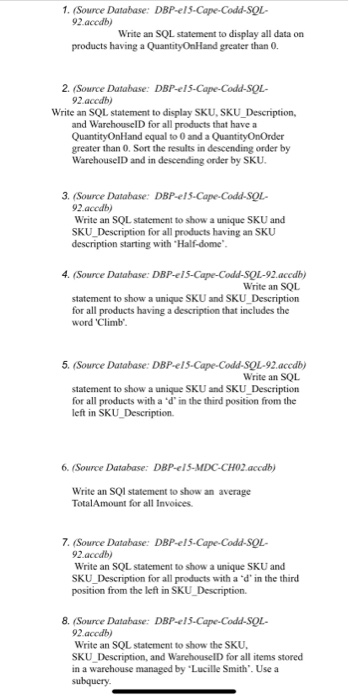
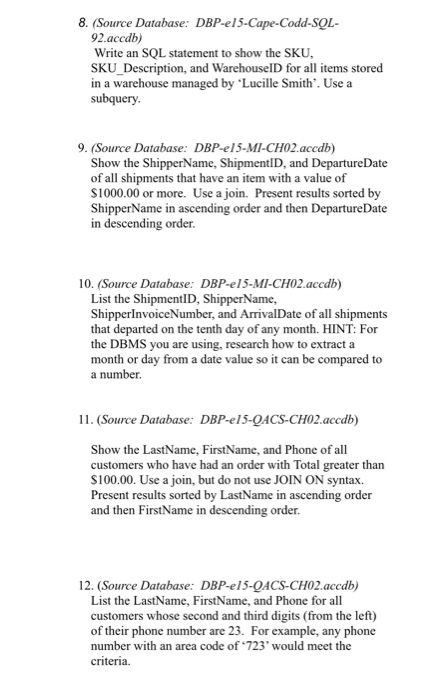
1. (Source Database: DBP-els-Cape-Codd-SOL- 92 accdb) Write an SQL statement to display all data on products having a QuantityOn Hand greater than 0. 2. (Source Database: DBP-els-Cape-Codd-SOL- 92.accdb) Write an SQL statement to display SKU, SKU_Description, and WarehouseID for all products that have a QuantityOn Hand equal to 0 and a QuantityOnOrder greater than 0. Sort the results in descending order by WarehouseID and in descending order by SKU. 3. (Source Database: DBP-els-Cape-Codd-SQL- 92.accdb) Write an SQL statement to show a unique SKU and SKU_Description for all products having an SKU description starting with Half-dome 4. (Source Database: DBP-els-Cape-Codd-SQL-92.accdb) Write an SQL statement to show a unique SKU and SKU_Description for all products having a description that includes the word 'Climb'. 5. (Source Database: DBP-els-Cape-Codd-SQL-92.accdb) Write an SQL statement to show a unique SKU and SKU Description for all products with a 'd' in the third position from the left in SKU Description 6. (Source Database: DBP-1S-MDC-CHO2.accdb) Write an SQI statement to show an average Total Amount for all Invoices. 7. (Source Database: DBP-els-Cape Codd-SOL- 92.accdb) Write an SQL statement to show a unique SKU and SKU_Description for all products with a 'd' in the third position from the left in SKU Description 8. (Source Database: DBP-els-Cape-Codd-SOL- 92.accdb) Write an SQL statement to show the SKU, SKU Description, and Warehouse for all items stored in a warehouse managed by "Lucille Smith'. Use a subquery. 8. (Source Database: DBP-el5-Cape-Codd-SOL- 92.accdb) Write an SQL statement to show the SKU, SKU_Description, and WarehouseID for all items stored in a warehouse managed by 'Lucille Smith'. Use a subquery. 9. (Source Database: DBP-el 5-MI-CH02.accdb) Show the Shipper Name, ShipmentID, and DepartureDate of all shipments that have an item with a value of $1000.00 or more. Use a join. Present results sorted by Shipper Name in ascending order and then DepartureDate in descending order. 10. (Source Database: DBP-el 5-MI-CH02.accdb) List the ShipmentID, Shipper Name, ShipperInvoiceNumber, and ArrivalDate of all shipments that departed on the tenth day of any month. HINT: For the DBMS you are using, research how to extract a month or day from a date value so it can be compared to a number. 11. (Source Database: DBP-e15-QACS-CH02.accdb) Show the LastName, FirstName, and Phone of all customers who have had an order with Total greater than $100.00. Use a join, but do not use JOIN ON syntax. Present results sorted by LastName in ascending order and then FirstName in descending order. 12. (Source Database: DBP-e15-QACS-CH02.accdb) List the LastName, FirstName, and Phone for all customers whose second and third digits (from the left) of their phone number are 23. For example, any phone number with an area code of 723' would meet the criteria. 1. (Source Database: DBP-els-Cape-Codd-SOL- 92 accdb) Write an SQL statement to display all data on products having a QuantityOn Hand greater than 0. 2. (Source Database: DBP-els-Cape-Codd-SOL- 92.accdb) Write an SQL statement to display SKU, SKU_Description, and WarehouseID for all products that have a QuantityOn Hand equal to 0 and a QuantityOnOrder greater than 0. Sort the results in descending order by WarehouseID and in descending order by SKU. 3. (Source Database: DBP-els-Cape-Codd-SQL- 92.accdb) Write an SQL statement to show a unique SKU and SKU_Description for all products having an SKU description starting with Half-dome 4. (Source Database: DBP-els-Cape-Codd-SQL-92.accdb) Write an SQL statement to show a unique SKU and SKU_Description for all products having a description that includes the word 'Climb'. 5. (Source Database: DBP-els-Cape-Codd-SQL-92.accdb) Write an SQL statement to show a unique SKU and SKU Description for all products with a 'd' in the third position from the left in SKU Description 6. (Source Database: DBP-1S-MDC-CHO2.accdb) Write an SQI statement to show an average Total Amount for all Invoices. 7. (Source Database: DBP-els-Cape Codd-SOL- 92.accdb) Write an SQL statement to show a unique SKU and SKU_Description for all products with a 'd' in the third position from the left in SKU Description 8. (Source Database: DBP-els-Cape-Codd-SOL- 92.accdb) Write an SQL statement to show the SKU, SKU Description, and Warehouse for all items stored in a warehouse managed by "Lucille Smith'. Use a subquery. 8. (Source Database: DBP-el5-Cape-Codd-SOL- 92.accdb) Write an SQL statement to show the SKU, SKU_Description, and WarehouseID for all items stored in a warehouse managed by 'Lucille Smith'. Use a subquery. 9. (Source Database: DBP-el 5-MI-CH02.accdb) Show the Shipper Name, ShipmentID, and DepartureDate of all shipments that have an item with a value of $1000.00 or more. Use a join. Present results sorted by Shipper Name in ascending order and then DepartureDate in descending order. 10. (Source Database: DBP-el 5-MI-CH02.accdb) List the ShipmentID, Shipper Name, ShipperInvoiceNumber, and ArrivalDate of all shipments that departed on the tenth day of any month. HINT: For the DBMS you are using, research how to extract a month or day from a date value so it can be compared to a number. 11. (Source Database: DBP-e15-QACS-CH02.accdb) Show the LastName, FirstName, and Phone of all customers who have had an order with Total greater than $100.00. Use a join, but do not use JOIN ON syntax. Present results sorted by LastName in ascending order and then FirstName in descending order. 12. (Source Database: DBP-e15-QACS-CH02.accdb) List the LastName, FirstName, and Phone for all customers whose second and third digits (from the left) of their phone number are 23. For example, any phone number with an area code of 723' would meet the criteria
Step by Step Solution
There are 3 Steps involved in it

Get step-by-step solutions from verified subject matter experts
 Study Help