







Question: how do you find these in spyder (python)? import numpy import os os.chdir(c:pythonprogs) testfile-numpy.loadtxt(open(sugecko.csv, print(testfile) retestfile.shape print(r) #frame rate is 120 frames per second frames
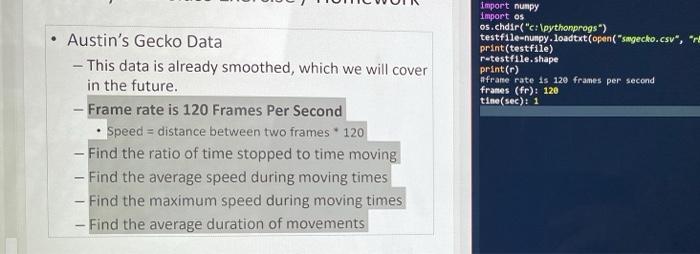
import numpy import os os.chdir("c:\pythonprogs) testfile-numpy.loadtxt(open("sugecko.csv, print(testfile) retestfile.shape print(r) #frame rate is 120 frames per second frames (fr): 120 tine(sec): 1 Austin's Gecko Data - This data is already smoothed, which we will cover in the future. - Frame rate is 120 Frames Per Second Speed = distance between two frames * 120 - Find the ratio of time stopped to time moving - Find the average speed during moving times - Find the maximum speed during moving times - Find the average duration of movements import numpy import os os.chdir("c:\pythonprogs) testfile-numpy.loadtxt(open("sugecko.csv, print(testfile) retestfile.shape print(r) #frame rate is 120 frames per second frames (fr): 120 tine(sec): 1 Austin's Gecko Data - This data is already smoothed, which we will cover in the future. - Frame rate is 120 Frames Per Second Speed = distance between two frames * 120 - Find the ratio of time stopped to time moving - Find the average speed during moving times - Find the maximum speed during moving times - Find the average duration of movements
Step by Step Solution
There are 3 Steps involved in it

Get step-by-step solutions from verified subject matter experts
 Study Help