







Question: How do you make this program to not crash on special characters or letters and instead it should ask to re-enter another integer. Ex. If
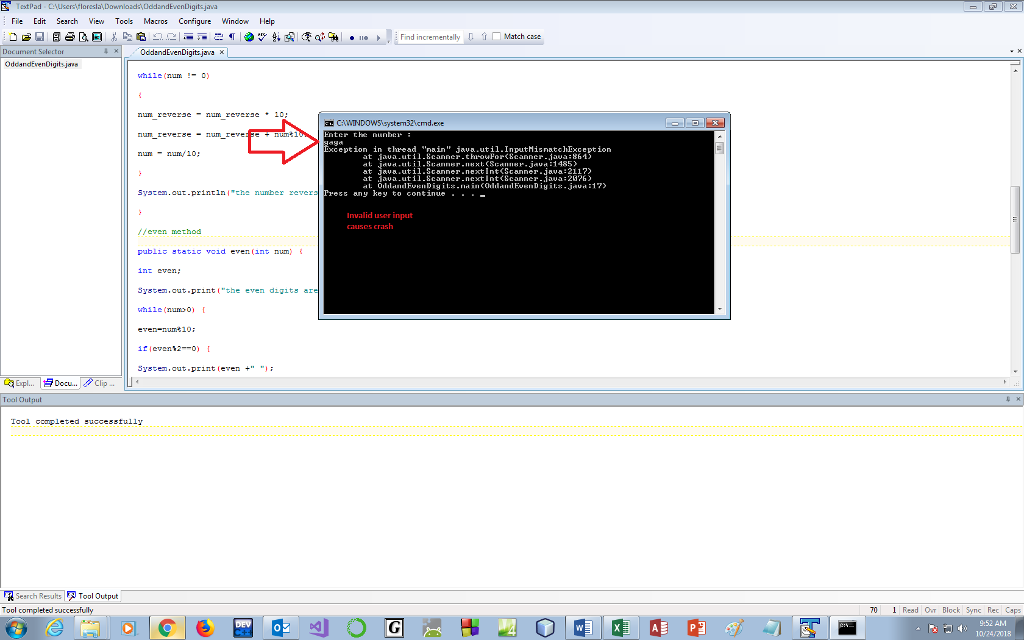 How do you make this program to not crash on special characters or letters and instead it should ask to re-enter another integer. Ex. If I type "lala" or "(%*(#@" the program would crash. Can someone edit the code to fix it. Thank you in advance.
import java.util.Scanner;
public class OddandEvenDigits {
public static void main(String[] args) {
int choice=0;
int num;
Scanner sc =new Scanner(System.in);
do {
System.out.println("Enter the number : ");
num =sc.nextInt();
System.out.println(validate(num));
if(num>0) {
System.out.println("the original number is : "+num);
reverse(num);
even(num);
System.out.println();
odd(num);
}
System.out.println(" 1:continue 0:exit");
System.out.println("Enter choice : ");
choice = sc.nextInt();
}while(choice == 1);
sc.close();
}
//reverse method
public static void reverse (int num) {
int num_reverse=0;
while(num != 0)
{
num_reverse = num_reverse * 10;
num_reverse = num_reverse + num%10;
num = num/10;
}
System.out.println("the number reversed "+num_reverse);
}
//even method
public static void even(int num) {
int even;
System.out.print("the even digits are ");
while(num>0) {
even=num%10;
if(even%2==0) {
System.out.print(even +" ");
}
num=num/10;
}
}
//odd method
public static void odd(int num) {
int odd;
System.out.print("the odd digits are ");
while(num>0) {
odd=num%10;
if(odd%2!=0) {
System.out.print(odd +" ");
}
num=num/10;
}
}
//validate method
public static String validate (int num) {
if(num>0) {
return "Entered number is greater than zero";
}
else {
return "Entered number is less than zero";
}
}
}
TestPad File Edit Search ie Toos Macros Corfigure Window Hep Match caee while(nu ) a Ca 32tcmd.xe reverse um Exception in thread "nain" java . util-inputhsnatchException ununy10: at jaua.util.8cannerthrouFor
Step by Step Solution
There are 3 Steps involved in it

Get step-by-step solutions from verified subject matter experts
 Study Help