







Question: How I can do database in access 2016?,please prelab 7 (Protected View) -Word Mailings Review View Tell me what you want to do Pre-Lab 7:
 How I can do database in access 2016?,please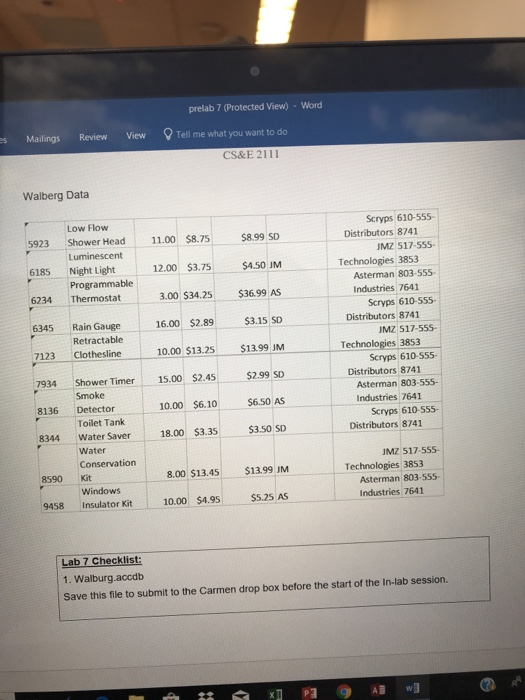
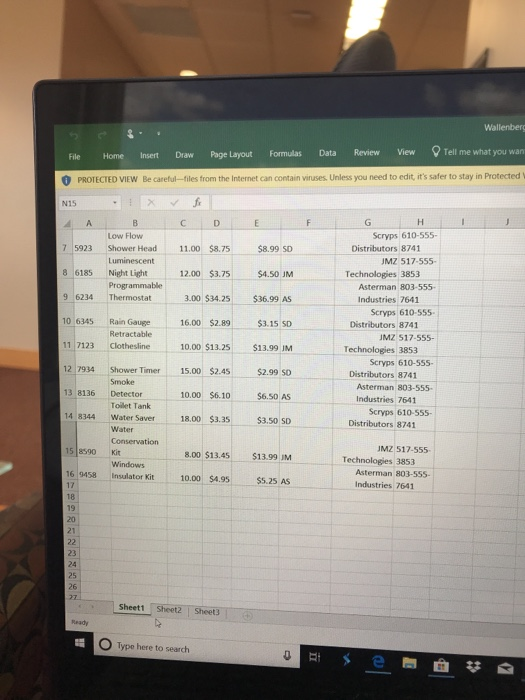
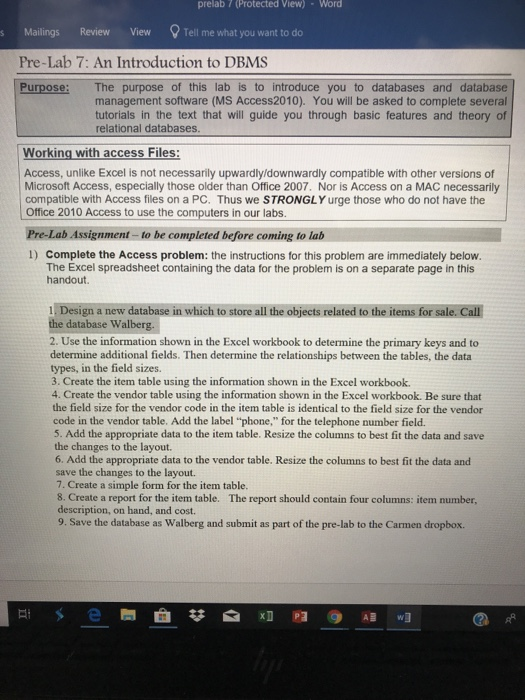
prelab 7 (Protected View) -Word Mailings Review View Tell me what you want to do Pre-Lab 7: An Introduction to DBMS Purpose: The purpose of this lab is to introduce you to databases and database management software (MS Access2010). You will be asked to complete several tutorials in the text that will guide you through basic features and theory of relational databases Working with access Files: Access, unlike Excel is not necessarily upwardly/downwardly compatible with other versions of Microsoft Access, especially those older than Office 2007. Nor is Access on a MAC necessarily compatible with Access files on a PC. Thus we STRONGLY urge those who do not have the Office 2010 Access to use the computers in our labs Pre-Lab Assignment-to be completed before coming to lab 1) Complete the Access problem: the instructions for this problem are immediately below. The Excel spreadsheet containing the data for the problem is on a separate page in this handout 1. Design a new database in which to store all the objects related to the items for sale. Call the database Walberg. 2. Use the information shown in the Excel workbook to determine the primary keys and to determine additional fields. Then determine the relationships between the tables, the data types, in the field sizes. 3. Create the item table using the information shown in the Excel workbook. 4. Create the vendor table using the information shown in the Excel workbook. Be sure that the field size for the vendor code in the item table is identical to the field size for the vendor code in the vendor table. Add the label "phone," for the telephone number field. 5. Add the appropriate data to the item table. Resize the columns to best fit the data and save the changes to the layout 6. Add the appropriate data to the vendor table. Resize the columns to best fit the data and save the changes to the layout. 7. Create a simple form for the item table. 8. Create a report for the item table. The report should contain four columns: item number description, on hand, and cost. 9. Save the database as Walberg and submit as part of the pre-lab to the Carmen dropbox. prelab 7 (Protected View) -Word Mailings Review View Tell me what you want to do Pre-Lab 7: An Introduction to DBMS Purpose: The purpose of this lab is to introduce you to databases and database management software (MS Access2010). You will be asked to complete several tutorials in the text that will guide you through basic features and theory of relational databases Working with access Files: Access, unlike Excel is not necessarily upwardly/downwardly compatible with other versions of Microsoft Access, especially those older than Office 2007. Nor is Access on a MAC necessarily compatible with Access files on a PC. Thus we STRONGLY urge those who do not have the Office 2010 Access to use the computers in our labs Pre-Lab Assignment-to be completed before coming to lab 1) Complete the Access problem: the instructions for this problem are immediately below. The Excel spreadsheet containing the data for the problem is on a separate page in this handout 1. Design a new database in which to store all the objects related to the items for sale. Call the database Walberg. 2. Use the information shown in the Excel workbook to determine the primary keys and to determine additional fields. Then determine the relationships between the tables, the data types, in the field sizes. 3. Create the item table using the information shown in the Excel workbook. 4. Create the vendor table using the information shown in the Excel workbook. Be sure that the field size for the vendor code in the item table is identical to the field size for the vendor code in the vendor table. Add the label "phone," for the telephone number field. 5. Add the appropriate data to the item table. Resize the columns to best fit the data and save the changes to the layout 6. Add the appropriate data to the vendor table. Resize the columns to best fit the data and save the changes to the layout. 7. Create a simple form for the item table. 8. Create a report for the item table. The report should contain four columns: item number description, on hand, and cost. 9. Save the database as Walberg and submit as part of the pre-lab to the Carmen dropbox
Step by Step Solution
There are 3 Steps involved in it

Get step-by-step solutions from verified subject matter experts
 Study Help