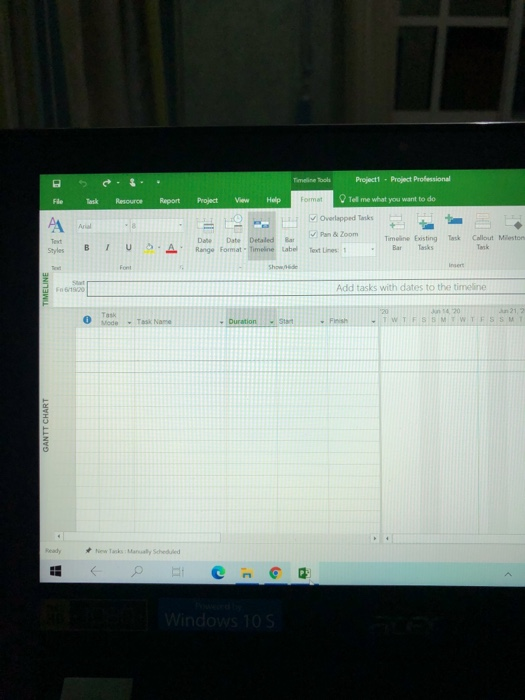
Question: how to add triple time estimates (days) using microsoft project? I cannot figure that out. tell me the procedure please W lelul dojo martodikin training

how to add triple time estimates (days) using microsoft project? I cannot figure that out.
tell me the procedure please
how to add triple time estimates (days) using
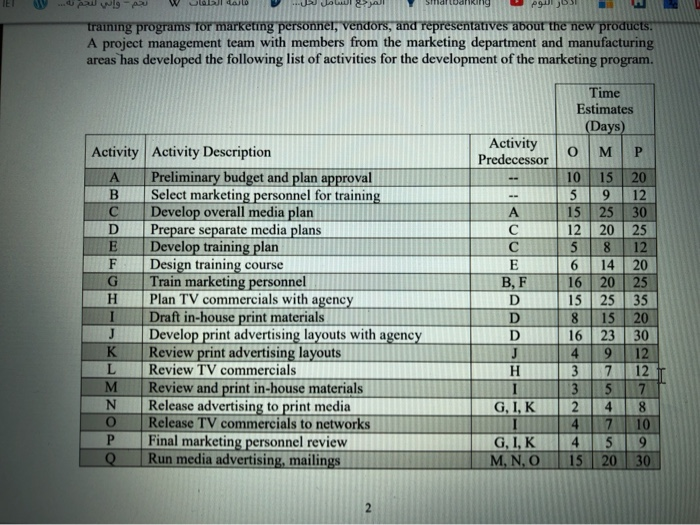
W lelul dojo martodikin training programs for marketing personnel, vendors, and representatives about the new products, A project management team with members from the marketing department and manufacturing areas has developed the following list of activities for the development of the marketing program. Activity Predecessor Activity Activity Description Preliminary budget and plan approval B Select marketing personnel for training Develop overall media plan D Prepare separate media plans E Develop training plan F Design training course G Train marketing personnel H Plan TV commercials with agency I Draft in-house print materials Develop print advertising layouts with agency K Review print advertising layouts L Review TV commercials M Review and print in-house materials N Release advertising to print media o Release TV commercials to networks P Final marketing personnel review Q Run media advertising, mailings A E BF D D D J H Time Estimates (Days) o M P 10 15 20 5 9 12 15 25 30 12 20 25 5 8 12 6 14 20 16 20 25 1525 35 8 15 20 1623 30 4 9 12 3 7 12 3 5 7 2 8 4 7 10 45 9 15 20 30 J G, I, K G, I, K M, N, O 2 Timeline Tools Project 1 - Project Professional Tell me what you want to do File Resource Report Project View Help Format Overlapped Tasks Ariel Pan & Zoom BIU BA Date Date Detailed Range Format - Timeline tabel Timeline Existing Bar Styles Cullout Mileston Tank Text Lines: 1 Fond Show.de TIMELINE F16/19/20 Add tasks with dates to the timeline 0 Tak Mode Jun 20 - TWTFSSMTWTFSST - Toska Duration SI Fish GANTT CHART c Windows 10 S

Step by Step Solution

There are 3 Steps involved in it

1 Expert Approved Answer
Step: 1 Unlock blur-text-image

Question Has Been Solved by an Expert!

Get step-by-step solutions from verified subject matter experts

Step: 2 Unlock
Step: 3 Unlock

Students Have Also Explored These Related General Management Questions!