



Question: how to calculate the current age cell using the date of purchase in excel 5 Calculate the Current Age cells using a formula that subtracts

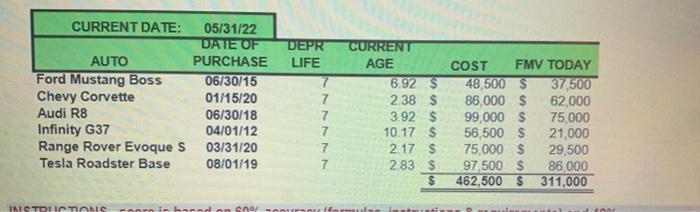
5 Calculate the Current Age cells using a formula that subtracts the Date of Purchase from the Current Date. Make sure to show the amount in years. 6 Enter the COST (which is the original purchase price) data and FMV (which is the value today) data as displayed and sum each column using SUM function. Make sure to format numbers and totals properly. 7 Name the sheet "MATH 1" Make sure sheet will print to one pane CURRENT DATE: 05/31/22 DATE OF DEPR AUTO PURCHASE LIFE 06/30/15 6.92 $ Ford Mustang Boss Chevy Corvette 01/15/20 2.38 S 06/30/18 3.92 $ Audi R8 Infinity G37 04/01/12 10.17 S Range Rover Evoque S 03/31/20 2.17 S Tesla Roadster Base 08/01/19 7 2.83 $ $ INSTRUCTIONS coorn in barnd on 5oor oursoufformules instmistic 7 7 7 7 7 CURRENT AGE COST FMV TODAY 37,500 62,000 75,000 21,000 29,500 86,000 311,000 Hal of cont 48,500 $ 86,000 $ 99,000 $ 56,500 $ 75,000 $ 97,500 $ 462,500 $ & muis
Step by Step Solution
There are 3 Steps involved in it

Get step-by-step solutions from verified subject matter experts