







Question: How to change my code so that it looks like the photo (needs to have a finish line and print the winner). import javafx.application.*; import
How to change my code so that it looks like the photo (needs to have a finish line and print the winner).
import javafx.application.*; import javafx.event.*; import javafx.scene.*; import javafx.scene.image.*; import javafx.scene.control.*; import javafx.scene.control.Alert.*; import javafx.scene.text.*; import javafx.scene.layout.*; import javafx.scene.shape.*; import javafx.stage.*; import javafx.geometry.*; import javafx.animation.*; import java.io.*; import java.util.*;
public class Races extends Application { private Stage stage; private Scene scene; private VBox root; private static String[] args; private final static String ICON_IMAGE="embars.gif"; private final static int DEFAULT = 5; private final static int WIDTH = 15; private int iconWidth; private int iconHeight; private CarRacer racer = null; private Image carImage = null;
private AnimationTimer timer; private static int carNum; public static void main(String [] _args) { args = _args; if(args.length == 0){ carNum = DEFAULT; } else{ carNum = Integer.parseInt(args[0]); } launch(args); } public void start(Stage _stage) { stage = _stage; stage.setTitle("Off to the Races"); stage.setOnCloseRequest( new EventHandler
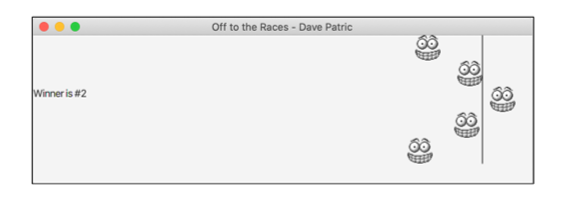
Off to the Races - Dave Patric 60 Winner is #2 00
Step by Step Solution
There are 3 Steps involved in it

Get step-by-step solutions from verified subject matter experts
 Study Help