







Question: How to code this Plane class in Java? Create a Plane Class using the UML diagram below. Plane | String: airline String: type - int
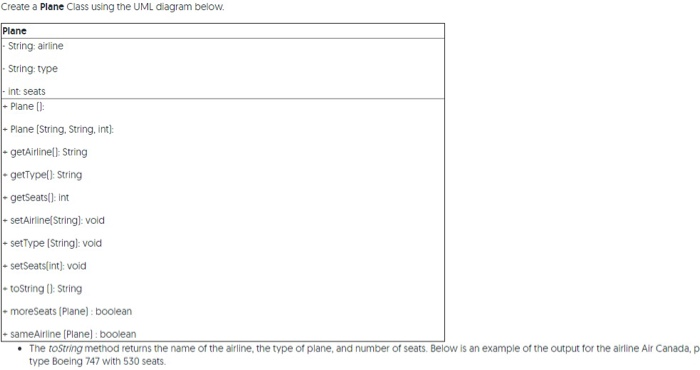
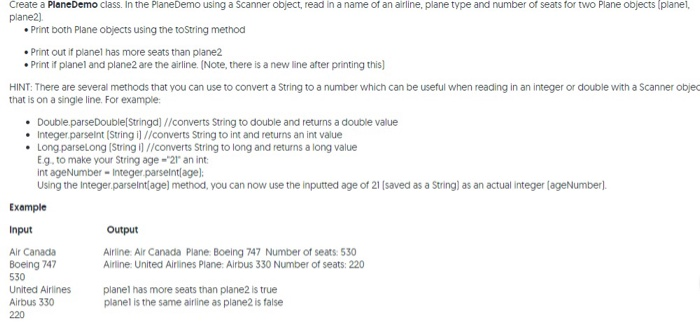
Create a Plane Class using the UML diagram below. Plane | String: airline String: type - int seats - Plane (): - Plane (String, String, int): - getAirlinell String - getType(): String - getSeats(): int - setAirlineString): vold - setType (String]: void - SetSeats[int): void - toString(): String - moreSeats (Plane): boolean - sameAirline (Plane): boolean The toString method returns the name of the airline, the type of plane, and number of seats. Below is an example of the output for the airline Air Canada, p type Boeing 747 with 530 seats. ead in a name of an airline, plane type and number of seats for two Plane objects planel, plane2) Print both Plane objects using the toString method Print out if planel has more seats than plane2 Print if planel and plane2 are the airline. (Note, there is a new line after printing this) HINT: There are several methods that you can use to convert a String to a number which can be useful when reading in an integer or double with a Scanner objec that is on a single line. For example: Double parseDouble(Stringd] //converts String to double and returns a double value Integer.parseInt(String i] //converts String to int and returns an int value Long parselong (String il //converts String to long and returns a long value Eg to make your String age - 21 an int int ageNumber - Integer.parseInt(age): Using the integer.parseInt(age) method, you can now use the inputted age of 21 (saved as a String) as an actual integer (ageNumber). Example Input Output Air Canada Boeing 747 Airline: Air Canada Plane: Boeing 747 Number of seats: 530 Airline: United Airlines Plane: Airbus 330 Number of seats: 220 530 United Airlines Airbus 330 220 planel has more seats than plane2 is true planel is the same airline as plane2 is false
Step by Step Solution
There are 3 Steps involved in it

Get step-by-step solutions from verified subject matter experts
 Study Help