







Question: How to convert UML to code in python begin{tabular}{|l|} hline multicolumn{1}{|c|}{ Airport } hline _code: str _name: str _city: str _state:
How to convert UML to code in python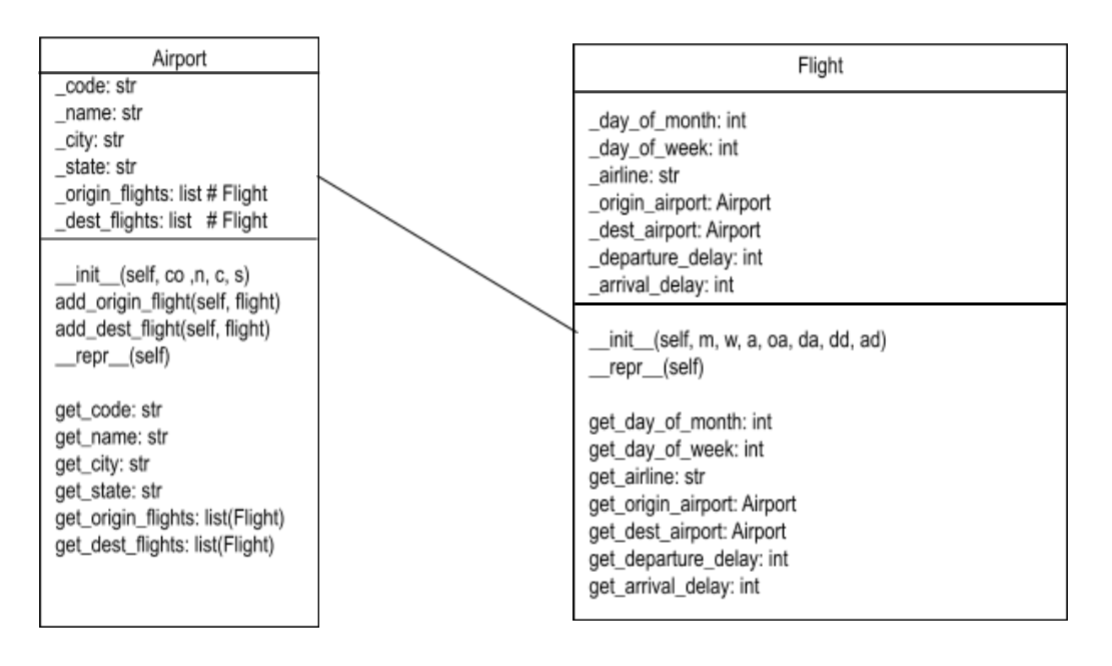
\begin{tabular}{|l|} \hline \multicolumn{1}{|c|}{ Airport } \\ \hline _code: str \\ _name: str \\ _city: str \\ _state: str \\ _origin_flights: list \# Flight \\ _dest_flights: list \# Flight \\ \hline _init_(self, co,n, c, s) \\ add_origin_flight(self, flight) \\ add_dest_flight(self, flight) \\ _repr__(self) \\ get_code: str \\ get_name: str \\ get_city: str \\ get_state: str \\ get__rigin_flights: list(Flight) \\ get_dest_flights: list(Flight) \end{tabular} \begin{tabular}{|l|} \hline \multicolumn{1}{|c|}{ Flight } \\ \hline _day_of_month: int \\ _day_of_week: int \\ _airline: str \\ _origin_airport: Airport \\ _dest_airport: Airport \\ _departure_delay: int \\ _arrival_delay: int \\ _init_(self, m, w, a, oa, da, dd, ad) \\ _repr_(self) \\ get_day_of_month: int \\ get_day_of_week: int \\ get_airline: str \\ get_origin_airport: Airport \\ get_dest_airport: Airport \\ get_departure_delay: int \\ get_arrival_delay: int \end{tabular}
Step by Step Solution
There are 3 Steps involved in it

Get step-by-step solutions from verified subject matter experts
 Study Help