







Question: How to create Range Names for step B when there are no values. You are the business manager for Indy Deck Builders, a local construction
How to create Range Names for step B when there are no values.
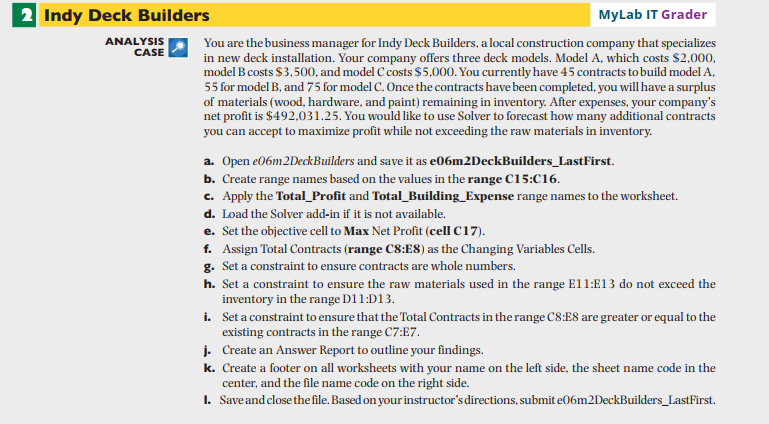
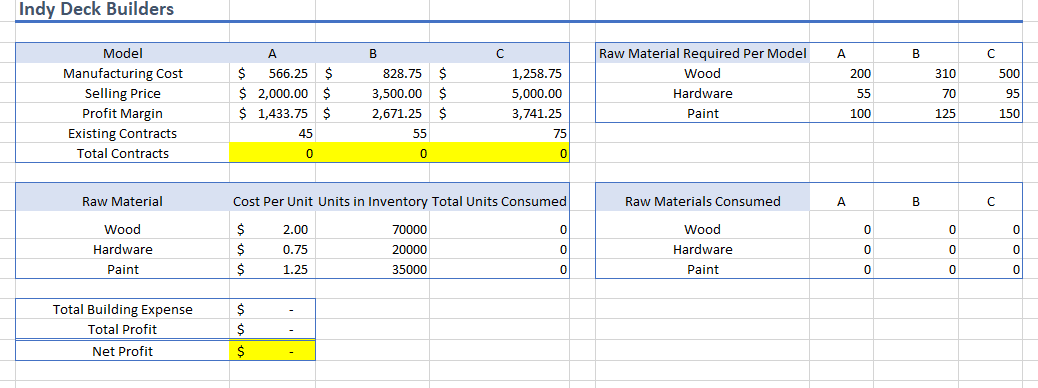
You are the business manager for Indy Deck Builders, a local construction company that specializes in new deck installation. Your company offers three deck models. Model A, which costs $2,000, model B costs $3,500, and model C costs $5,000. You currently have 45 contracts to build model A, 55 for model B, and 75 for model C. Once the contracts have been completed, you will have a surplus of materials (wood, hardware, and paint) remaining in inventory. After expenses, your company's net profit is $492,031.25. You would like to use Solver to forecast how many additional contracts you can accept to maximize profit while not exceeding the raw materials in inventory. a. Open e06m2DeckBuilders and save it as e06m2DeckBuilders_LastFirst. b. Create range names based on the values in the range C15:C16. c. Apply the Total_Profit and Total_Building_Expense range names to the worksheet. d. Load the Solver add-in if it is not available. e. Set the objective cell to Max Net Profit (cell c17). f. Assign Total Contracts (range C8:E8) as the Changing Variables Cells. g. Set a constraint to ensure contracts are whole numbers. h. Set a constraint to ensure the raw materials used in the range E11:E13 do not exceed the inventory in the range D11:D13. i. Set a constraint to ensure that the Total Contracts in the range C8:E8 are greater or equal to the existing contracts in the range C7:E7. j. Create an Answer Report to outline your findings. k. Create a footer on all worksheets with your name on the left side, the sheet name code in the center, and the file name code on the right side. I. Save and close the file. Based on your instructor's directions, submit e06m2DeckBuilders_LastFirst. Indy Deck Builders
Step by Step Solution
There are 3 Steps involved in it

Get step-by-step solutions from verified subject matter experts
 Study Help