







Question: how to do that second part b r studio ? I In many programing environments, the up arrow will cycle through previous commands. Try hitting
how to do that second part b r studio ? 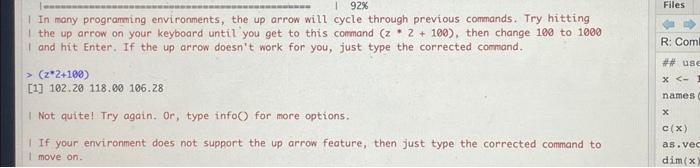
I In many programing environments, the up arrow will cycle through previous commands. Try hitting I the up arrow on your keyboard until you get to this command (z2+100), then change 100 to 1000 I and hit Enter. If the up arrow doesn't work for you, just type the corrected comand. >(z2+100) [1] 102.20118.00106.28 I Not quite! Try again. Or, type infoO for more options. 1 If your environment does not support the up arrow feature, then just type the corrected command to I move on
Step by Step Solution
There are 3 Steps involved in it
1 Expert Approved Answer
Step: 1 Unlock

Question Has Been Solved by an Expert!
Get step-by-step solutions from verified subject matter experts
Step: 2 Unlock
Step: 3 Unlock
 Study Help