







Question: How to do this on excel? 4. Simon is also responsible to calculate the commissions for the salespersons. His calculation is based on the following
How to do this on excel?
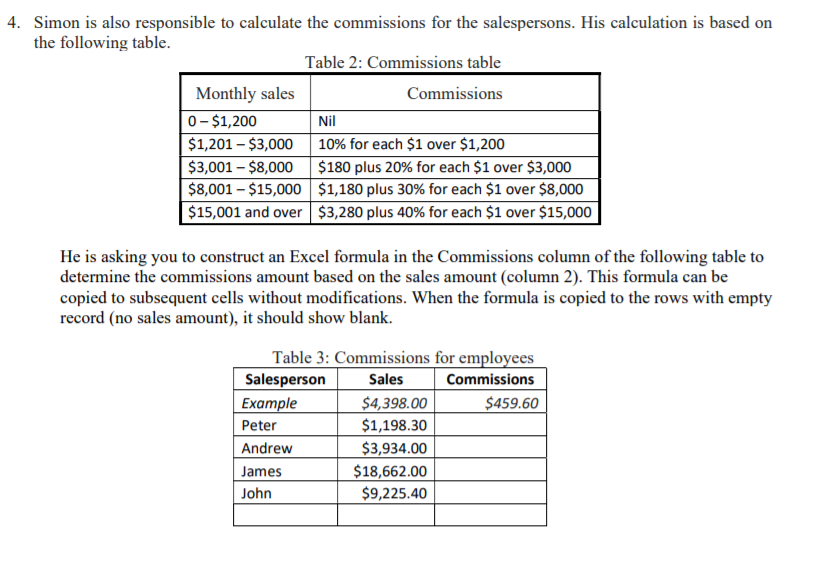
4. Simon is also responsible to calculate the commissions for the salespersons. His calculation is based on the following table. Table 2: Commissions table Monthly sales Commissions 0 - $1,200 Nil $1,201 - $3,000 10% for each $1 over $1,200 $3,001 - $8,000 $180 plus 20% for each $1 over $3,000 $8,001 - $15,000 $1,180 plus 30% for each $1 over $8,000 $15,001 and over $3,280 plus 40% for each $1 over $15,000 He is asking you to construct an Excel formula in the Commissions column of the following table to determine the commissions amount based on the sales amount (column 2). This formula can be copied to subsequent cells without modifications. When the formula is copied to the rows with empty record (no sales amount), it should show blank. Table 3: Commissions for employees Salesperson Sales Commissions Example $4,398.00 $459.60 Peter $1,198.30 Andrew $3,934.00 James $18,662.00 John $9,225.40
Step by Step Solution
There are 3 Steps involved in it

Get step-by-step solutions from verified subject matter experts
 Study Help