







Question: How to have two tables and store data from those two tables within the same database in Android Studio? I have a table that stores
How to have two tables and store data from those two tables within the same database in Android Studio? I have a table that stores student information in a database (which works). I have created another table that stores the students tasks within the same database (which I have attempted but does not work). When I enter the tasks and click "Add Task" button, I get an error shown in the image below. I am not storing anything for the radio buttons in the database yet....am not sure how to store radio buttons (I am aware of text and edit text but not radio buttons).
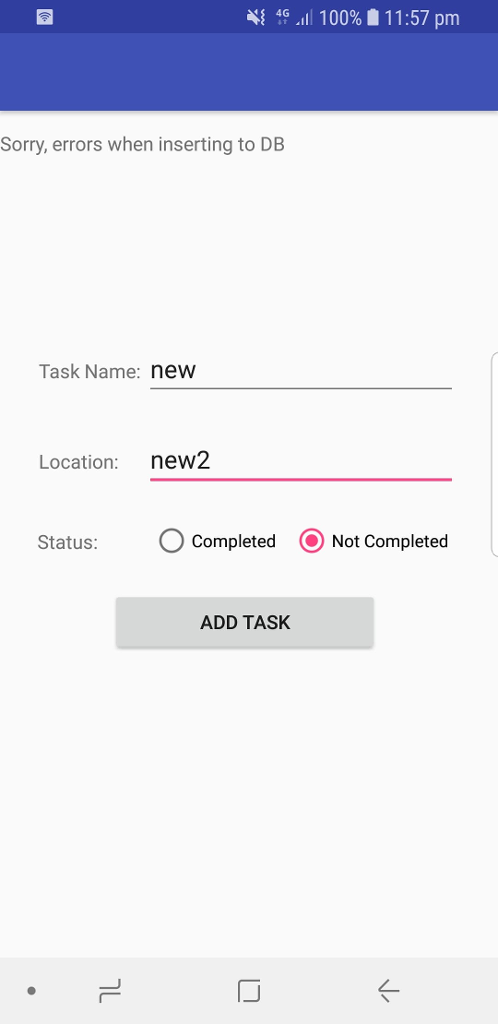
Below are the coding for student information table, student tasks table and the database respectively:
//content_screen2.xml
LinearLayout xmlns:android="http://schemas.android.com/apk/res/android" android:orientation="vertical" android:layout_width="match_parent" android:layout_height="match_parent" android:paddingTop="70dp" > TextView android:layout_width="match_parent" android:layout_height="wrap_content" android:id="@+id/response" /> TextView android:layout_width="match_parent" android:layout_height="wrap_content" android:id="@+id/studrec" /> TableLayout android:id="@+id/add_table" android:layout_width="match_parent" android:layout_height="379dp" android:paddingTop="40dp"> TableRow> TextView android:layout_marginLeft="45dp" android:padding="3dip" android:text="Student ID:" /> EditText android:id="@+id/sid" android:layout_width="match_parent" android:layout_height="wrap_content" /> TableRow> TableRow> TextView android:layout_marginLeft="45dp" android:padding="3dip" android:text="First Name:" /> EditText android:id="@+id/fn" android:layout_width="match_parent" android:layout_height="wrap_content" android:minWidth="150dip" /> TableRow> TableRow> TextView android:layout_marginLeft="45dp" android:padding="3dip" android:text="Last Name:" /> EditText android:id="@+id/ln" android:layout_width="match_parent" android:layout_height="wrap_content" android:minWidth="150dip" /> TableRow> TableRow> TextView android:layout_marginLeft="45dp" android:padding="3dip" android:text="Gender:" /> EditText android:id="@+id/ge" android:layout_width="match_parent" android:layout_height="wrap_content" android:minWidth="150dip" /> TableRow> TableRow> TextView android:layout_marginLeft="45dp" android:padding="3dip" android:text="Course Study:" /> EditText android:id="@+id/cs" android:layout_width="match_parent" android:layout_height="wrap_content" android:minWidth="150dip" /> TableRow> TableRow> TextView android:layout_marginLeft="45dp" android:padding="3dip" android:text="Age:" /> EditText android:id="@+id/ag" android:layout_width="match_parent" android:layout_height="wrap_content" android:minWidth="150dip" /> TableRow> TableRow> TextView android:layout_marginLeft="45dp" android:padding="3dip" android:text="Address:" /> EditText android:id="@+id/ad" android:layout_width="match_parent" android:layout_height="wrap_content" android:minWidth="150dip" /> TableRow> TableLayout> Button android:id="@+id/add_button" android:layout_width="207dp" android:layout_height="wrap_content" android:layout_marginLeft="65dp" android:layout_marginTop="4dp" android:padding="6dip" android:text="Add Student" /> Button android:id="@+id/cancel_button" android:layout_width="207dp" android:layout_height="wrap_content" android:layout_marginLeft="65dp" android:padding="6dip" android:text="Cancel" /> Button android:id="@+id/back_button" android:layout_width="207dp" android:layout_height="wrap_content" android:layout_marginLeft="65dp" android:padding="6dip" android:onClick="back_button" android:text="Back" /> LinearLayout>
//Screen2.java
package com.user.myproject; import android.content.Context; import android.content.Intent; import android.os.Bundle; import android.support.v7.app.AppCompatActivity; import android.support.v7.widget.Toolbar; import android.view.View; import android.view.Menu; import android.view.MenuItem; import android.widget.TextView; import android.widget.EditText; import android.widget.TableLayout; import android.widget.Button; import android.view.View.OnClickListener; import android.view.inputmethod.InputMethodManager; import android.widget.Toast; import java.util.ArrayList; public class Screen2 extends AppCompatActivity { private DatabaseManager mydManager; private TextView response; private TextView studentRec; private EditText sid, fn, ln, ge, cs, ag, ad; private Button addButton; private TableLayout addLayout; private boolean recInserted; @Override protected void onCreate(Bundle savedInstanceState) { super.onCreate(savedInstanceState); setContentView(R.layout.activity_main2); Toolbar toolbar = (Toolbar) findViewById(R.id.toolbar); setSupportActionBar(toolbar); getSupportActionBar().setTitle(null); mydManager = new DatabaseManager(Screen2.this); response = (TextView)findViewById(R.id.response); studentRec = (TextView)findViewById(R.id.studrec); addLayout = (TableLayout)findViewById(R.id.add_table); addLayout.setVisibility(View.GONE); //response.setText("Press MENU button to display menu"); addLayout.setVisibility(View.VISIBLE); //response.setText("Enter information of the new product"); studentRec.setVisibility(View.GONE); addButton = (Button) findViewById(R.id.add_button); addButton.setOnClickListener(new OnClickListener() { public void onClick(View v) { sid = (EditText)findViewById(R.id.sid); fn = (EditText)findViewById(R.id.fn); ln = (EditText)findViewById(R.id.ln); ge = (EditText)findViewById(R.id.ge); cs = (EditText)findViewById(R.id.cs); ag = (EditText)findViewById(R.id.ag); ad = (EditText)findViewById(R.id.ad); recInserted = mydManager.addRow(Integer.parseInt(sid.getText().toString()), fn.getText().toString(),ln.getText().toString(), ge.getText().toString(), cs.getText().toString(), Integer.parseInt(ag.getText().toString()), ad.getText().toString()); //addLayout.setVisibility(View.GONE); if (recInserted) { //Toast.makeText(Screen2.this, "The row in the products table is inserted", Toast.LENGTH_SHORT).show(); response.setText("The row in the students table is inserted"); } else { response.setText("Sorry, errors when inserting to DB"); } InputMethodManager imm = (InputMethodManager) getSystemService(Context.INPUT_METHOD_SERVICE); mydManager.close(); sid.setText(""); fn.setText(""); ln.setText(""); ge.setText(""); cs.setText(""); ag.setText(""); ad.setText(""); studentRec.setText(""); } }); } public void back_button(View view) { Intent intent = new Intent(Screen2.this, Screen1.class); startActivity(intent); } @Override public boolean onCreateOptionsMenu(Menu menu) { // Inflate the menu; this adds items to the action bar if it is present. getMenuInflater().inflate(R.menu.menu_screen2, menu); return true; } public boolean showRec() { addLayout.setVisibility(View.GONE); studentRec.setVisibility(View.VISIBLE); mydManager.openReadable(); ArrayList tableContent = mydManager.retrieveRows(); response.setText("The rows in the students table are: "); String info = ""; for (int i = 0; i " "; } studentRec.setText(info); System.out.println(info); //mydManager.close(); return true; } public boolean removeRecs() { mydManager.clearRecords(); response.setText("All Records are removed"); studentRec.setText(""); return true; } } //content_screen3.xml
android.support.constraint.ConstraintLayout xmlns:android="http://schemas.android.com/apk/res/android" android:orientation="vertical" android:layout_width="match_parent" android:layout_height="match_parent" android:paddingTop="70dp" > TextView android:layout_width="match_parent" android:layout_height="wrap_content" android:id="@+id/response2" /> TextView android:layout_width="match_parent" android:layout_height="wrap_content" android:id="@+id/taskrec" /> TableLayout android:id="@+id/add_table" android:layout_width="match_parent" android:layout_height="379dp" android:paddingTop="150dp"> TableRow> TextView android:layout_marginLeft="25dp" android:padding="3dip" android:text="Task Name:" /> EditText android:id="@+id/tn" android:layout_width="190dp" android:layout_height="wrap_content" /> TableRow> TableRow> TextView android:layout_marginLeft="25dp" android:padding="3dip" android:layout_marginTop="20dp" android:text="Location:" /> EditText android:id="@+id/loc" android:layout_width="match_parent" android:layout_height="wrap_content" android:layout_marginTop="20dp" android:minWidth="150dip" /> TableRow> TableRow> TextView android:layout_marginLeft="20dp" android:padding="7dip" android:layout_marginTop="20dp" android:text="Status:" /> RadioGroup android:layout_width="match_parent" android:layout_height="wrap_content" android:layout_marginTop="20dp" android:orientation="horizontal"> RadioButton android:id="@+id/completed" android:layout_width="wrap_content" android:layout_height="wrap_content" android:scaleX="0.9" android:scaleY="0.9" android:text="Completed" /> RadioButton android:id="@+idotcompleted" android:layout_width="wrap_content" android:layout_height="match_parent" android:scaleX="0.9" android:scaleY="0.9" android:text="Not Completed" android:checked="true"/> RadioGroup> TableRow> Button android:id="@+id/add_button2" android:layout_width="207dp" android:layout_height="wrap_content" android:layout_marginLeft="80dp" android:layout_marginRight="86dp" android:layout_marginTop="18dp" android:padding="6dip" android:text="Add Task" /> TableLayout> android.support.constraint.ConstraintLayout>
//screen3.java
package com.user.myproject; import android.content.Context; import android.os.Bundle; import android.support.design.widget.FloatingActionButton; import android.support.design.widget.Snackbar; import android.support.v7.app.AppCompatActivity; import android.support.v7.widget.Toolbar; import android.view.View; import android.view.inputmethod.InputMethodManager; import android.widget.Button; import android.widget.EditText; import android.widget.RadioGroup; import android.widget.TableLayout; import android.widget.TextView; public class Screen3 extends AppCompatActivity { private DatabaseManager mydManager; private TextView response2; private TextView taskRec; private EditText tn, loc; private Button addButton2; private TableLayout addLayout; private boolean recInserted; @Override protected void onCreate(Bundle savedInstanceState) { super.onCreate(savedInstanceState); setContentView(R.layout.activity_main3); Toolbar toolbar = (Toolbar) findViewById(R.id.toolbar); setSupportActionBar(toolbar); getSupportActionBar().setTitle(null); mydManager = new DatabaseManager(Screen3.this); response2 = (TextView)findViewById(R.id.response2); taskRec = (TextView)findViewById(R.id.taskrec); addLayout = (TableLayout)findViewById(R.id.add_table); addLayout.setVisibility(View.GONE); addLayout.setVisibility(View.VISIBLE); taskRec.setVisibility(View.GONE); addButton2 = (Button) findViewById(R.id.add_button2); addButton2.setOnClickListener(new View.OnClickListener() { public void onClick(View v) { tn = (EditText)findViewById(R.id.tn); loc = (EditText)findViewById(R.id.loc); recInserted = mydManager.addRow2(tn.getText().toString(),loc.getText().toString()); if (recInserted) { //Toast.makeText(Screen2.this, "The row in the products table is inserted", Toast.LENGTH_SHORT).show(); response2.setText("The row in the tasks table is inserted"); } else { response2.setText("Sorry, errors when inserting to DB"); } InputMethodManager imm = (InputMethodManager) getSystemService(Context.INPUT_METHOD_SERVICE); mydManager.close(); tn.setText(""); loc.setText(""); taskRec.setText(""); } }); } } //DatabaseManager.java
package com.user.myproject; import android.database.sqlite.SQLiteDatabase; import android.content.Context; import android.content.ContentValues; import android.database.Cursor; import android.database.sqlite.SQLiteOpenHelper; import android.util.Log; import java.util.ArrayList; public class DatabaseManager { public static final String DB_NAME = "student"; public static final String DB_TABLE = "information"; public static final String DB_TABLE2 = "information2"; public static final int DB_VERSION = 1; private static final String CREATE_TABLE = "CREATE TABLE " + DB_TABLE + " (studentId INTEGER, first_name TEXT, last_name TEXT, gender TEXT, course_study TEXT, age INTEGER, address TEXT);"; private static final String CREATE_TABLE2 = "CREATE TABLE " + DB_TABLE + " (task_name TEXT, location INTEGER);"; private SQLHelper helper; private SQLiteDatabase db; private Context context; public DatabaseManager(Context c) { this.context = c; helper = new SQLHelper(c); this.db = helper.getWritableDatabase(); } public DatabaseManager openReadable() throws android.database.SQLException { helper = new SQLHelper(context); db = helper.getReadableDatabase(); return this; } public void close() { helper.close(); } public boolean addRow(Integer c, String fn, String ln, String ge, String cs, Integer ag, String ad) { synchronized (this.db) { ContentValues newStudent = new ContentValues(); newStudent.put("studentId", c); newStudent.put("first_name", fn); newStudent.put("last_name", ln); newStudent.put("gender", ge); newStudent.put("course_study", cs); newStudent.put("age", ag); newStudent.put("address", ad); try { db.insertOrThrow(DB_TABLE, null, newStudent); } catch (Exception e) { Log.e("Error in inserting rows", e.toString()); e.printStackTrace(); return false; } //db.close(); return true; } } public boolean addRow2(String tn, String lo) { synchronized (this.db) { ContentValues newTask = new ContentValues(); newTask.put("task_name", tn); newTask.put("location", lo); try { db.insertOrThrow(DB_TABLE2, null, newTask); } catch (Exception e) { Log.e("Error in inserting rows", e.toString()); e.printStackTrace(); return false; } //db.close(); return true; } } public ArrayList retrieveRows() { ArrayList studentRows = new ArrayList(); String[] columns = new String[]{"studentId", "first_name", "last_name", "gender", "course_study", "age", "address"}; Cursor cursor = db.query(DB_TABLE, columns, null, null, null, null, null); cursor.moveToFirst(); while (cursor.isAfterLast() == false) { studentRows.add(Integer.toString(cursor.getInt(0)) + ", " + cursor.getString(1) + ", " + cursor.getString(2) + ", " + cursor.getString(3) + ", " + cursor.getString(4) + ", " + Integer.toString(cursor.getInt(5)) + ", " + cursor.getString(6)); cursor.moveToNext(); } if (cursor != null && !cursor.isClosed()) { cursor.close(); } return studentRows; } public ArrayList retrieveRows2() { ArrayList taskRows = new ArrayList(); String[] columns = new String[]{"task_name", "location"}; Cursor cursor = db.query(DB_TABLE2, columns, null, null, null, null, null); cursor.moveToFirst(); while (cursor.isAfterLast() == false) { taskRows.add(cursor.getString(0) + ", " + cursor.getString(1)); cursor.moveToNext(); } if (cursor != null && !cursor.isClosed()) { cursor.close(); } return taskRows; } public void clearRecords() { db = helper.getWritableDatabase(); db.delete(DB_TABLE, null, null); } public void clearRecords2() { db = helper.getWritableDatabase(); db.delete(DB_TABLE2, null, null); } public class SQLHelper extends SQLiteOpenHelper { public SQLHelper(Context c) { super(c, DB_NAME, null, DB_VERSION); } @Override public void onCreate(SQLiteDatabase db) { db.execSQL(CREATE_TABLE); db.execSQL(CREATE_TABLE2); } @Override public void onUpgrade(SQLiteDatabase db, int oldVersion, int newVersion) { Log.w("Students table", "Upgrading database i.e. dropping table and re-creating it"); db.execSQL("DROP TABLE IF EXISTS " + DB_TABLE); db.execSQL("DROP TABLE IF EXISTS " + DB_TABLE2); onCreate(db); } } }
Step by Step Solution
There are 3 Steps involved in it

Get step-by-step solutions from verified subject matter experts
 Study Help